A Pocket Computer That Actually Does Stuff
Forget the Arduino starter kit gathering dust on a shelf. The M5Stack Cardputer Adv is a fully assembled, credit-card-sized computer with a real keyboard, a color screen, built-in WiFi, a microphone, and a speaker — right out of the box. No soldering. No hunting for breadboards. No 47-piece component bag that makes parents nervous.
It runs on an ESP32-S3 chip, which means it’s powerful enough to run real projects: WiFi scanners, retro games, Bluetooth remote controls, even a pocket AI terminal. And it fits in a jeans pocket.
If your teen is into tech, hacking (the legal, educational kind), or just wants something genuinely cool to carry around and tinker with, this is the gift that actually gets used.
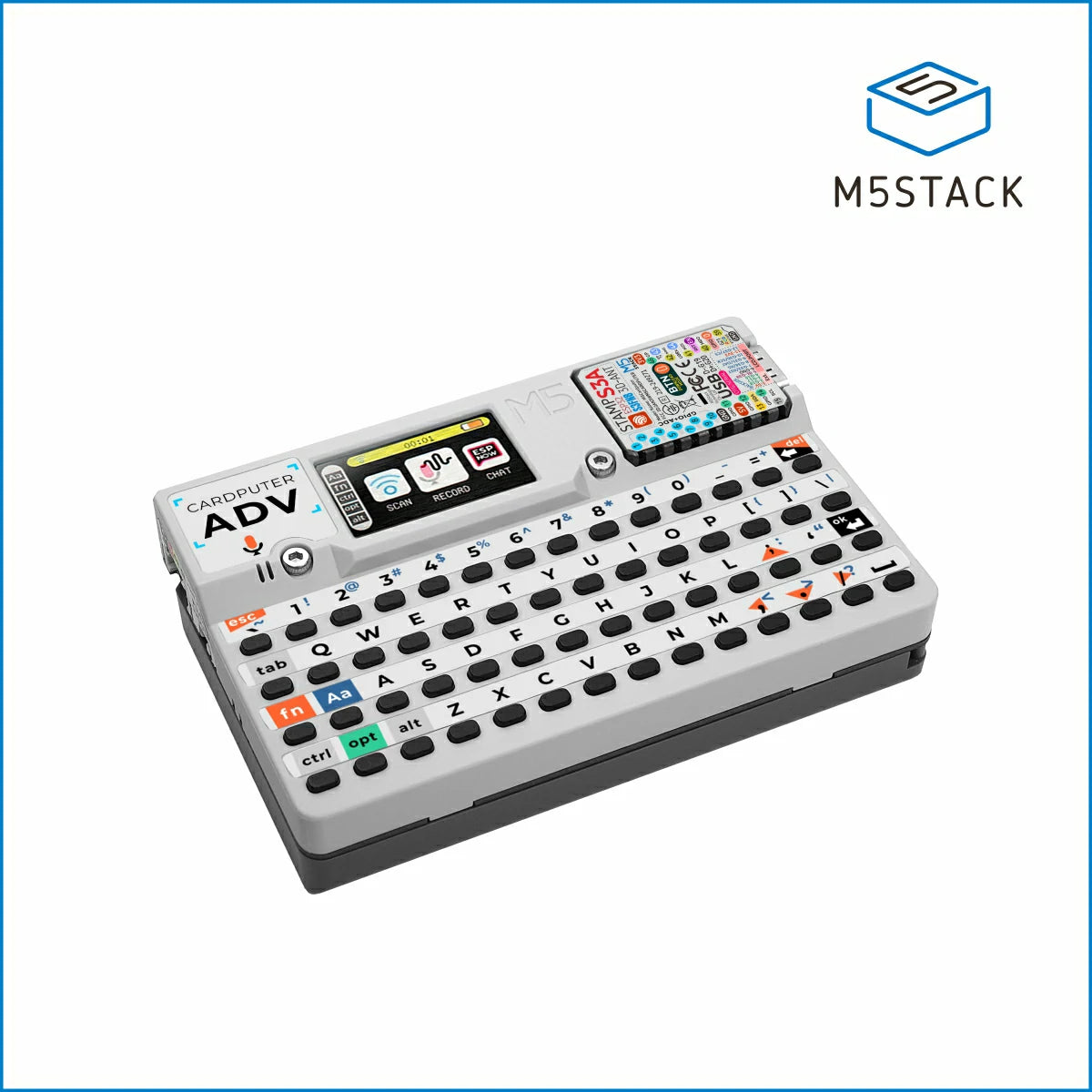
What’s in the Box — Specs for Humans
Let’s skip the datasheet and talk about what it actually has:
| Feature | What it means for you |
|---|---|
| 2.125” color display | Sharp enough to run games and menus |
| Full QWERTY keyboard | Tiny but real — type actual code on-device |
| ESP32-S3 chip | Fast enough for WiFi, Bluetooth, and basic ML |
| Built-in WiFi + Bluetooth | Connect to networks, scan for devices, send data wirelessly |
| Microphone + speaker | Voice input, audio feedback, even basic voice recognition |
| MicroSD card slot | Load games, files, and programs |
| USB-C charging | Same cable as your phone |
| Grove connector | Plug in extra sensors without soldering |
| Magnetic back | Sticks to metal surfaces — useful for projects |
| Built-in RGB LEDs | Because blinky lights never get old |
The “Adv” version comes with an upgraded battery and a few extra accessories compared to the base model. At $29.90 from the official M5Stack store and around $35–40 on Amazon, it’s genuinely affordable for what you get.
7 Things Teens Actually Build With This
This is where the Cardputer earns its reputation. Here’s what the community is actually making:
1. WiFi Scanner and Network Analyzer
Turn it into a pocket WiFi detective. The Cardputer can scan nearby networks, show signal strengths, identify devices, and log everything to an SD card. Great intro to how networks actually work — and a legitimate skill for anyone interested in IT or cybersecurity.
2. Retro Game Console
The screen and keyboard make it a surprisingly capable game platform. Dozens of community-built games already exist: Snake, Tetris, Pong, and Doom-era style games. Teens can also write their own in MicroPython or Arduino C++.
3. Pocket Mesh Chat Network
Using the LoRa add-on or ESP-NOW protocol, multiple Cardputers can communicate wirelessly without any internet connection — like walkie-talkies but for text. Great for camping trips or school hallways (responsibly, of course).
4. Cybersecurity Education with Evil-M5Project
The Evil-M5Project is an open-source firmware that turns the Cardputer into a WiFi security testing tool — it can probe for vulnerable networks, demonstrate deauthentication attacks, and show how phishing pages work. This is for educational purposes only, but it’s one of the best ways for teens to understand real-world cybersecurity from the inside. It’s used in ethical hacking courses and by security researchers. Parent supervision recommended; teaches critical digital literacy.
5. AI Terminal in Your Pocket
Connect the Cardputer to an API (OpenAI, Claude, or any local model), and you have a tiny AI assistant you can carry around. Teens into AI and programming love building their own custom prompts and interfaces for it.
6. Smartwatch / Remote Controller
Pair it via Bluetooth to a phone or PC and use it as a custom remote — media controls, custom macros, keyboard shortcuts. A few teens have built wrist mounts and use it as a smartwatch-style device.
7. Environmental Sensor Dashboard
Plug in a temperature, humidity, or CO2 sensor via the Grove connector and build a real-time dashboard. Genuinely useful, looks impressive on a school science project, and teaches data visualization basics.
Who Is This For?
Great fit if your teen:
- Is 12+ and curious about how technology works
- Has already done some basic coding (Scratch, Python, even HTML)
- Gets bored of “follow the tutorial” kits and wants to experiment
- Is into cybersecurity, networking, electronics, or game dev
- Wants something that feels like a real tool, not a toy
Maybe not the right fit if:
- They’ve never touched code and want guided, structured learning (consider a Raspberry Pi 400 or a guided course first)
- They’re under 10 — the keyboard is small and the learning curve real
- They want something that “just works” with no setup — this requires some tinkering patience
- You want a kit with step-by-step projects included (the community is excellent, but you’ll mostly rely on forums and GitHub)
Parents: What You Need to Know
Is it safe? Yes. It’s a microcontroller, not a phone. No social media, no app stores, no hidden data collection.
Is it hard to set up? Moderate. The Cardputer comes preloaded with demo firmware that works immediately. Loading custom projects requires installing a USB driver and using a flashing tool — there are excellent tutorials online, and most 13-year-olds figure it out in under an hour.
What about the Evil-M5Project? This is worth knowing about. It’s security research firmware that demonstrates WiFi vulnerabilities. Using it on networks you don’t own is illegal in most countries. Frame it the way security professionals do: understanding attacks helps you defend against them. It’s the same reason cybersecurity courses teach penetration testing. If your teen is interested in this angle, it’s a fantastic gateway into ethical hacking — a field with real career demand.
What does it cost to run? Just the device. No subscription, no cloud required (though cloud APIs for the AI projects are optional and often have free tiers). You’ll want a MicroSD card ($5–8) if they plan to store files or games.
Programming languages? MicroPython (beginner-friendly), Arduino C++ (intermediate), and a growing number of high-level graphical environments for the ESP32 ecosystem.
How It Compares to Arduino Starter Kits
You’ve probably seen those “Ultimate Arduino Starter Kit” boxes on Amazon — 300 components, 30 LEDs, a breadboard, and a 200-page manual. They’re fine, but they have a real problem: the gap between “blinking an LED” and “building something I actually want” is enormous. Most teens hit a wall around project 5.
The Cardputer is different because it’s already a finished device. The screen, keyboard, WiFi, and speaker are all there. You don’t have to figure out how to wire them up — you skip straight to making them do something interesting. The learning curve is about logic and code, not about why your breadboard connection isn’t making contact.
It also just looks cool, which matters more than engineers want to admit. Teens are more likely to keep using something they’re proud to show their friends.
Pros and Cons
| Pros | Cons |
|---|---|
| Everything built-in — no soldering required | Small keyboard takes getting used to |
| Huge active community, tons of open-source projects | Documentation can be scattered (GitHub + forums) |
| Real ESP32-S3 chip — not a toy processor | No beginner project guide included in box |
| Fits in a pocket | MicroSD card sold separately |
| USB-C charging | Screen is small — not great for long coding sessions on-device |
| Educational cybersecurity use cases | Requires some coding knowledge to get the most from it |
| Grove connector for expandability | WiFi-only (no cellular or GPS built in) |
| $30 is genuinely affordable |
Verdict
The M5Stack Cardputer Adv is one of the most interesting STEM gifts available under $50 — and probably the most unique thing on this list. It’s not a “learn to code” kit with training wheels. It’s a real device that does real things, aimed at teens who are ready to go beyond tutorials and start making something their own.
If your teen is genuinely curious about tech — not just “I played Minecraft once” curious, but “I took apart the router to see how it works” curious — this will stay in their pocket and get used constantly. It’s the kind of gift that sparks a career.
Recommended age: 12–17
Skill level: Beginner-intermediate (some prior coding helpful)
Price: $29.90 (M5Stack official) / ~$35–40 (Amazon)
Where to Buy
- M5Stack Official Store — $29.90 — Best price, ships from China (10–20 days)
- Buy on Amazon — ~$35–40 — Faster shipping, Prime eligible
- AliExpress — ~$28–32 — Cheapest option, slower shipping
Our pick: Amazon if you need it for a birthday or holiday with a firm date. The official store if you’re planning ahead and want to save a few dollars.
What to Build Next
Once they’ve had a few weeks with the Cardputer, here’s where teens usually go next:
- Best Beginner Python Projects for Teens — learn the language that powers most Cardputer scripts
- ESP32 WiFi Projects — Beginner to Advanced — go deeper on networking and IoT
- Ethical Hacking for Teens — Where to Start — career guide for the cybersecurity-curious
- M5Stack Ecosystem Buying Guide — expand with sensors, displays, and modules
- Best STEM Gifts Under $50 in 2026 — more ideas like this one
Projects to build with your Cardputer
The Cardputer runs on an ESP32-S3 — the same chip used in all of these projects. Build them with your Cardputer or any ESP32 board:
| Project | What you’ll build | Time |
|---|---|---|
| Universal TV Remote | IR blaster that controls any TV | ~1h |
| Encrypted Messenger | Secure text chat between devices | ~2h |
| QR Hidden Message | Generate and decode secret QR codes | ~1h |
| Bluetooth Speaker | Wireless audio player | ~2h |
| Audio Visualizer LED Strip | Music-reactive light show | ~2h |