Parent info
Parts you need
Affiliate links — we may earn a small commission
Try this circuit in your browser!
Run the code, press the buttons and watch what happens — before you buy any parts. No account needed.
Open in Simulator →“Hey, what speaker is that?” “I built it.”
Imagine opening your phone’s Bluetooth settings and seeing “BuildCool Speaker” in the list. You pair it. You hit play. Music comes out. Real music — not a tinny buzzing sound, but actual warm audio that surprises everyone who hears it, especially when you explain you assembled it yourself this afternoon.
That’s this project. You’re building a functional Bluetooth speaker from a $12 microcontroller, a $3 amplifier chip, and a $5 speaker. The software is four lines of code. Most of the work is wiring.
3 hours. About $22.
Important: This project needs a classic ESP32 (ESP32-WROOM-32 DevKit) — NOT the ESP32-S3 or ESP32-C6. Bluetooth audio needs Bluetooth Classic (A2DP), and only the classic ESP32 has it. The S3 and C6 only support Bluetooth Low Energy (BLE), which doesn’t carry music — if you pick them in the sketch, it stops with a friendly error message.
What you’ll need
| Part | What it does | Price |
|---|---|---|
| Classic ESP32 DevKit (ESP32-WROOM-32) | The brain AND the Bluetooth radio — receives the audio stream from your phone. Must be a classic ESP32: the S3 and C6 have no Bluetooth Classic | ~$12 |
| MAX98357A I2S Audio Amplifier | Converts the digital audio signal to analog power to drive the speaker | ~$3 |
| 4Ω/3W Speaker (40–50mm diameter) | The actual sound output — a 40mm speaker fits in a matchbox-sized enclosure | ~$5 |
| Breadboard + jumper wires | Connects everything | ~$5 |
Optional for portable use: LiPo battery (3.7V, 500mAh, $4) + TP4056 charging module ($2).
Total: ~$22 | Time: ~3 hours | Difficulty: ●●○○○
How it works (60 seconds)
Your phone sends music over Bluetooth Classic using a protocol called A2DP (Advanced Audio Distribution Profile) — the same one your wireless headphones use. The ESP32 receives this audio stream and converts it to a 3-wire digital signal called I2S.
The MAX98357A amplifier chip reads that I2S signal and converts it to analog power that moves the speaker cone back and forth, creating air pressure waves — which is sound.
Your phone is the source. The ESP32 is the receiver. The MAX98357A is the amplifier. The speaker is the output. Four components, four lines of code.
Step 0: Speaker physics (30 seconds)
Before you assemble anything: A speaker needs to be mounted on a flat panel (called a baffle). Without one, sound from the front and back of the speaker cone cancels out and you lose almost all the bass.
The simplest baffle: a piece of cardboard with a hole cut to fit the speaker diameter. Mount the speaker in the hole and the sound quality doubles compared to a speaker dangling in open air.
For a proper enclosure: a small sealed box (about 200ml volume for a 40mm speaker) dramatically improves bass response. A shoeboxl works for testing. A 3D printed box is the permanent solution.
For first testing on the breadboard, the speaker doesn’t need a baffle. But when you hear how much better it sounds with one, you’ll understand why enclosures exist.
Step 1: Wire it up
Time: ~10 minutes
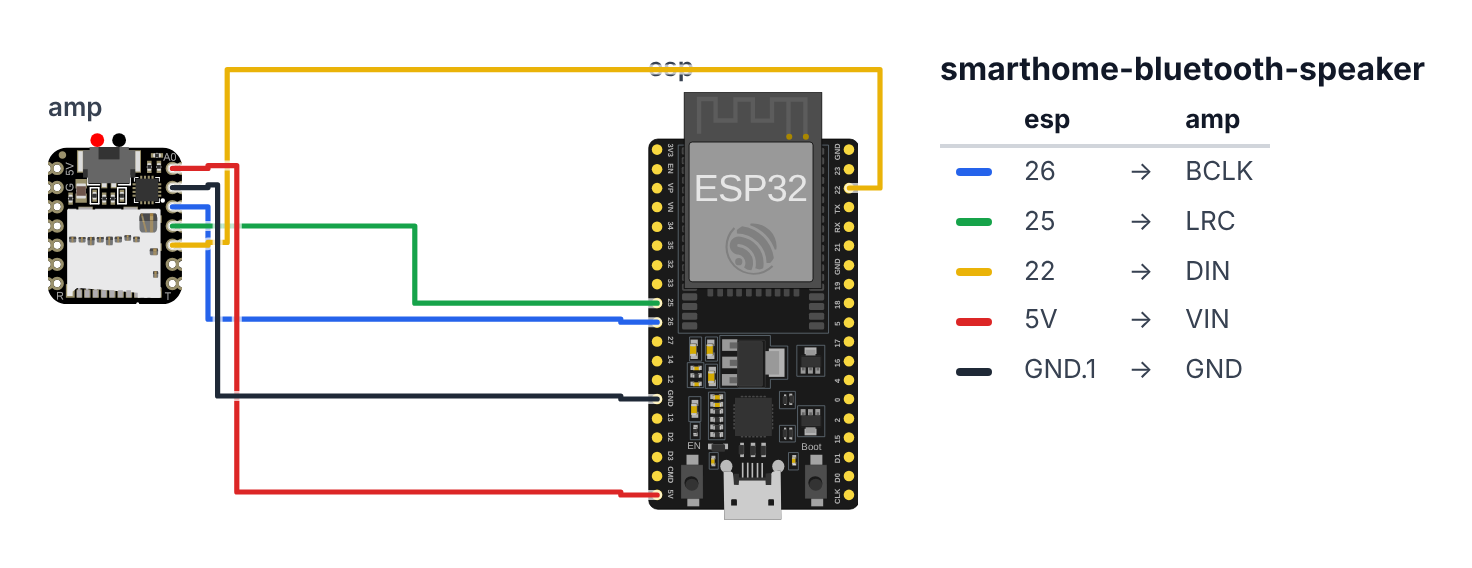
You’re connecting the ESP32 to the MAX98357A with 5 wires.
Classic ESP32 only: these pins are for a classic ESP32 DevKit (ESP32-WROOM-32). GPIO 26 / 25 / 22 are the ESP32-A2DP library’s default I2S pins.
ESP32 → MAX98357A (5 wires):
- Board GPIO 26 → MAX98357A BCLK (Bit Clock) — blue wire
- Board GPIO 25 → MAX98357A LRC (Left/Right Clock) — green wire
- Board GPIO 22 → MAX98357A DIN (Data In) — yellow wire
- Board 5V → MAX98357A VIN — red wire
- Board GND → MAX98357A GND — black wire
MAX98357A → Speaker (2 wires): 6. MAX98357A OUT+ → Speaker + terminal (red wire from speaker) 7. MAX98357A OUT- → Speaker - terminal (black wire from speaker)
Leave MAX98357A’s SD pin unconnected — it has an internal pull-up that keeps the amplifier enabled.
Check: 5 wires between ESP32 and amplifier, 2 wires between amplifier and speaker. The speaker terminals are usually labeled + and -. If not: try both polarities — wrong polarity just makes the cone move in the opposite direction, not harmful.
Warning: Don’t connect the speaker directly to the ESP32’s GPIO pins. The GPIO pins can only drive a few milliamps — not enough to move a speaker cone, and you’d damage the pin. The MAX98357A is the amplifier that provides the current.
Step 2: Flash the code
Time: ~5 minutes
Install the ESP32-A2DP library by Phil Schatzmann from Library Manager (search “ESP32-A2DP”). Then upload this code:
The big picture first. This program turns the ESP32 into a Bluetooth speaker:
- The ESP32 receives Bluetooth audio from your phone using a protocol called A2DP — the same protocol your wireless headphones use.
- That audio arrives as a digital stream of numbers. The ESP32 sends it over 3 wires (called I2S) to the MAX98357A amplifier chip.
- The MAX98357A converts the digital numbers into electrical power that moves the speaker cone back and forth — creating air pressure waves — which is what sound is.
- The entire Bluetooth + buffering + I2S pipeline runs in background tasks. Your
loop()does nothing.
// ========== CHOOSE YOUR BOARD ==========
// Uncomment the line for YOUR board:
#define BOARD_ESP32  // classic ESP32 DevKit (ESP32-WROOM-32)
//#define BOARD_S3    // ESP32-S3-DevKitC-1
//#define BOARD_C6  // ESP32-C6-DevKitC-1
// ========================================

#ifdef BOARD_ESP32
  #define PIN_I2S_BCLK  26
  #define PIN_I2S_LRC   25
  #define PIN_I2S_DOUT  22
#endif
#ifdef BOARD_S3
  #error "Bluetooth speakers need a classic ESP32: the ESP32-S3 has no Bluetooth Classic (only BLE). Pick BOARD_ESP32 at the top."
#endif
#ifdef BOARD_C6
  #error "Bluetooth speakers need a classic ESP32: the ESP32-C6 has no Bluetooth Classic (only BLE). Pick BOARD_ESP32 at the top."
#endif

#include "BluetoothA2DPSink.h"

BluetoothA2DPSink a2dp_sink;

i2s_pin_config_t pin_config = {
  .bck_io_num   = PIN_I2S_BCLK,
  .ws_io_num    = PIN_I2S_LRC,
  .data_out_num = PIN_I2S_DOUT,
  .data_in_num  = I2S_PIN_NO_CHANGE
};

void setup() {
  Serial.begin(115200);

  a2dp_sink.set_pin_config(pin_config);

  a2dp_sink.start("BuildCool Speaker");

  Serial.println("Bluetooth speaker started.");
  Serial.println("Look for 'BuildCool Speaker' in your phone's Bluetooth settings.");
}

void loop() {
  delay(1000);
}
Line-by-line: what every line does and why
Line 1: Borrowing the audio library
#include "BluetoothA2DPSink.h"#include grabs an instruction book. BluetoothA2DPSink is the entire Bluetooth audio stack — it handles Bluetooth Classic protocol, SBC audio codec decoding, audio buffering, and I2S output. One library does everything. The “Sink” part means “receiver” — the ESP32 receives audio (from your phone, the “Source”).
Line 3: Creating the speaker object
BluetoothA2DPSink a2dp_sink;This creates an object named a2dp_sink. Think of naming a dog so you can call it. From now on, a2dp_sink.something() tells the speaker object to do things. This single line creates an object that contains hundreds of lines of Bluetooth code inside it.
Lines 5–10: The I2S pin settings
i2s_pin_config_t pin_config = {
  .bck_io_num   = PIN_I2S_BCLK,
  .ws_io_num    = PIN_I2S_LRC,
  .data_out_num = PIN_I2S_DOUT,
  .data_in_num  = I2S_PIN_NO_CHANGE
};
i2s_pin_config_t pin_config is a settings form for the I2S audio bus. I2S (Inter-IC Sound) carries digital audio over 3 wires between chips:
.bck_io_num = PIN_I2S_BCLK— Bit Clock on GPIO 26 (the number comes from the board block at the top of the sketch). This wire pulses once for every single audio bit — like a metronome ticking for each number..ws_io_num = PIN_I2S_LRC— Word Select (also called LRC, Left/Right Clock) on GPIO 25. This wire toggles between “left channel” and “right channel” at the sample rate (44,100 times per second for CD quality audio)..data_out_num = PIN_I2S_DOUT— Data Out on GPIO 22. This is the wire that carries the actual audio — each bit of each sample, one per clock tick..data_in_num = I2S_PIN_NO_CHANGE— we’re not receiving audio (no microphone), so no data input pin needed.
The .fieldName = value syntax is called a designated initializer — it fills in a specific slot of the settings form by name.
Lines 12–22: setup() — morning routine
void setup() {
  Serial.begin(115200);
  a2dp_sink.set_pin_config(pin_config);
  a2dp_sink.start("BuildCool Speaker");
  Serial.println("Bluetooth speaker started.");
  Serial.println("Look for 'BuildCool Speaker' in your phone's Bluetooth settings.");
}
setup() runs exactly once when the board powers on.
Serial.begin(115200) — start the “phone line” to your computer via USB so you can read messages in Serial Monitor.
a2dp_sink.set_pin_config(pin_config) — hand the I2S pin settings form to the speaker object. Now it knows which GPIO wires carry the audio signal.
a2dp_sink.start("BuildCool Speaker") — this is the most important line. It does all of this at once:
- Starts the Bluetooth Classic radio.
- Begins advertising the name “BuildCool Speaker” — this is what your phone sees in Bluetooth settings.
- Launches several background tasks (invisible programs running on the ESP32’s second core): one for Bluetooth protocol, one for audio buffering, one for I2S output.
- Sets up the SBC audio codec decoder — SBC is the compression format Bluetooth audio uses, like how MP3 compresses music files.
The string "BuildCool Speaker" is what you tap in your phone’s Bluetooth menu. Change it to any name you like.
Lines 24–27: loop() — intentionally empty
void loop() {
  delay(1000);
}
loop() normally contains your program’s repeating work. Here, it does nothing — on purpose.
All the audio work happens in background tasks the library launched with start(). Those tasks run on the ESP32’s second processor core, completely independent of loop().
delay(1000) — sleep for 1 second. Without any delay, an empty loop would run millions of times per second, wasting power for no reason.
The audio pipeline that runs invisibly: your phone → Bluetooth radio → ESP32 Bluetooth stack → SBC decoder → audio buffer → I2S signal on GPIO 26/25/22 → MAX98357A amplifier chip → speaker cone → sound waves in the air.
The whole thing in one sentence
setup() starts the Bluetooth stack and names the device “BuildCool Speaker”; from that point on, the library’s background tasks handle all audio — your loop() sits empty while music flows from phone to speaker.
First thing to try: after uploading, open your phone’s Bluetooth settings and scan for devices. “BuildCool Speaker” should appear within a few seconds. Tap it to pair. Open any music app and press play. Then try a2dp_sink.start("My Bedroom Speaker") — the name is just a string, change it to anything you like.
Check: After uploading, open Serial Monitor (115200 baud). You should see “Bluetooth speaker started.” The board is now broadcasting “BuildCool Speaker” over Bluetooth.
Step 3: Pair and play
Time: ~2 minutes
- On your phone, open Bluetooth settings
- Scan for devices
- Tap “BuildCool Speaker” — it should appear within a few seconds
- Pair (no PIN needed — A2DP pairing is automatic)
- Open any music app and press play
- Music comes out of your speaker
Check: You hear music from the speaker. If the sound is very quiet, check volume on your phone — the MAX98357A has no hardware volume control, it’s set by your phone. At maximum phone volume, a 3W speaker at 5V is noticeably louder than phone speakers.
If you hear a buzzing sound instead of music: Check that BCLK, LRC, and DIN are on the correct GPIO pins. Swapping BCLK and LRC produces noise. Swapping DIN with another pin produces silence.
Step 4: Improve the sound
Now that it works:
Cardboard baffle test: Cut a piece of cardboard 20×20cm. Cut a hole the diameter of your speaker. Mount the speaker in the hole with tape. You’ll immediately hear significantly more bass. This is why every speaker in the world has an enclosure.
Sealed box: Take a small cardboard box (phone box, shoe box corner, anything rigid). Make a hole for the speaker, mount it, tape all edges airtight. The sealed air volume inside acts as a spring for the speaker cone, improving bass extension and reducing distortion.
Volume control: The library’s a2dp_sink.set_volume(level) function accepts 0–127. You can add a button on GPIO0 (the BOOT button) that cycles through volume levels. Short press = volume up, long press = mute.
What just happened
-
Bluetooth A2DP stands for Advanced Audio Distribution Profile. It’s the Bluetooth Classic protocol for streaming stereo audio — the same one your wireless headphones use. Your phone is the “Source” and your ESP32 is the “Sink.” Audio is compressed with SBC codec (good quality) by default. The ESP32-A2DP library abstracts all codec and protocol complexity —
start("name")launches the entire audio stack. -
I2S — digital audio over 3 wires: I2S (Inter-IC Sound) is a synchronous serial bus for audio. BCLK ticks at
sample_rate × bit_depth × channels— for CD quality audio (44100 Hz × 16 bits × 2 channels), that’s 1.4 MHz. On each tick, one bit of audio arrives on DIN. LRC toggles at exactly the sample rate to separate left and right channels. The MAX98357A receives this stream and converts it to an amplified analog signal. This is why Bluetooth speakers sound better than analog: the digital signal travels cleanly to the amp chip with zero interference. -
FreeRTOS background tasks: The ESP32 runs FreeRTOS, a real-time operating system. When you call
a2dp_sink.start(), it launches several background tasks — one for Bluetooth protocol, one for audio buffering, one for I2S output. These run independently ofloop(). That’s whyloop()can be empty. Embedded programs aren’t single-threaded; understanding FreeRTOS tasks is the key to building responsive systems. -
Speaker physics: The MAX98357A is a Class D amplifier — it switches its output between full voltage and zero at high frequency, creating a PWM signal that the speaker coil averages into smooth movement. A 4Ω/3W speaker with this amplifier at 5V produces about 2.5W peak output — louder than phone speakers. Speaker impedance must match the amplifier’s rating: 4Ω to 4Ω is correct. Using an 8Ω speaker halves the output power. Using a 2Ω speaker risks damaging the amplifier.
Level Up
Add a hardware volume knob. Wire a rotary encoder to GPIO 16 and GPIO 17. In loop(), read the encoder and adjust a volume variable from 0–127. Call a2dp_sink.set_volume(volume) to apply it. Add a small OLED showing the current volume as a bar. Now it behaves like a proper audio device with a physical control.
Add beat-reactive LEDs. Register a stream reader callback: a2dp_sink.set_stream_reader(myCallback). In the callback, you receive raw PCM audio samples — compute RMS (root mean square) to measure loudness. Map RMS to a brightness value and update a WS2812B LED strip. Bass-heavy music creates big amplitude spikes. You’ve built a hardware VU meter.
Add a 3D printed enclosure. A proper sealed box with volume calculated from the speaker’s Thiele-Small parameters will dramatically improve bass response. This is acoustic engineering at essentially zero cost. Thingiverse has dozens of ESP32 speaker enclosure designs ready to print.
Troubleshooting
| Problem | Fix |
|---|---|
| “BuildCool Speaker” doesn’t appear in Bluetooth settings | Make sure it’s a classic ESP32 (ESP32-WROOM-32) — an S3 or C6 can’t do Bluetooth Classic. Wait 30 seconds after upload. Make sure your phone’s Bluetooth is on and actively scanning. The board must be powered on. |
| Audio plays but sounds like buzzing or static | Check the I2S pin assignments — BCLK=26, LRC=25, DIN=22. Swapping these produces noise/silence. |
| Very quiet sound | Turn up your phone volume — the MAX98357A has no hardware volume control. Check that VIN is connected to 5V (not 3.3V). Higher voltage = more amplifier headroom. |
| One channel sounds different from the other | The MAX98357A is a mono amplifier. By default it mixes both L+R channels. If you want only one channel, connect the SD pin to 3.3V (left channel only) or GND (right channel only). |
| Works on first connection but fails to reconnect | Unpair and re-pair from your phone’s Bluetooth settings. Some phones hold a stale connection. Restarting the ESP32 also clears the connection. |
| Library not found in Library Manager | Search for “ESP32-A2DP” — if not found, download directly from GitHub: github.com/pschatzmann/ESP32-A2DP. |