Parent info
Parts you need
Affiliate links — we may earn a small commission
Try this circuit in your browser!
Run the code, press the buttons and watch what happens — before you buy any parts. No account needed.
Open in Simulator →It sits at the ceiling. Perfectly still. Then someone walks in.
Imagine this: you clip a small mechanism to the top of your door frame. A rubber spider hangs from it, coiled up near the ceiling. Completely invisible in a dark hallway.
Someone walks through the door. The spider drops to eye level in half a second.
And because the ESP32 has Wi-Fi, your phone becomes the remote control: arm the trap, disarm it when Grandma visits, or press Drop now! at exactly the right moment.
In 1.5 hours. For about $25.
What you’ll need
| Part | What it does | Price |
|---|---|---|
| ESP32-S3-DevKitC-1 (or an ESP32-C6-DevKitC-1) | The brain — reads PIR, controls servo, hosts the phone page | ~$12 |
| PIR Motion Sensor (HC-SR501) | Detects someone approaching the doorway | ~$4 |
| SG90 Micro Servo | Holds the fishing line spool — releases on trigger | ~$3 |
| Breadboard + jumper wires | Connects everything without soldering | ~$5 |
| USB-C cable + phone charger | Powers the ESP32 from a wall outlet | ~$5 |
Total: ~$29 | Time: ~1.5 hours | Difficulty: ●○○○○
You also need: A fake rubber spider (dollar store), fishing line (8–10 lb test, thin enough to be near-invisible), and a 3D-printed ceiling mount mechanism.
The mount: Search Thingiverse for “servo spool drop mechanism” or “Halloween spider drop prop.” Look for a bracket with: a keyhole slot for door frame hanging, a servo pocket sized for SG90, and a line spool that presses onto the servo horn. Print in black PLA at 0.2mm.
How it works (60 seconds)
Think of the servo as a winch. At position 0°, the servo horn is rotated so it holds the fishing line spool under tension — spider stays at the ceiling. At position 180°, the servo releases the spool, which unwinds freely under gravity. The spider drops on its line at free-fall speed.
After 3 seconds, the servo turns back to 0° — smoothly, over one second — and rewinds the spool, pulling the spider back up without a jerk. A 10-second rest prevents the servo from firing again immediately.
The PIR sensor watches the doorway from above, angled at 45 degrees downward. Nobody sees the mechanism until the spider is already at eye level.
The ESP32 also runs a tiny website. Open it on your phone and you see the spider’s state, how many people you scared, and buttons to arm, disarm or drop.
Step 0: Print and assemble the ceiling mount
Time: ~4 hours print time (print overnight)
Print the ceiling mount bracket in black PLA at 0.2mm layer height. This part takes mechanical stress when the servo rewinds — don’t use a lower infill percentage than 40%.
Assemble:
- Press the servo into its pocket in the bracket (friction fit, or secure with a small drop of hot glue)
- Press the printed spool onto the servo horn — it should grip the horn tightly
- Wind fishing line around the spool by hand with the servo at position 0 (hold position)
- Tie the spider to the free end of the line
- Clip the bracket to the top of the door frame using the keyhole slot and a small nail or Command strip
Setting line length: The spider should start at ceiling level (invisible) and drop to eye level — about 150–160cm from the floor. Measure your door frame, subtract 10cm, and cut the fishing line to that length.
Check: With the servo at 0°, pull the spider gently. The line should stay taut. With the servo at 180°, the spool should release freely and the spider should fall smoothly. If the spider doesn’t drop (line too tight), you’ll need to release a bit of initial tension.
Step 1: Wire it up
Time: ~10 minutes
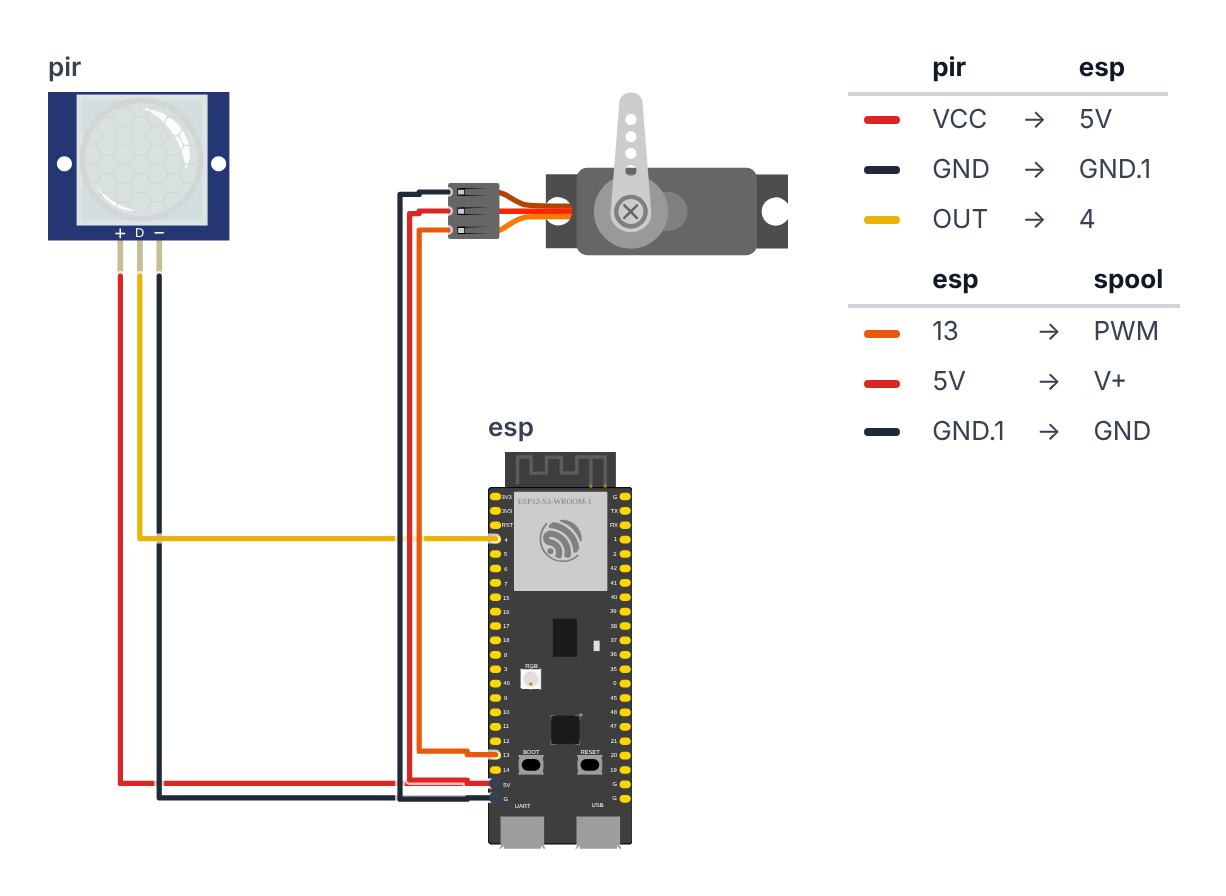
Only 6 wires total. The pin numbers depend on your board:
| Wire | ESP32-S3 | ESP32-C6 |
|---|---|---|
| PIR signal (OUT) | GPIO 4 | GPIO 0 |
| Servo signal | GPIO 13 | GPIO 5 |
PIR Sensor (3 wires):
- PIR Signal (OUT) → board GPIO 4 (C6: GPIO 0) — yellow wire
- PIR VCC → board 5V (also labeled VIN or 5V0) — red wire
- PIR GND → board GND — black wire
Servo (3 wires): 4. Servo Signal (orange wire from servo) → board GPIO 13 (C6: GPIO 5) — orange wire 5. Servo VCC (red wire from servo) → board 5V — red wire 6. Servo GND (brown wire from servo) → board GND — black wire
Check: Both the PIR and the servo get 5V. The HC-SR501 has its own little voltage regulator inside and is made for 4.5–20 V — on 3.3V it gets confused and triggers by itself. Don’t worry about the ESP32: the PIR’s OUT pin only ever sends 3.3V, even when the PIR is powered from 5V. Only 6 total wires. Board is NOT plugged in yet.
Step 2: Upload the code
Install one library via Arduino IDE Library Manager: ESP32Servo by Kevin Harrington. Everything else (WiFi, WebServer, ESPmDNS) is already built into the ESP32 board package — nothing to install.
The big picture first. This program turns the ESP32 into a one-trick ambush machine — and the trick is perfectly timed:
- The ESP32 is the brain — it waits, watches, and fires with perfect timing.
- The PIR sensor is the eye — it detects body heat walking through the doorway.
- The servo is the winch — at one angle it holds the fishing line (spider stays up), at the other angle it releases the spool (spider falls).
- The web page is the remote control — your phone shows what the trap is doing and lets you arm, disarm or drop.
A program is like a recipe. The computer reads it top to bottom and does exactly what’s written, nothing more. Copy this entire recipe into Arduino IDE.
Before you upload:
- At the top, leave
#define BOARD_S3as it is for an ESP32-S3. For an ESP32-C6, put//in front of#define BOARD_S3and remove the//in front of#define BOARD_C6. - Want the page on your home Wi-Fi? Replace
YOUR_WIFI_NAMEandYOUR_PASSWORDwith your Wi-Fi name and password. If you skip this, the trap makes its own Wi-Fi hotspot instead — that works too.
// ========== CHOOSE YOUR BOARD ==========
// Uncomment the line for YOUR board:
#define BOARD_S3    // ESP32-S3-DevKitC-1
//#define BOARD_C6  // ESP32-C6-DevKitC-1
// ========================================

#ifdef BOARD_S3
  #define PIN_PIR              4
  #define PIN_SERVO            13
  #define PIN_BOARD_RGB        38
#endif
#ifdef BOARD_C6
  #define PIN_PIR              0
  #define PIN_SERVO            5
  #define PIN_BOARD_RGB        8
#endif

#include <ESP32Servo.h>
#include <WiFi.h>
#include <WebServer.h>
#include <ESPmDNS.h>

// ---------- Settings ----------
#define DROP_POSITION 180
#define HOLD_POSITION 0
#define DROP_HOLD_MS 3000
#define LOCKOUT_MS 10000
#define REWIND_MS 1000
#define PIR_WARMUP_MS 30000
#define PIR_STUCK_MS 120000

// ---------- Wi-Fi ----------
const char* WIFI_NAME = "YOUR_WIFI_NAME";
const char* WIFI_PASSWORD = "YOUR_PASSWORD";
const char* HOTSPOT_NAME = "BuildCool-Spider";
const char* HOTSPOT_PASSWORD = "buildcool";
const char* WEB_NAME = "spider";

// ---------- Parts ----------
Servo spoolServo;
WebServer server(80);

// ---------- Memory ----------
enum State { WARMING_UP, READY, DROPPED, REWINDING, LOCKED };
const char* STATE_NAMES[] = {"warming up", "ready", "dropped", "rewinding", "resting"};
State state = WARMING_UP;
unsigned long stateStart = 0;

bool armed = true;
bool pirWasLow = false;
bool dropRequested = false;
int hangMs = DROP_HOLD_MS;
int scareCount = 0;
unsigned long lastScare = 0;
unsigned long pirHighSince = 0;
bool ledIsOn = false;
bool pirStuckWarned = false;
String webAddress = "";

// ---------- Web page ----------
const char PAGE[] PROGMEM = R"rawliteral(
<!doctype html><html lang="en"><head><meta charset="utf-8">
<meta name="viewport" content="width=device-width,initial-scale=1">
<title>Spider Drop · BuildCool</title>
<style>
:root{--o:#f97316;--o6:#ea580c;--o7:#c2410c;--o50:#fff7ed;--o200:#fed7aa;--g9:#111827;--g7:#374151;--g5:#6b7280;--g2:#e5e7eb;--g0:#f9fafb;--ok:#16a34a;--bad:#dc2626}
*{box-sizing:border-box}
body{margin:0;font-family:-apple-system,BlinkMacSystemFont,"Segoe UI",Roboto,"Helvetica Neue",Arial,sans-serif;color:var(--g9);background:var(--g0)}
header{position:sticky;top:0;z-index:9;background:rgba(255,255,255,.9);backdrop-filter:blur(8px);border-bottom:1px solid var(--g2)}
.wrap{max-width:640px;margin:0 auto;padding:12px 16px}
.bar{display:flex;align-items:center;justify-content:space-between}
.logo{font-size:20px;font-weight:800;letter-spacing:-.02em;color:var(--g9);text-decoration:none}
.logo span{color:var(--o)}
.badge{display:inline-flex;align-items:center;gap:8px;background:var(--o50);border:1px solid var(--o200);color:var(--o7);font-size:13px;font-weight:500;padding:4px 12px;border-radius:999px}
.dot{width:8px;height:8px;border-radius:50%;background:var(--o);animation:p 2s infinite}
.off .dot{background:var(--g5);animation:none}
@keyframes p{50%{opacity:.35}}
h1{font-size:30px;font-weight:800;letter-spacing:-.02em;line-height:1.1;margin:20px 0 6px}
h1 span{color:var(--o)}
.sub{color:var(--g5);margin:0 0 20px}
.grid{display:grid;grid-template-columns:repeat(auto-fit,minmax(140px,1fr));gap:12px}
.card{background:#fff;border:1px solid var(--g2);border-radius:16px;padding:16px}
.wide{grid-column:1/-1}
.label{font-size:13px;color:var(--g5);font-weight:500}
.value{font-size:32px;font-weight:800;letter-spacing:-.02em;margin-top:4px}
.unit{font-size:16px;color:var(--g5);font-weight:600}
.row{display:flex;gap:8px;flex-wrap:wrap;margin-top:10px}
.btn{display:inline-flex;justify-content:center;align-items:center;padding:12px 20px;background:var(--o);color:#fff;font-weight:600;border:0;border-radius:12px;font-size:15px;text-decoration:none;cursor:pointer;box-shadow:0 10px 15px -3px var(--o200)}
.btn:active{transform:scale(.95)}
.btn.ghost{background:#fff;color:var(--g7);border:1px solid var(--g2);box-shadow:none}
.btn.big{width:100%;padding:18px;font-size:18px}
input[type=range]{width:100%;accent-color:var(--o);margin-top:12px}
.state{display:inline-block;font-size:13px;font-weight:600;padding:2px 10px;border-radius:999px;background:var(--g0);border:1px solid var(--g2)}
.state.ok{color:var(--ok);border-color:#bbf7d0;background:#f0fdf4}
.state.bad{color:var(--bad);border-color:#fecaca;background:#fef2f2}
footer{color:var(--g5);font-size:13px;text-align:center;padding:28px 16px}
footer a{color:var(--o);font-weight:600;text-decoration:none}
</style></head><body>
<header><div class="wrap bar"><a class="logo" href="https://buildcool.fun">Build<span>Cool</span></a>
<span class="badge" id="live"><span class="dot"></span><span id="livetxt">Live</span></span></div></header>
<main class="wrap">
<h1>Spider <span>Drop</span></h1>
<p class="sub">Halloween door trap · watch and scare from your phone</p>
<div class="grid">
<div class="card"><div class="label">Spider</div><div class="value" id="st" style="font-size:22px">–</div></div>
<div class="card"><div class="label">People scared</div><div class="value" id="n">0</div></div>
<div class="card"><div class="label">Motion sensor</div><div style="margin-top:10px"><span class="state" id="pir">–</span></div></div>
<div class="card"><div class="label">Last scare</div><div class="value"><span id="ago">–</span><span class="unit" id="agou"></span></div></div>
<div class="card wide"><div class="label">Trap · <span class="state" id="arm">–</span></div>
<div class="row"><button class="btn" onclick="act('armed','1')">Arm</button><button class="btn ghost" onclick="act('armed','0')">Disarm</button></div>
<button class="btn big" style="margin-top:12px" onclick="act('drop','1')">🕷 Drop now!</button></div>
<div class="card wide"><div class="label">Hang time · <span id="hv">–</span> s</div>
<input type="range" min="1" max="10" id="hang" onchange="act('hang',this.value)"></div>
</div></main>
<footer>Made with <a href="https://buildcool.fun">buildcool.fun</a></footer>
<script>
const $=id=>document.getElementById(id);
function live(ok){$("live").classList.toggle("off",!ok);$("livetxt").textContent=ok?"Live":"Offline"}
async function act(k,v){try{await fetch("/api/set?"+k+"="+encodeURIComponent(v),{method:"POST"});tick()}catch(e){live(false)}}
async function tick(){
 try{const d=await (await fetch("/api")).json();
  $("st").textContent=d.state;$("n").textContent=d.count;
  $("pir").textContent=d.motion?"Motion!":"Quiet";$("pir").className="state "+(d.motion?"bad":"ok");
  $("arm").textContent=d.armed?"Armed":"Disarmed";$("arm").className="state "+(d.armed?"ok":"");
  if(d.ago<0){$("ago").textContent="–";$("agou").textContent=""}
  else if(d.ago<120){$("ago").textContent=d.ago;$("agou").textContent=" s ago"}
  else{$("ago").textContent=Math.round(d.ago/60);$("agou").textContent=" min ago"}
  if(document.activeElement.id!="hang")$("hang").value=d.hang;$("hv").textContent=d.hang;
  live(true)}catch(e){live(false)}
}
tick();setInterval(tick,1000);
</script></body></html>
)rawliteral";

// ---------- Helpers ----------
void setLed(bool on) {
  if (on == ledIsOn) return;
  ledIsOn = on;
  rgbLedWrite(PIN_BOARD_RGB, on ? 64 : 0, on ? 16 : 0, 0);
}

void setState(State newState) {
  state = newState;
  stateStart = millis();
  Serial.print("# Spider: ");
  Serial.println(STATE_NAMES[state]);
}

void dropSpider(const char* reason) {
  Serial.print("# ");
  Serial.print(reason);
  Serial.println(" DROPPING SPIDER!");
  spoolServo.write(DROP_POSITION);
  scareCount++;
  lastScare = millis();
  setLed(true);
  setState(DROPPED);
}

// ---------- Trap logic ----------
void updateTrap() {
  unsigned long now = millis();
  unsigned long inState = now - stateStart;
  bool motion = digitalRead(PIN_PIR) == HIGH;

  if (!motion) pirWasLow = true;

  switch (state) {
    case WARMING_UP:
      setLed((now / 500) % 2);
      if (inState >= PIR_WARMUP_MS) {
        setLed(false);
        setState(READY);
        Serial.println("# Spider Drop Trap armed. Stand back.");
      }
      break;

    case READY:
      if (dropRequested) {
        dropSpider("Phone button pressed!");
      } else if (armed && motion && pirWasLow) {
        pirWasLow = false;
        dropSpider("TARGET DETECTED!");
      }
      break;

    case DROPPED:
      if (inState >= (unsigned long)hangMs) {
        Serial.println("# Rewinding spider...");
        setLed(false);
        setState(REWINDING);
      }
      break;

    case REWINDING: {
      long angle = map(min(inState, (unsigned long)REWIND_MS), 0, REWIND_MS, DROP_POSITION, HOLD_POSITION);
      spoolServo.write(angle);
      if (inState >= REWIND_MS) setState(LOCKED);
      break;
    }

    case LOCKED:
      if (inState >= LOCKOUT_MS) {
        pirWasLow = !motion;
        setState(READY);
      }
      break;
  }
  dropRequested = false;
}

void checkPirStuck() {
  if (state == WARMING_UP) return;
  if (digitalRead(PIN_PIR) == LOW) {
    pirHighSince = 0;
    pirStuckWarned = false;
    return;
  }
  if (pirHighSince == 0) pirHighSince = millis();
  if (!pirStuckWarned && millis() - pirHighSince > PIR_STUCK_MS) {
    pirStuckWarned = true;
    Serial.println("# Motion sensor has been ON for 2 minutes. Is it pointing at a heater or window?");
    Serial.println("# Turn the sensitivity knob down or check that PIR VCC goes to 5V (VIN).");
  }
}

// ---------- Wi-Fi and web server ----------
void startWiFi() {
  if (String(WIFI_NAME) != "YOUR_WIFI_NAME") {
    WiFi.mode(WIFI_STA);
    WiFi.begin(WIFI_NAME, WIFI_PASSWORD);
    Serial.print("# Joining Wi-Fi");
    unsigned long start = millis();
    while (WiFi.status() != WL_CONNECTED && millis() - start < 15000) {
      delay(250);
      Serial.print(".");
    }
    Serial.println();
    if (WiFi.status() == WL_CONNECTED) {
      webAddress = WiFi.localIP().toString();
      if (MDNS.begin(WEB_NAME)) {
        Serial.print("# Also try: http://");
        Serial.print(WEB_NAME);
        Serial.println(".local");
      }
      Serial.print("# Open in your browser: http://");
      Serial.println(webAddress);
      return;
    }
    Serial.println("# Could not join Wi-Fi, starting own hotspot instead");
  }
  WiFi.mode(WIFI_AP);
  WiFi.softAP(HOTSPOT_NAME, HOTSPOT_PASSWORD);
  webAddress = WiFi.softAPIP().toString();
  Serial.print("# Connect your phone to Wi-Fi \"");
  Serial.print(HOTSPOT_NAME);
  Serial.print("\" (password: ");
  Serial.print(HOTSPOT_PASSWORD);
  Serial.print("), then open http://");
  Serial.println(webAddress);
}

void handlePage() {
  server.send(200, "text/html", PAGE);
}

void handleApi() {
  long ago = scareCount == 0 ? -1 : (long)((millis() - lastScare) / 1000);
  String json = "{";
  json += "\"state\":\"" + String(STATE_NAMES[state]) + "\"";
  json += ",\"armed\":" + String(armed ? "true" : "false");
  json += ",\"motion\":" + String(digitalRead(PIN_PIR) == HIGH ? "true" : "false");
  json += ",\"count\":" + String(scareCount);
  json += ",\"ago\":" + String(ago);
  json += ",\"hang\":" + String(hangMs / 1000);
  json += "}";
  server.send(200, "application/json", json);
}

void handleSet() {
  if (server.hasArg("armed")) {
    armed = server.arg("armed") == "1";
    Serial.println(armed ? "# Trap armed from phone" : "# Trap disarmed from phone");
  }
  if (server.hasArg("hang")) hangMs = constrain(server.arg("hang").toInt(), 1, 10) * 1000;
  if (server.hasArg("drop") && state == READY) dropRequested = true;
  handleApi();
}

void startWebServer() {
  server.on("/", handlePage);
  server.on("/api", HTTP_GET, handleApi);
  server.on("/api/set", HTTP_POST, handleSet);
  server.begin();
}

// ---------- Setup ----------
void setup() {
  Serial.begin(115200);
  rgbLedWrite(PIN_BOARD_RGB, 0, 0, 0);
  pinMode(PIN_PIR, INPUT_PULLDOWN);

  spoolServo.setPeriodHertz(50);
  spoolServo.attach(PIN_SERVO, 500, 2400);
  spoolServo.write(HOLD_POSITION);
  delay(500);

  startWiFi();
  startWebServer();

  Serial.println("# Motion sensor warming up for 30 seconds, keep out of its view...");
  setState(WARMING_UP);
}

// ---------- Loop ----------
void loop() {
  server.handleClient();
  updateTrap();
  checkPirStuck();
}
Line-by-line: what every line does and why
The board selector: telling the code which ESP32 you have
#define BOARD_S3    // ESP32-S3-DevKitC-1
//#define BOARD_C6  // ESP32-C6-DevKitC-1
Different ESP32 boards have their pins in different places, like two houses with the kitchen in a different room. Only one of these lines may be “switched on” (no // in front). The #ifdef BOARD_S3 block below it then gives the pins their numbers for that board:
#define PIN_PIR              4
#define PIN_SERVO            13
#define PIN_BOARD_RGB        38
#define gives each pin number a nickname. On the S3, the PIR sensor’s output wire plugs into pin 4 and the servo’s signal wire into pin 13 (on the C6: pins 0 and 5). PIN_BOARD_RGB is the tiny color LED that is already soldered onto your board — GPIO 38 on the S3, GPIO 8 on the C6. Nothing to wire. Using names instead of numbers means if you rewire, you change one line instead of searching through all the code.
Borrowing four instruction books
#include <ESP32Servo.h>
#include <WiFi.h>
#include <WebServer.h>
#include <ESPmDNS.h>
#include means “grab this instruction book.” ESP32Servo knows how to talk to a servo motor, so we can just say spoolServo.write(180) instead of figuring out the pulse timing ourselves. WiFi connects to (or creates) a Wi-Fi network. WebServer turns the ESP32 into a tiny website. ESPmDNS gives that website a friendly name like spider.local, so you don’t have to remember numbers.
Settings: the behavior knobs
#define DROP_POSITION 180
#define HOLD_POSITION 0
#define DROP_HOLD_MS 3000
#define LOCKOUT_MS 10000
#define REWIND_MS 1000
#define PIR_WARMUP_MS 30000
#define PIR_STUCK_MS 120000
DROP_POSITION 180— the servo angle that releases the spool so the spider falls. (If it goes the wrong way, change this to0and swapHOLD_POSITIONto180.)HOLD_POSITION 0— the angle that holds the line taut, keeping the spider at the ceiling.DROP_HOLD_MS 3000— the spider hangs for 3,000 milliseconds (3 seconds) before it is wound back up. You can change this later from your phone.LOCKOUT_MS 10000— after rewinding, the trap rests 10 seconds before it can fire again.REWIND_MS 1000— the rewind takes 1 second instead of a sudden snap. Slow and smooth means the line doesn’t jerk, the spider doesn’t bounce, and the servo doesn’t gulp so much power that the ESP32 restarts.PIR_WARMUP_MS 30000— the PIR sensor needs about 30 seconds after power-on to “get used to” the room. During that time it sends random signals, so the code ignores it.PIR_STUCK_MS 120000— if the PIR says “motion!” for 2 minutes without a break, something is wrong (more on that below).
Wi-Fi settings
const char* WIFI_NAME = "YOUR_WIFI_NAME";
const char* WIFI_PASSWORD = "YOUR_PASSWORD";
const char* HOTSPOT_NAME = "BuildCool-Spider";
const char* HOTSPOT_PASSWORD = "buildcool";
const char* WEB_NAME = "spider";
The first two lines are for your home Wi-Fi. The next two are the trap’s own Wi-Fi network, which it creates when it can’t join yours — like a lemonade stand that brings its own table. WEB_NAME becomes the address http://spider.local.
Creating objects
Servo spoolServo;
WebServer server(80);
Servo is a type — like “winch.” spoolServo is the name of our specific servo, the one holding the spool. WebServer server(80) creates the website. 80 is the “door number” that every web browser knocks on by default.
Memory: the state machine and its boxes
enum State { WARMING_UP, READY, DROPPED, REWINDING, LOCKED };
const char* STATE_NAMES[] = {"warming up", "ready", "dropped", "rewinding", "resting"};
State state = WARMING_UP;
unsigned long stateStart = 0;
This is the heart of the program. The trap is always in exactly one of five moods, like a traffic light that is always red, yellow or green — never two at once:
WARMING_UP— the PIR is still getting used to the room. Hands off.READY— armed and waiting for a victim.DROPPED— the spider is dangling in someone’s face.REWINDING— the spool is winding the spider back up.LOCKED— a short rest before the trap can fire again.
enum is a way to give these moods names instead of numbers. STATE_NAMES holds the same moods as human words, for the Serial Monitor and the phone page. state remembers the current mood, and stateStart remembers when we entered it — so we can ask “how long have we been in this mood?” This pattern is called a state machine, and it’s used in video games, elevators, washing machines and traffic lights.
bool armed = true;
bool pirWasLow = false;
bool dropRequested = false;
int hangMs = DROP_HOLD_MS;
int scareCount = 0;
unsigned long lastScare = 0;
unsigned long pirHighSince = 0;
bool ledIsOn = false;
bool pirStuckWarned = false;
String webAddress = "";
More memory boxes:
armed— is the trap allowed to fire on motion? Your phone can switch this off.pirWasLow— has the PIR gone quiet since the last drop? (Explained inupdateTrap().)dropRequested— did someone press Drop now! on the phone?hangMs— how long the spider hangs, starting at 3 seconds.scareCountandlastScare— your score: how many drops, and when the last one was.pirHighSinceandpirStuckWarned— for the “is the sensor stuck?” check.ledIsOn— remembers whether the board LED is on, so we only switch it when it needs to change.webAddress— the number address of the web page, like192.168.4.1.
The web page
const char PAGE[] PROGMEM = R"rawliteral(
<!doctype html><html lang="en"><head>...
)rawliteral";
This long block is a whole web page — written in HTML (the language of websites), CSS (the colors and layout) and JavaScript (the part that updates the numbers). It is stored inside the ESP32 as one giant piece of text. R"rawliteral( … )rawliteral" means “everything in between is plain text, don’t try to understand it as C++.” PROGMEM says “keep it in the big flash memory, not in the small working memory.”
The JavaScript on the page asks the ESP32 for fresh numbers every second. If the ESP32 doesn’t answer (unplugged, or your phone left the Wi-Fi), the badge at the top switches from Live to Offline.
Helpers: small jobs with names
void setLed(bool on) {
  if (on == ledIsOn) return;
  ledIsOn = on;
  rgbLedWrite(PIN_BOARD_RGB, on ? 64 : 0, on ? 16 : 0, 0);
}
Switches the board’s RGB LED on or off — but only if it’s actually changing. It’s a color LED, so digitalWrite can’t switch it: rgbLedWrite(PIN_BOARD_RGB, red, green, blue) mixes a color from three numbers between 0 and 255. on ? 64 : 0 means “if on is true, use 64, otherwise 0.” So “on” is red 64 + green 16 = pumpkin orange, and “off” is 0, 0, 0. Every change sends a special message to the LED, and sending that message thousands of times per second for nothing would waste time.
void setState(State newState) {
  state = newState;
  stateStart = millis();
  Serial.print("# Spider: ");
  Serial.println(STATE_NAMES[state]);
}
Every mood change goes through this one function. It saves the new mood, starts the mood’s stopwatch (millis() is a built-in stopwatch counting milliseconds since power-on) and prints the mood to the Serial Monitor. One place for all changes = no forgotten stopwatch.
void dropSpider(const char* reason) {
  ...
  spoolServo.write(DROP_POSITION);
  scareCount++;
  lastScare = millis();
  setLed(true);
  setState(DROPPED);
}
The scare itself. Print why we dropped (motion or phone button), turn the servo to release the spool, add 1 to the score, remember the time, light the LED, and switch to the DROPPED mood.
updateTrap(): the brain, checked thousands of times per second
unsigned long now = millis();
unsigned long inState = now - stateStart;
bool motion = digitalRead(PIN_PIR) == HIGH;

if (!motion) pirWasLow = true;
First, three quick facts: what time is it, how long have we been in this mood, and does the PIR see someone right now? digitalRead reads the voltage on the PIR pin — HIGH means “body heat moving!”
The last line is the clever trick called edge detection. An HC-SR501 keeps its output HIGH as long as someone moves in front of it. Without this trick, a person standing in the doorway would get the spider dropped on them again and again, every time the rest is over. With it, the PIR must first go quiet (LOW) — the person left — before the trap can fire again. We react to the change from quiet to motion (the “edge”), not to motion itself.
switch (state) {
  case WARMING_UP:
    setLed((now / 500) % 2);
    if (inState >= PIR_WARMUP_MS) { ... setState(READY); }
    break;
switch is like a hallway with one door per mood: the code walks straight to the door of the current mood and only runs what’s behind it.
Warming up: (now / 500) % 2 flips between 0 and 1 every half second — that makes the LED blink. After 30 seconds, the LED goes off and the trap becomes READY.
  case READY:
    if (dropRequested) {
      dropSpider("Phone button pressed!");
    } else if (armed && motion && pirWasLow) {
      pirWasLow = false;
      dropSpider("TARGET DETECTED!");
    }
    break;
Ready: if someone pressed Drop now! on the phone — drop. Otherwise, drop only if all three are true: the trap is armed, there is motion, and the PIR was quiet before (the edge). Then pirWasLow = false so the same person can’t trigger it twice.
  case DROPPED:
    if (inState >= (unsigned long)hangMs) { ... setState(REWINDING); }
    break;
Dropped: the spider hangs. When the hang time is over, the LED goes off and we start rewinding.
  case REWINDING: {
    long angle = map(min(inState, (unsigned long)REWIND_MS), 0, REWIND_MS, DROP_POSITION, HOLD_POSITION);
    spoolServo.write(angle);
    if (inState >= REWIND_MS) setState(LOCKED);
    break;
  }
Rewinding: this is the smooth rewind. map() is a converter, like converting °C to °F: it turns “how far are we through the 1-second rewind” (0 to 1000 ms) into “which angle should the servo be at” (180° down to 0°). Halfway through the second → 90°. Because loop() runs thousands of times per second, the servo gets a slightly smaller angle each time and turns smoothly instead of snapping. min() makes sure we never go past the end. After 1 second → LOCKED.
  case LOCKED:
    if (inState >= LOCKOUT_MS) {
      pirWasLow = !motion;
      setState(READY);
    }
    break;
}
dropRequested = false;
Resting: after 10 seconds, back to READY. pirWasLow = !motion means: if the doorway is empty right now, the trap may fire on the next person; if someone is still standing there, they must leave first. The last line forgets any Drop now! press that came at a wrong moment (for example while the spider was still hanging).
checkPirStuck(): a sensor doctor
if (digitalRead(PIN_PIR) == LOW) { pirHighSince = 0; ... return; }
if (pirHighSince == 0) pirHighSince = millis();
if (!pirStuckWarned && millis() - pirHighSince > PIR_STUCK_MS) { ... }
If the PIR is quiet, everything is fine — reset the timer. If it says “motion,” start a timer. If it has said “motion” for 2 whole minutes without a break, that’s suspicious: real people don’t wiggle in a doorway for 2 minutes. The code prints a hint on the Serial Monitor: the sensor may point at a heater or a sunny window, its sensitivity knob may be too high, or its VCC wire is on 3.3V instead of 5V. It warns only once (pirStuckWarned) so it doesn’t flood the screen.
startWiFi(): home Wi-Fi or own hotspot
if (String(WIFI_NAME) != "YOUR_WIFI_NAME") {
  WiFi.mode(WIFI_STA);
  WiFi.begin(WIFI_NAME, WIFI_PASSWORD);
  ...
  while (WiFi.status() != WL_CONNECTED && millis() - start < 15000) { delay(250); ... }
If you typed in your Wi-Fi name, the ESP32 tries to join it — for at most 15 seconds, printing a dot every quarter second so you can see it working. If it works, it prints the address (like http://192.168.1.57) and starts the spider.local name.
WiFi.mode(WIFI_AP);
WiFi.softAP(HOTSPOT_NAME, HOTSPOT_PASSWORD);
If you didn’t change the Wi-Fi name, or joining failed (wrong password, too far from the router), the ESP32 creates its own Wi-Fi network called BuildCool-Spider with password buildcool. This is called a hotspot fallback — plan B, so the phone page always works, even at a Halloween party far away from your router. In hotspot mode, the page is always at http://192.168.4.1.
The web server: three addresses
server.on("/", handlePage);
server.on("/api", HTTP_GET, handleApi);
server.on("/api/set", HTTP_POST, handleSet);
Like a receptionist with three desks:
/hands out the web page itself./apianswers “what’s going on?” with a short text called JSON, for example{"state":"ready","armed":true,"motion":false,"count":4,"ago":37,"hang":3}. The page reads it every second and updates the cards./api/settakes orders from the buttons:armed=1orarmed=0,drop=1, orhang=5.
if (server.hasArg("hang")) hangMs = constrain(server.arg("hang").toInt(), 1, 10) * 1000;
if (server.hasArg("drop") && state == READY) dropRequested = true;
Never trust what comes from outside! constrain(..., 1, 10) squeezes any hang time into 1–10 seconds, even if someone sends hang=9999. And Drop now! only counts when the trap is READY — you can’t drop a spider that is already dropped or still warming up. Notice that the button doesn’t move the servo itself: it just sets dropRequested, and updateTrap() does the actual drop. That way only one part of the code ever moves the servo.
setup(): runs once at power-on
rgbLedWrite(PIN_BOARD_RGB, 0, 0, 0);
pinMode(PIN_PIR, INPUT_PULLDOWN);
The board’s RGB LED starts off (no red, no green, no blue). The PIR pin reads voltage in. INPUT_PULLDOWN adds a tiny invisible resistor that gently pulls the pin to LOW. If the PIR wire falls out, the pin reads “quiet” instead of floating around randomly and dropping the spider on nobody.
spoolServo.setPeriodHertz(50);
spoolServo.attach(PIN_SERVO, 500, 2400);
spoolServo.write(HOLD_POSITION);
delay(500);
Servos listen for a pulse 50 times per second (50 Hz). attach(PIN_SERVO, 500, 2400) connects the servo and tells the library that a 500-microsecond pulse means 0° and a 2400-microsecond pulse means 180° — the range an SG90 really uses, so it turns all the way. Then move to the hold position and wait half a second for the motor to get there.
startWiFi();
startWebServer();
setState(WARMING_UP);
Start Wi-Fi, start the website, and enter the first mood: warming up.
loop(): repeats forever
void loop() {
  server.handleClient();
  updateTrap();
  checkPirStuck();
}
Three jobs, thousands of times per second: answer the phone if it’s asking something, update the trap, and check the sensor’s health. There is no long delay() anywhere — nothing ever waits. That’s why the phone page stays fast even while the spider is dropping. This is called non-blocking code.
The whole thing in one sentence
When powered on, the spool winds tight, the Wi-Fi and phone page start, and the PIR warms up for 30 seconds (setup); then forever (loop) the trap moves through its five moods — warming up, ready, dropped, rewinding, resting — firing only when someone new walks in or you press Drop now! on your phone.
First thing to try: upload the code, open Serial Monitor at 115200, and wait for # Spider: ready. Then wave your hand in front of the PIR sensor. You should see TARGET DETECTED! DROPPING SPIDER! and the servo should turn immediately.
Check: You should see the Wi-Fi address and
# Motion sensor warming up for 30 secondsin the Serial Monitor. The board LED blinks during warm-up. After 30 seconds you see# Spider Drop Trap armed. Stand back.Walk in front of the PIR sensor — the servo turns to DROP_POSITION, the LED lights up while the spider hangs, then the servo turns back smoothly.
If 180 winds the wrong way: Change
DROP_POSITIONto0andHOLD_POSITIONto180. It depends entirely on which direction your servo horn was installed on the spool.
Step 3: Control it from your phone
If you did NOT change the Wi-Fi name in the code:
- On your phone, open Wi-Fi settings and join BuildCool-Spider (password: buildcool).
- Open the browser and go to http://192.168.4.1
If you entered your home Wi-Fi:
- Keep your phone on the same home Wi-Fi.
- Open http://spider.local — or the number address the Serial Monitor printed (like
http://192.168.1.57).
On the page you see:
- Spider — the current mood: warming up, ready, dropped, rewinding or resting.
- People scared — your score since power-on.
- Motion sensor — “Motion!” or “Quiet,” live. Great for aiming the PIR at the doorway.
- Last scare — how long ago the spider dropped.
- Arm / Disarm — disarmed, the trap ignores motion (the Drop now! button still works).
- Drop now! — drop the spider by hand, at the perfect moment. Works only when the spider is “ready.”
- Hang time — slide between 1 and 10 seconds.
For parents: Anyone who is on the same Wi-Fi can open the page and press Drop now!. If you use the hotspot at a party, change
HOTSPOT_PASSWORDin the code to your own password (at least 8 characters).
Step 4: Test and deploy
Time: ~10 minutes
Before mounting on the door frame, test on your desk:
- Power on via USB wall adapter. Wait 30 seconds while the LED blinks (PIR warm-up — keep out of its view).
- Hold your hand in front of the PIR. The servo should turn to DROP_POSITION.
- After 3 seconds, the servo should turn back to HOLD_POSITION, smoothly over 1 second.
- 10 seconds later, take your hand away, then bring it back — it fires again. (If you keep your hand there the whole time, it won’t fire again. That’s on purpose!)
If the rewind direction is wrong: The spider “drops” when it should go up. Swap DROP_POSITION and HOLD_POSITION values.
Mounting on the door frame:
- Hang the bracket from the keyhole slot using a small nail in the top of the door frame
- Position the PIR sensor on the wall above the door, angled at 45 degrees downward
- The PIR should detect someone at about 1 meter before they reach the door — watch the Motion sensor card on your phone while a friend walks toward the door
- Run the USB cable to a power adapter inside the room (route it along the door frame)
Final check: Have someone walk through the doorway from 2 meters away. The spider should drop before they’re all the way through, hitting them at eye level.
Safety for parents: Mount the bracket so it cannot fall down, and keep the spider light (a rubber or plush spider, nothing hard). Fishing line at face height is hard to see — don’t leave the trap where someone could run into the line. And think about who walks through the door: small children or people with heart conditions may be truly frightened. Disarm the trap from your phone when they visit.
What just happened (what you learned)
-
Servo PWM and position control — servos hold a position by receiving a pulse every 20ms. The pulse width tells the motor where to go: about 0.5ms = 0°, 1.5ms = 90°, 2.4ms = 180° on an SG90. The motor fights to hold that position against external force (like the tension in the fishing line) — that’s why the line stays taut.
-
State machines — this code has five states: warming up, ready, dropped, rewinding and resting. The
statevariable is always exactly one of them, andswitchruns only the code for that state. This is the same pattern used in every video game, elevator, and traffic light. -
Edge detection — reacting to the moment something changes (quiet → motion) instead of to how it is right now. It’s why the trap doesn’t keep dropping on someone who stays in the doorway.
-
Smooth motion with
map()— turning time into an angle, step by step, makes a robot move gently instead of jerking. -
Non-blocking code — there’s no
while(PIR is LOW)and no longdelay()anywhere. The code runs throughloop()thousands of times per second, checking everything each pass. That’s how one little chip can watch a sensor, move a servo and run a website at the same time. -
A web server with a hotspot fallback — the ESP32 joins your Wi-Fi if it can, and makes its own if it can’t. Your phone talks to it with a tiny JSON “API,” just like real apps talk to real servers.
-
Physical reality and software —
DROP_POSITION = 180only makes sense given how the servo is mounted. Flip the servo upside down and 180 would wind the line the wrong way. The code is correct, but only in combination with the specific hardware setup.
Level Up
Random hang time: Instead of a fixed hang time, set hangMs = random(2000, 5000); inside dropSpider() to pick a hang duration between 2 and 5 seconds each time. Unpredictable timing is psychologically more disturbing than a pattern people learn.
Two-sensor entry/exit detection: Add a second PIR facing the exit side (S3: GPIO 5, C6: GPIO 1 — add it as PIN_PIR2 to both board blocks). The spider only drops when someone is entering, not leaving. Track which sensor fired first using timestamps.
Teaser mode: First detect → spider lowers halfway (servo to 90°) and holds. Second detect within 10 seconds → spider drops the rest of the way. Creates anticipation — they see it starting to descend. That’s actually worse. Hint: add a new TEASING state to the enum.
★★ You completed: Spider Drop Trap!
Troubleshooting
| Problem | Fix |
|---|---|
| Spider drops in the wrong direction (goes up when should go down) | Swap DROP_POSITION and HOLD_POSITION values in the code. |
| Nothing happens for the first 30 seconds | That’s the PIR warm-up. The board LED blinks while it waits. Serial Monitor says # Spider: ready when it’s done. |
| PIR doesn’t trigger | Check the Motion sensor card on the phone page. Is the trap Armed? Verify PIR VCC is on 5V, not 3.3V. Try turning the sensitivity potentiometer on the back of the PIR module. |
| Spider drops by itself, with nobody there | PIR VCC on 3.3V (move it to 5V), PIR pointing at a heater, lamp or sunny window, or sensitivity knob too high. If the PIR stays on for 2 minutes, the Serial Monitor prints a hint. |
| Spider drops only once when someone stands in the doorway | That’s on purpose (edge detection). The person has to leave the PIR’s view before it fires again. |
| Spider doesn’t fall freely | Line is too tight in the HOLD_POSITION — the servo is holding the spool too tight. Try changing HOLD_POSITION to 5 or 10 degrees instead of exactly 0. |
| Servo doesn’t rewind fully / heavy spider bounces | Make the rewind slower: change REWIND_MS to 1500. If the line still isn’t wound up before the next drop, increase LOCKOUT_MS to 15000. |
| ESP32 resets when servo fires | Servo drawing too much current from USB. Use a USB wall adapter rated at 1A minimum, not a laptop USB port (usually limited to 500mA). |
| Phone can’t find the page | Hotspot mode: join BuildCool-Spider (password buildcool) and open http://192.168.4.1. Some phones switch back to mobile data on a Wi-Fi without internet — tap “Stay connected.” Home Wi-Fi mode: use the number address from the Serial Monitor if spider.local doesn’t work. |
| Serial Monitor says “Could not join Wi-Fi” | Check the Wi-Fi name and password (they’re case-sensitive). The ESP32 only works with 2.4 GHz Wi-Fi, not 5 GHz. The trap still works with its own hotspot. |
| “Sketch too big” when uploading | Tools → Partition Scheme → Huge APP (3MB No OTA/1MB SPIFFS). |
| Board LED doesn’t blink | Very early S3 boards (v1.0) have the RGB LED on GPIO 48 instead of 38 — change 38 to 48 in the S3 block. Everything else still works without it — just watch the Serial Monitor and the phone page instead. |