Parent info
Parts you need
Affiliate links — we may earn a small commission
Try this circuit in your browser!
Run the code, press the buttons and watch what happens — before you buy any parts. No account needed.
Open in Simulator →Your box sits there. Looking innocent. Then someone walks past.
Imagine this: a black box at the end of your driveway. Motionless. Harmless-looking. Someone walks up. The lid explodes open. Two red eyes flash. A scream tears through the night.
You’re watching from the window, trying not to laugh.
That’s what we’re building. In 2 hours. For about $30. No experience required.
What you’ll need
| Part | What it does | Price |
|---|---|---|
| ESP32-S3 Dev Board (ESP32-S3-DevKitC-1, or an ESP32-C6-DevKitC-1) | The brain — reads the PIR, fires everything and hosts the phone page | ~$12 |
| PIR Motion Sensor (HC-SR501) | Detects body heat moving through its field | ~$4 |
| SG90 Micro Servo | Wrenches the lid open in under 200ms | ~$3 |
| DFPlayer Mini MP3 Module | Plays MP3 files from an SD card | ~$5 |
| Small Speaker (8Ω, 1W) | Makes the scream actually loud | ~$3 |
| Red LEDs × 2 + 220Ω resistors | Flash inside the box like glowing eyes | ~$2 |
| 1kΩ resistor | Protects the DFPlayer’s RX input | (in any resistor kit) |
| Micro SD card (any size) | Stores your scream MP3 files | ~$5 |
| Breadboard + jumper wires | Connects everything without soldering | ~$5 |
| 5V 2A USB phone charger | Powers the box — a laptop USB port is often too weak for servo + speaker | — |
Total: ~$39 | Time: ~2 hours | Difficulty: ●●○○○
Sound files: Download free screams and monster sounds from
freesound.org. Name them0001.mp3,0002.mp3, etc. and copy them to the SD card root folder (no subfolders).
How it works (60 seconds)
Think of it like a mousetrap — except instead of catching mice, it catches the dignity of every adult who walks past your driveway.
The PIR sensor is watching a zone. The moment it detects infrared radiation (body heat) moving through its field, it sends a HIGH signal to the ESP32. The ESP32 then does three things at once: snaps the servo to 180° (lid flies open), starts flashing the red LEDs alternating every 150ms, and — a split second later — tells the DFPlayer Mini to play one random scream from the SD card.
After 5 seconds, everything resets. The lid closes. The scream stops. The LEDs go dark. After 8 seconds of rest, the trap rearms. Ready for the next person.
Bonus: the ESP32 also makes a little web page. Open it on your phone, watch from the window, count your victims — and press SCARE NOW! at exactly the right moment.
Step 0: Prepare the box
Time: ~30 minutes
You need a box with a hinged lid that a servo can open.
The easiest option: Search Thingiverse for “servo jump scare Halloween box.” Download a design with a built-in servo pocket on the inside of the front wall, and a lid with a hinge pin. Print in black PETG at 0.2mm layer height (PETG handles outdoor humidity better than PLA).
The hinge pin: Cut a piece of 1.75mm printer filament to span the hinge width. It’s the perfect diameter.
Mounting the servo: The servo arm connects to the lid edge. When the servo rotates to 180°, the arm pushes the lid open. When it returns to 0°, the lid drops closed.
Check: Move the servo arm by hand through its range. The lid should open and close freely with no binding. If it binds, the servo will buzz and overheat.
Mount the LEDs inside the box pointing up toward the lid gap. When the lid opens, they shine outward like eyes.
Step 1: Wire it up
Time: ~15 minutes
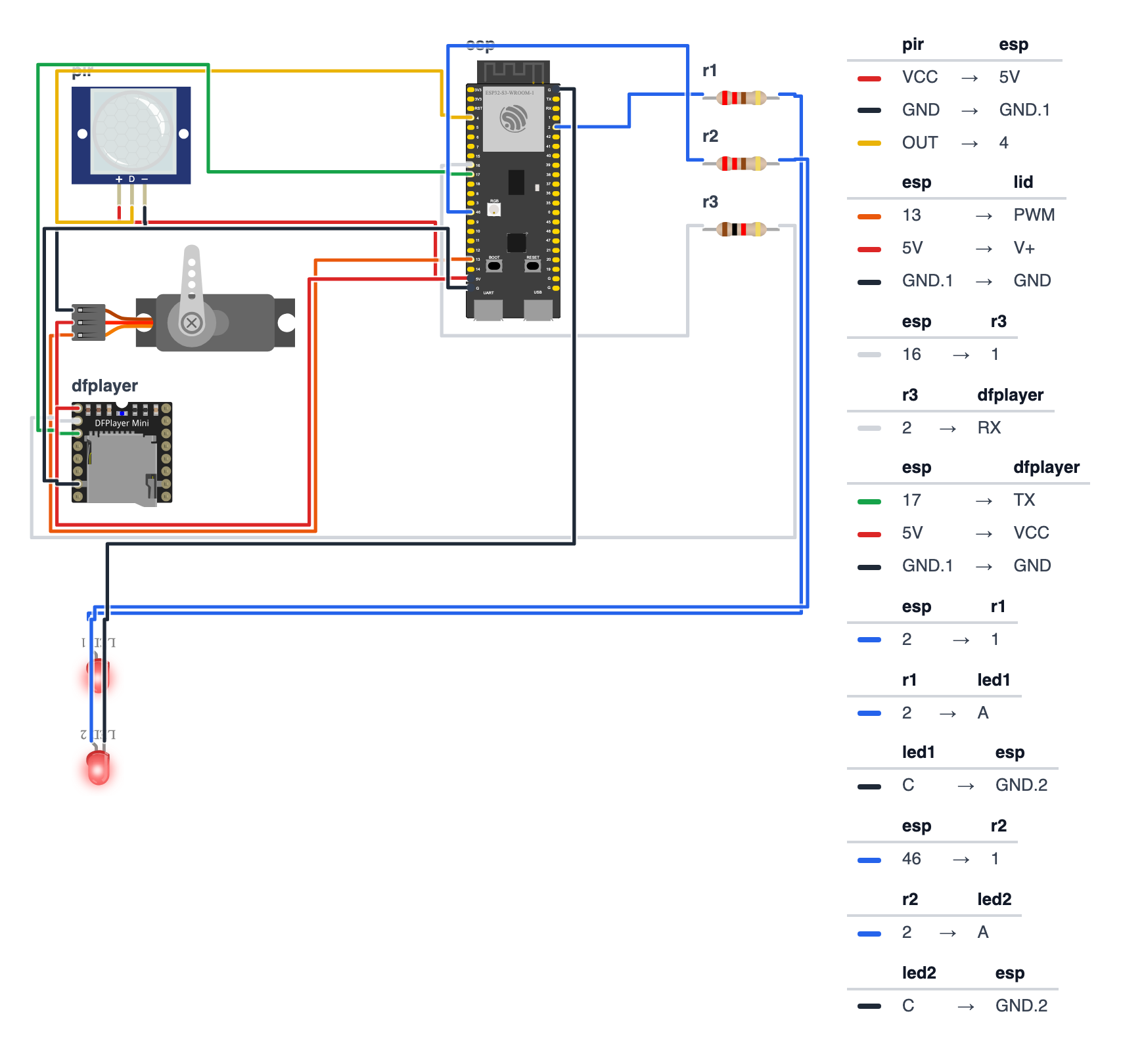
You’re connecting 5 components. Pick the pin column for your board — the code at the top says which board you have (BOARD_S3 or BOARD_C6).
PIR Sensor (3 wires):
| PIR pin | ESP32-S3 | ESP32-C6 | Wire color |
|---|---|---|---|
| OUT (signal) | GPIO 4 | GPIO 0 | yellow |
| VCC | 5V (VIN) | 5V | red |
| GND | GND | GND | black |
Why 5V for the PIR? The HC-SR501 has its own little voltage regulator that needs at least 4.5V. On 3.3V many modules never trigger — or trigger randomly. Its OUT pin still only sends 3.3V, so it’s safe for the ESP32.
Servo (3 wires):
| Servo wire | ESP32-S3 | ESP32-C6 | Wire color |
|---|---|---|---|
| Signal (orange servo wire) | GPIO 13 | GPIO 5 | orange |
| VCC (red servo wire) | 5V (VIN) | 5V | red |
| GND (brown servo wire) | GND | GND | black |
DFPlayer Mini (4 wires + speaker):
| DFPlayer pin | ESP32-S3 | ESP32-C6 | Notes |
|---|---|---|---|
| TX | GPIO 17 | GPIO 20 | direct wire — the ESP32 listens here |
| RX | GPIO 16 | GPIO 21 | through a 1kΩ resistor — the ESP32 talks here |
| VCC | 5V (VIN) | 5V | red |
| GND | GND | GND | black |
| SPK1 | Speaker + | ||
| SPK2 | Speaker − |
LEDs (eyes):
| LED | ESP32-S3 | ESP32-C6 |
|---|---|---|
| LED 1 anode (long leg) via 220Ω resistor | GPIO 2 | GPIO 11 |
| LED 2 anode (long leg) via 220Ω resistor | GPIO 46 | GPIO 10 |
| Both cathodes (short legs) | GND | GND |
Check: Count your connections. Three red wires go to 5V (PIR, servo, DFPlayer). Several blacks go to GND. Then yellow (PIR signal), orange (servo signal), two DFPlayer serial wires, and two LED wires. Board is NOT plugged into USB yet.
Common mistake: The 1kΩ resistor goes on the wire to the DFPlayer’s RX pin, not TX. TX → RX and RX → TX is like a phone call: one person’s mouth goes to the other person’s ear.
Step 2: Load the SD card
Time: ~10 minutes
- Format the SD card as FAT32 (on Windows: right-click → Format. On Mac: Disk Utility → Erase → MS-DOS FAT).
- Download 3–5 scream or monster sound MP3 files from
freesound.org. - Name them exactly:
0001.mp3,0002.mp3,0003.mp3, etc. — no spaces, no other characters. - Copy them to the root folder of the SD card. Not in any subfolder.
- Insert the SD card into the DFPlayer Mini’s slot.
Check: The SD card clicks into the DFPlayer slot and sits flush. Files are in root, named
0001.mp3etc.
Step 3: Upload the code
Time: ~10 minutes
Install these libraries via Arduino IDE Library Manager (Sketch → Include Library → Manage Libraries):
ESP32Servoby Kevin HarringtonDFRobotDFPlayerMiniby DFRobot
The Wi-Fi and web server parts (WiFi, WebServer, ESPmDNS) come built in with the ESP32 board package — nothing extra to install. Select your board under Tools → Board (ESP32S3 Dev Module or ESP32C6 Dev Module).
The big picture first. This program turns the ESP32 into a motion-triggered scare machine:
- The ESP32 is the brain — it waits patiently, then fires everything at once.
- The PIR sensor is the eye — it detects body heat moving through its field.
- The servo is the muscle — it snaps the lid open in under a second.
- The LEDs are the effect — they alternate red flashes to look like glowing eyes.
- The DFPlayer is the voice — it plays one random scream from the SD card.
- The web page is your remote control — watch the trap from the window and fire it yourself.
A program is like a recipe. The computer reads it top to bottom and does exactly what’s written, nothing more.
Before you upload:
- At the top, leave
#define BOARD_S3as it is for an ESP32-S3. For an ESP32-C6, put//in front of#define BOARD_S3and remove the//in front of#define BOARD_C6. - Want the page on your home Wi-Fi? Replace
YOUR_WIFI_NAMEandYOUR_PASSWORDwith your Wi-Fi name and password. If you skip this, the box makes its own Wi-Fi hotspot instead — that works too.
Paste this complete code and upload:
// ========== CHOOSE YOUR BOARD ==========
// Uncomment the line for YOUR board:
#define BOARD_S3    // ESP32-S3-DevKitC-1
//#define BOARD_C6  // ESP32-C6-DevKitC-1
// ========================================

#ifdef BOARD_S3
  #define PIN_PIR              4
  #define PIN_SERVO            13
  #define PIN_LED1             2
  #define PIN_LED2             46
  #define PIN_DFPLAYER_RX      17
  #define PIN_DFPLAYER_TX      16
#endif
#ifdef BOARD_C6
  #define PIN_PIR              0
  #define PIN_SERVO            5
  #define PIN_LED1             11
  #define PIN_LED2             10
  #define PIN_DFPLAYER_RX      20
  #define PIN_DFPLAYER_TX      21
#endif

#include <WiFi.h>
#include <WebServer.h>
#include <ESPmDNS.h>
#include <ESP32Servo.h>
#include <HardwareSerial.h>
#include <DFRobotDFPlayerMini.h>

// ---------- Settings ----------
#define SCARE_DURATION_MS   5000
#define LOCKOUT_MS          8000
#define WARMUP_MS           30000
#define LID_CLOSED_ANGLE    0
#define LID_OPEN_ANGLE      180
#define SOUND_DELAY_MS      150
#define START_VOLUME        25

// ---------- Wi-Fi ----------
const char* WIFI_NAME = "YOUR_WIFI_NAME";
const char* WIFI_PASSWORD = "YOUR_PASSWORD";
const char* HOTSPOT_NAME = "BuildCool-Scare";
const char* HOTSPOT_PASSWORD = "buildcool";
const char* WEB_NAME = "scare";

// ---------- Parts ----------
Servo lidServo;
HardwareSerial mySerial(1);
DFRobotDFPlayerMini myDFPlayer;
WebServer server(80);

// ---------- Memory ----------
bool scarePlaying = false;
bool soundStarted = false;
bool armed = true;
bool soundReady = false;
unsigned long scareStartTime = 0;
unsigned long lastScareEnd = 0;
int trackCount = 1;
int volume = START_VOLUME;
int scareCount = 0;
String lastTrigger = "none yet";
String webAddress = "";

// ---------- Web page ----------
const char PAGE[] PROGMEM = R"rawliteral(
<!doctype html><html lang="en"><head><meta charset="utf-8">
<meta name="viewport" content="width=device-width,initial-scale=1">
<title>Jump Scare Box · BuildCool</title>
<style>
:root{--o:#f97316;--o6:#ea580c;--o7:#c2410c;--o50:#fff7ed;--o200:#fed7aa;--g9:#111827;--g7:#374151;--g5:#6b7280;--g2:#e5e7eb;--g0:#f9fafb;--ok:#16a34a;--bad:#dc2626}
*{box-sizing:border-box}
body{margin:0;font-family:-apple-system,BlinkMacSystemFont,"Segoe UI",Roboto,"Helvetica Neue",Arial,sans-serif;color:var(--g9);background:var(--g0)}
header{position:sticky;top:0;z-index:9;background:rgba(255,255,255,.9);backdrop-filter:blur(8px);border-bottom:1px solid var(--g2)}
.wrap{max-width:640px;margin:0 auto;padding:12px 16px}
.bar{display:flex;align-items:center;justify-content:space-between}
.logo{font-size:20px;font-weight:800;letter-spacing:-.02em;color:var(--g9);text-decoration:none}
.logo span{color:var(--o)}
.badge{display:inline-flex;align-items:center;gap:8px;background:var(--o50);border:1px solid var(--o200);color:var(--o7);font-size:13px;font-weight:500;padding:4px 12px;border-radius:999px}
.dot{width:8px;height:8px;border-radius:50%;background:var(--o);animation:p 2s infinite}
.off .dot{background:var(--g5);animation:none}
@keyframes p{50%{opacity:.35}}
h1{font-size:30px;font-weight:800;letter-spacing:-.02em;line-height:1.1;margin:20px 0 6px}
h1 span{color:var(--o)}
.sub{color:var(--g5);margin:0 0 20px}
.grid{display:grid;grid-template-columns:repeat(auto-fit,minmax(140px,1fr));gap:12px}
.card{background:#fff;border:1px solid var(--g2);border-radius:16px;padding:16px}
.wide{grid-column:1/-1}
.label{font-size:13px;color:var(--g5);font-weight:500}
.value{font-size:32px;font-weight:800;letter-spacing:-.02em;margin-top:4px}
.unit{font-size:16px;color:var(--g5);font-weight:600}
.row{display:flex;gap:8px;flex-wrap:wrap;margin-top:10px}
.btn{display:inline-flex;justify-content:center;align-items:center;padding:12px 20px;background:var(--o);color:#fff;font-weight:600;border:0;border-radius:12px;font-size:15px;text-decoration:none;cursor:pointer;box-shadow:0 10px 15px -3px var(--o200)}
.btn:active{transform:scale(.95)}
.btn.ghost{background:#fff;color:var(--g7);border:1px solid var(--g2);box-shadow:none}
.btn.big{width:100%;padding:18px;font-size:18px}
input[type=range]{width:100%;accent-color:var(--o);margin-top:12px}
.state{display:inline-block;font-size:13px;font-weight:600;padding:2px 10px;border-radius:999px;background:var(--g0);border:1px solid var(--g2)}
.state.ok{color:var(--ok);border-color:#bbf7d0;background:#f0fdf4}
.state.bad{color:var(--bad);border-color:#fecaca;background:#fef2f2}
footer{color:var(--g5);font-size:13px;text-align:center;padding:28px 16px}
footer a{color:var(--o);font-weight:600;text-decoration:none}
</style></head><body>
<header><div class="wrap bar"><a class="logo" href="https://buildcool.fun">Build<span>Cool</span></a>
<span class="badge" id="live"><span class="dot"></span><span id="livetxt">Live</span></span></div></header>
<main class="wrap">
<h1>Scare <span>Box</span></h1>
<p class="sub">Watch from the window · trigger it yourself</p>
<div class="grid">
<div class="card"><div class="label">Trap</div><div class="value" style="font-size:22px"><span class="state" id="st">–</span></div></div>
<div class="card"><div class="label">Victims tonight</div><div class="value" id="n">0</div></div>
<div class="card wide"><div class="label">Last scare</div><div class="value" style="font-size:20px" id="last">–</div></div>
<div class="card wide"><div class="label">Remote control</div>
<div class="row"><button class="btn big" onclick="act('scare','1')">SCARE NOW!</button></div>
<div class="row"><button class="btn ghost" id="arm" onclick="act('armed',armed?'0':'1')">–</button></div></div>
<div class="card wide"><div class="label">Scream volume · <span id="vt">–</span> / 30</div>
<input type="range" min="0" max="30" id="vol" onchange="act('volume',this.value)"></div>
</div></main>
<footer>Made with <a href="https://buildcool.fun">buildcool.fun</a></footer>
<script>
const $=id=>document.getElementById(id);
let armed=true,touched=false;
$("vol").oninput=()=>{touched=true;$("vt").textContent=$("vol").value};
function live(ok){$("live").classList.toggle("off",!ok);$("livetxt").textContent=ok?"Live":"Offline"}
async function act(k,v){touched=false;try{await fetch("/api/set?"+k+"="+encodeURIComponent(v),{method:"POST"});tick()}catch(e){live(false)}}
async function tick(){
 try{const d=await (await fetch("/api")).json();
  armed=d.armed;
  const st=$("st");st.textContent=d.status;st.className="state "+(d.status=="Armed"?"ok":d.status=="Off"?"bad":"");
  $("arm").textContent=armed?"Disarm motion sensor":"Arm motion sensor";
  $("n").textContent=d.count;$("last").textContent=d.last;
  if(!touched){$("vol").value=d.volume;$("vt").textContent=d.volume}
  live(true)}catch(e){live(false)}
}
tick();setInterval(tick,2000);
</script></body></html>
)rawliteral";

// ---------- Helpers ----------
void blinkError(int times) {
  for (int i = 0; i < times; i++) {
    digitalWrite(PIN_LED1, HIGH);
    digitalWrite(PIN_LED2, HIGH);
    delay(150);
    digitalWrite(PIN_LED1, LOW);
    digitalWrite(PIN_LED2, LOW);
    delay(150);
  }
  delay(700);
}

String statusText() {
  if (scarePlaying) return "SCARING!";
  if (!armed) return "Off";
  if (millis() < WARMUP_MS) return "Warming up";
  if (scareCount > 0 && millis() - lastScareEnd < LOCKOUT_MS) return "Resting";
  return "Armed";
}

// ---------- Sound ----------
void startSound() {
  for (int tries = 0; tries < 5 && !soundReady; tries++) {
    Serial.println("# Initializing DFPlayer...");
    if (myDFPlayer.begin(mySerial)) {
      soundReady = true;
    } else {
      Serial.println("# DFPlayer not found! Check the TX/RX wires (1k resistor on DFPlayer RX) and the SD card.");
      blinkError(4);
    }
  }
  if (!soundReady) {
    Serial.println("# Running WITHOUT sound. Fix the DFPlayer and press reset.");
    return;
  }
  myDFPlayer.volume(volume);
  int files = myDFPlayer.readFileCounts();
  if (files > 0) {
    trackCount = files;
    Serial.print("# Found ");
    Serial.print(trackCount);
    Serial.println(" sound files on the SD card");
  } else {
    Serial.println("# Could not count MP3 files - will play 0001.mp3 only");
  }
}

void playRandomScream() {
  if (!soundReady) return;
  int track = random(1, trackCount + 1);
  myDFPlayer.play(track);
  Serial.print("# Playing ");
  Serial.print(track);
  Serial.println(".mp3");
}

// ---------- Scare ----------
void startScare(String reason) {
  Serial.print("# TRIGGERED by ");
  Serial.print(reason);
  Serial.println("! Opening lid...");
  scarePlaying = true;
  soundStarted = false;
  scareStartTime = millis();
  scareCount++;
  lastTrigger = reason + " (" + String(millis() / 60000) + " min after start)";
  lidServo.write(LID_OPEN_ANGLE);
}

void endScare() {
  Serial.println("# Scare ended. Resetting trap...");
  scarePlaying = false;
  lastScareEnd = millis();
  lidServo.write(LID_CLOSED_ANGLE);
  digitalWrite(PIN_LED1, LOW);
  digitalWrite(PIN_LED2, LOW);
  if (soundReady) myDFPlayer.stop();
}

void updateScare(unsigned long now) {
  if (!soundStarted && now - scareStartTime >= SOUND_DELAY_MS) {
    soundStarted = true;
    playRandomScream();
  }
  bool ledState = ((now / 150) % 2 == 0);
  digitalWrite(PIN_LED1, ledState);
  digitalWrite(PIN_LED2, !ledState);
  if (now - scareStartTime >= SCARE_DURATION_MS) {
    endScare();
  }
}

// ---------- Wi-Fi and web server ----------
void startWiFi() {
  if (String(WIFI_NAME) != "YOUR_WIFI_NAME") {
    WiFi.mode(WIFI_STA);
    WiFi.begin(WIFI_NAME, WIFI_PASSWORD);
    Serial.print("# Joining Wi-Fi");
    unsigned long start = millis();
    while (WiFi.status() != WL_CONNECTED && millis() - start < 15000) {
      delay(250);
      Serial.print(".");
    }
    Serial.println();
    if (WiFi.status() == WL_CONNECTED) {
      webAddress = WiFi.localIP().toString();
      if (MDNS.begin(WEB_NAME)) {
        Serial.print("# Also try: http://");
        Serial.print(WEB_NAME);
        Serial.println(".local");
      }
      Serial.print("# Open in your browser: http://");
      Serial.println(webAddress);
      return;
    }
    Serial.println("# Could not join Wi-Fi, starting own hotspot instead");
  }
  WiFi.mode(WIFI_AP);
  WiFi.softAP(HOTSPOT_NAME, HOTSPOT_PASSWORD);
  webAddress = WiFi.softAPIP().toString();
  Serial.print("# Connect your phone to Wi-Fi \"");
  Serial.print(HOTSPOT_NAME);
  Serial.print("\" (password: ");
  Serial.print(HOTSPOT_PASSWORD);
  Serial.print("), then open http://");
  Serial.println(webAddress);
}

void handlePage() {
  server.send(200, "text/html", PAGE);
}

void handleApi() {
  String json = "{";
  json += "\"status\":\"" + statusText() + "\"";
  json += ",\"armed\":" + String(armed ? "true" : "false");
  json += ",\"count\":" + String(scareCount);
  json += ",\"volume\":" + String(volume);
  json += ",\"sound\":" + String(soundReady ? "true" : "false");
  json += ",\"last\":\"" + lastTrigger + "\"";
  json += "}";
  server.send(200, "application/json", json);
}

void handleSet() {
  if (server.hasArg("armed")) {
    armed = server.arg("armed") == "1";
    Serial.println(armed ? "# Armed from phone" : "# Disarmed from phone");
  }
  if (server.hasArg("volume")) {
    volume = constrain(server.arg("volume").toInt(), 0, 30);
    if (soundReady) myDFPlayer.volume(volume);
  }
  if (server.hasArg("scare") && !scarePlaying) {
    startScare("phone");
  }
  server.send(200, "application/json", "{\"ok\":true}");
}

void startWebServer() {
  server.on("/", handlePage);
  server.on("/api", handleApi);
  server.on("/api/set", HTTP_POST, handleSet);
  server.begin();
}

// ---------- Setup ----------
void setup() {
  Serial.begin(115200);
  randomSeed(esp_random());

  pinMode(PIN_PIR, INPUT_PULLDOWN);
  pinMode(PIN_LED1, OUTPUT);
  pinMode(PIN_LED2, OUTPUT);
  digitalWrite(PIN_LED1, LOW);
  digitalWrite(PIN_LED2, LOW);

  lidServo.attach(PIN_SERVO, 500, 2400);
  lidServo.write(LID_CLOSED_ANGLE);
  delay(500);

  mySerial.begin(9600, SERIAL_8N1, PIN_DFPLAYER_RX, PIN_DFPLAYER_TX);
  delay(1000);
  startSound();

  startWiFi();
  startWebServer();

  Serial.println("# Jump Scare Box ARMED. PIR needs 30 seconds to warm up.");
}

// ---------- Loop ----------
void loop() {
  server.handleClient();
  unsigned long now = millis();

  if (scarePlaying) {
    updateScare(now);
    return;
  }

  if (!armed || now < WARMUP_MS) return;
  if (scareCount > 0 && now - lastScareEnd < LOCKOUT_MS) return;

  if (digitalRead(PIN_PIR) == HIGH) {
    startScare("motion");
  }
}
Line-by-line: what every line does and why
The board chooser and pin names
#define BOARD_S3    // ESP32-S3-DevKitC-1
//#define BOARD_C6  // ESP32-C6-DevKitC-1

#ifdef BOARD_S3
  #define PIN_PIR              4
  #define PIN_SERVO            13
  ...
The two boards have their metal legs (pins) in different places, so the code carries two lists of pin numbers. #define BOARD_S3 switches on the S3 list. #ifdef BOARD_S3 means “only read the next lines if BOARD_S3 is switched on.” Lines that start with // are switched off — the computer skips them.
#define PIN_PIR 4 gives a pin number a nickname. Later the code says PIN_PIR instead of 4, so if you ever move a wire, you only change one line.
PIN_DFPLAYER_RX is the pin where the ESP32 receives (listens) — that’s why the DFPlayer’s TX (its mouth) is wired to it.
Borrowing instruction books
#include <WiFi.h>
#include <WebServer.h>
#include <ESPmDNS.h>
#include <ESP32Servo.h>
#include <HardwareSerial.h>
#include <DFRobotDFPlayerMini.h>
#include means “grab this instruction book.” Someone already figured out how to join Wi-Fi, how to run a tiny website, how to give the ESP32 a name like scare.local, how to control a servo, how to use a serial channel, and how to talk to the DFPlayer Mini. We borrow their work so we don’t have to figure it out ourselves.
Settings you can change
#define SCARE_DURATION_MS   5000
#define LOCKOUT_MS          8000
#define WARMUP_MS           30000
#define LID_CLOSED_ANGLE    0
#define LID_OPEN_ANGLE      180
#define SOUND_DELAY_MS      150
#define START_VOLUME        25
All the numbers you might want to tweak live in one place:
SCARE_DURATION_MS 5000— the scare lasts 5,000 milliseconds (5 seconds).LOCKOUT_MS 8000— after the lid closes, the trap rests for 8 seconds before it can fire again. Enough time for people to recover and a new victim to approach.WARMUP_MS 30000— the PIR sensor needs 30 seconds after power-on to learn what the room “normally” looks like. During that time we ignore it, otherwise it fires at nobody.LID_CLOSED_ANGLE/LID_OPEN_ANGLE— where the servo arm goes. If your lid opens too far or not far enough, change these.SOUND_DELAY_MS 150— the scream starts 150 ms after the lid snaps. Why wait? The servo grabs a big gulp of electricity when it jumps. If the speaker grabs one at the very same moment, the ESP32 can run short of power and restart. A tiny pause — nobody notices it — keeps everyone happy.START_VOLUME 25— the DFPlayer volume goes from 0 to 30. 25 is loud but won’t distort.
Wi-Fi names
const char* WIFI_NAME = "YOUR_WIFI_NAME";
const char* WIFI_PASSWORD = "YOUR_PASSWORD";
const char* HOTSPOT_NAME = "BuildCool-Scare";
const char* HOTSPOT_PASSWORD = "buildcool";
const char* WEB_NAME = "scare";
const char* is a piece of text that never changes. The first two are your home Wi-Fi. The next two are the box’s own Wi-Fi, which it makes if it can’t join yours. WEB_NAME gives the box the address http://scare.local on your home Wi-Fi.
Creating the parts and the memory boxes
Servo lidServo;
HardwareSerial mySerial(1);
DFRobotDFPlayerMini myDFPlayer;
WebServer server(80);
Servo is a type — like saying “dog.” lidServo is the name of our specific servo, the lid one. mySerial(1) is a communication channel inside the ESP32 — the (1) picks channel number 1, which exists on both the S3 and the C6. myDFPlayer is the audio player module. server(80) is the tiny website; 80 is the “door number” every web browser knocks on.
bool scarePlaying = false;
bool soundStarted = false;
bool armed = true;
bool soundReady = false;
unsigned long scareStartTime = 0;
unsigned long lastScareEnd = 0;
int trackCount = 1;
int volume = START_VOLUME;
int scareCount = 0;
String lastTrigger = "none yet";
bool is a box that holds only true or false — like a light switch:
scarePlaying— is a scare happening right now?soundStarted— did this scare’s scream start yet?armed— is the motion sensor allowed to fire the trap? (You can switch it off from your phone.)soundReady— did the DFPlayer answer at startup?
unsigned long boxes hold big numbers — here, moments in time measured in milliseconds. int boxes hold whole numbers: how many MP3 files are on the card, the volume, and how many people we scared. String holds text: what fired the last scare.
The web page
const char PAGE[] PROGMEM = R"rawliteral(
<!doctype html><html lang="en"><head>...
)rawliteral";
This long block is a whole web page, stored inside the ESP32. PROGMEM keeps it in the big flash memory instead of the small working memory. R"rawliteral( … )rawliteral" means “everything between these markers is just text — don’t try to understand it.” The page has its own little program (JavaScript) that asks the box “what’s going on?” every 2 seconds and updates the cards. If the box doesn’t answer, the badge at the top switches from Live to Offline.
blinkError(): a secret code with the eyes
void blinkError(int times) {
  for (int i = 0; i < times; i++) {
    digitalWrite(PIN_LED1, HIGH);
    digitalWrite(PIN_LED2, HIGH);
    delay(150);
    digitalWrite(PIN_LED1, LOW);
    digitalWrite(PIN_LED2, LOW);
    delay(150);
  }
  delay(700);
}
The box has no screen, so when something is wrong it tells you with the eye LEDs. for (int i = 0; i < times; i++) means “repeat this times times.” Each repeat: both eyes on, wait, both eyes off, wait. Then a longer pause, so you can count the group. 4 blinks means “the DFPlayer isn’t answering.”
statusText(): what is the trap doing?
if (scarePlaying) return "SCARING!";
if (!armed) return "Off";
if (millis() < WARMUP_MS) return "Warming up";
if (scareCount > 0 && millis() - lastScareEnd < LOCKOUT_MS) return "Resting";
return "Armed";
This turns all the memory boxes into one word for the phone page. The checks go top to bottom and the first one that’s true wins — just like asking “Are you busy? Asleep? Still waking up? Taking a break? No? Then you’re ready!”
startSound(): waking up the DFPlayer — with a plan B
for (int tries = 0; tries < 5 && !soundReady; tries++) {
  if (myDFPlayer.begin(mySerial)) {
    soundReady = true;
  } else {
    Serial.println("# DFPlayer not found! ...");
    blinkError(4);
  }
}
We knock on the DFPlayer’s door up to 5 times. && means AND: keep trying while we’ve tried fewer than 5 times AND it still hasn’t answered. Each failed knock prints a hint and blinks 4 times.
if (!soundReady) {
  Serial.println("# Running WITHOUT sound. Fix the DFPlayer and press reset.");
  return;
}
If it never answers, we don’t give up on the whole box. A flying lid and flashing eyes are still scary! So the box runs without sound and tells you on the Serial Monitor. (The old way — while (true); — froze everything forever.)
myDFPlayer.volume(volume);
int files = myDFPlayer.readFileCounts();
if (files > 0) {
  trackCount = files;
Set the volume and ask the DFPlayer: “How many MP3 files are on the card?” If it gives a real answer, we remember it. Some cheap DFPlayer copies don’t know how to answer — then we play 0001.mp3 every time.
playRandomScream(): one scream, please
int track = random(1, trackCount + 1);
myDFPlayer.play(track);
random(1, trackCount + 1) picks a whole number from 1 up to the number of files (the second number is “stop before this one,” so we add 1). With 4 files you get 1, 2, 3 or 4. play(track) plays exactly that one file. In setup(), randomSeed(esp_random()) shakes the dice first, using a real random-number generator inside the ESP32 — otherwise the “random” order would be the same every time you power on.
startScare(), updateScare() and endScare(): the scare in three acts
void startScare(String reason) {
  scarePlaying = true;
  soundStarted = false;
  scareStartTime = millis();
  scareCount++;
  lastTrigger = reason + " (" + String(millis() / 60000) + " min after start)";
  lidServo.write(LID_OPEN_ANGLE);
}
Act 1. reason tells us who fired it: "motion" or "phone". Mark the scare as active, write down the start time, add 1 to the victim counter (++ means “plus one”), remember what fired it and when (millis() / 60000 turns milliseconds into minutes), and snap the lid open.
void updateScare(unsigned long now) {
  if (!soundStarted && now - scareStartTime >= SOUND_DELAY_MS) {
    soundStarted = true;
    playRandomScream();
  }
  bool ledState = ((now / 150) % 2 == 0);
  digitalWrite(PIN_LED1, ledState);
  digitalWrite(PIN_LED2, !ledState);
  if (now - scareStartTime >= SCARE_DURATION_MS) {
    endScare();
  }
}
Act 2 runs over and over while the scare is on. First: if the scream hasn’t started yet and 150 ms have passed — start it (only once, thanks to soundStarted).
Then the eyes. (now / 150) divides the current time into 150-millisecond chunks. % 2 gives the remainder after dividing by 2 — it alternates like a clock: 0, 1, 0, 1… == 0 turns that into true or false. The result: every 150 ms, ledState flips, and the LEDs alternate without using delay(). The ! in !ledState means NOT — LED 2 is always the opposite of LED 1.
When 5 seconds have passed, go to Act 3.
void endScare() {
  scarePlaying = false;
  lastScareEnd = millis();
  lidServo.write(LID_CLOSED_ANGLE);
  digitalWrite(PIN_LED1, LOW);
  digitalWrite(PIN_LED2, LOW);
  if (soundReady) myDFPlayer.stop();
}
Act 3. The scare is over. Write down when it ended — the 8-second rest starts now, not when the scare began. Close the lid, eyes off, and stop the scream.
startWiFi(): home Wi-Fi or own hotspot
if (String(WIFI_NAME) != "YOUR_WIFI_NAME") {
  WiFi.mode(WIFI_STA);
  WiFi.begin(WIFI_NAME, WIFI_PASSWORD);
  ...
  while (WiFi.status() != WL_CONNECTED && millis() - start < 15000) { delay(250); ... }
If you typed in your Wi-Fi name, the ESP32 tries to join it — for at most 15 seconds, printing a dot every quarter second so you can see it working. If it works, it prints the address (like http://192.168.1.57) and starts the scare.local name.
WiFi.mode(WIFI_AP);
WiFi.softAP(HOTSPOT_NAME, HOTSPOT_PASSWORD);
If you didn’t change the Wi-Fi name, or joining failed (wrong password, too far from the router), the ESP32 creates its own Wi-Fi network called BuildCool-Scare with password buildcool. This is called a hotspot fallback — plan B, so the phone page always works, even at the end of the driveway, far away from your router. In hotspot mode, the page is always at http://192.168.4.1.
The web server: three addresses
server.on("/", handlePage);
server.on("/api", handleApi);
server.on("/api/set", HTTP_POST, handleSet);
Like a receptionist with three desks:
/hands out the web page itself./apianswers “what’s going on?” with a short text called JSON. It looks like this:
{"status":"Armed","armed":true,"count":7,"volume":25,"sound":true,"last":"motion (42 min after start)"}/api/settakes orders from the buttons:scare=1(SCARE NOW!),armed=0orarmed=1, andvolume=0tovolume=30.
if (server.hasArg("volume")) {
  volume = constrain(server.arg("volume").toInt(), 0, 30);
  ...
}
if (server.hasArg("scare") && !scarePlaying) {
  startScare("phone");
}
Never trust what comes from outside! constrain(..., 0, 30) squeezes any volume into 0–30, even if someone sends volume=9999. And SCARE NOW! only works when no scare is already running.
setup(): runs once when you power on
Serial.begin(115200);
randomSeed(esp_random());
pinMode(PIN_PIR, INPUT_PULLDOWN);
pinMode(PIN_LED1, OUTPUT);
pinMode(PIN_LED2, OUTPUT);
Start the Serial Monitor channel and shake the random dice. pinMode tells each pin its role. OUTPUT means “send voltage out.” INPUT_PULLDOWN means “read what’s coming in — and if the wire falls out, gently pull the pin to LOW.” That way a loose PIR wire reads “nobody there” instead of floating around randomly and opening the lid for ghosts.
lidServo.attach(PIN_SERVO, 500, 2400);
lidServo.write(LID_CLOSED_ANGLE);
delay(500);
attach(PIN_SERVO, 500, 2400) connects the servo and tells the library that a 500-microsecond pulse means 0° and a 2400-microsecond pulse means 180° — the range an SG90 really uses, so it turns all the way. Then close the lid and wait half a second for the motor to get there.
mySerial.begin(9600, SERIAL_8N1, PIN_DFPLAYER_RX, PIN_DFPLAYER_TX);
delay(1000);
startSound();
startWiFi();
startWebServer();
Open the communication channel to the DFPlayer at 9,600 bits per second. Wait 1 second for it to boot and read the SD card. Then wake up the sound, the Wi-Fi and the website.
loop(): repeats forever
server.handleClient();
unsigned long now = millis();

if (scarePlaying) {
  updateScare(now);
  return;
}
First, answer the phone if it’s asking something. Then look at the stopwatch: millis() counts milliseconds since power-on. If a scare is on, run Act 2 and return — skip the rest of loop() for now.
if (!armed || now < WARMUP_MS) return;
if (scareCount > 0 && now - lastScareEnd < LOCKOUT_MS) return;
Three reasons not to watch the PIR yet. || means OR: the trap is switched off OR the PIR is still warming up. The second line is the rest time: if there was a scare and it ended less than 8 seconds ago, wait.
if (digitalRead(PIN_PIR) == HIGH) {
  startScare("motion");
}
digitalRead reads the voltage on the PIR pin. The PIR sends HIGH (3.3V) when it detects movement. If yes — Act 1!
There is no long delay() anywhere in loop() — nothing ever waits. That’s why the phone page stays fast even while the lid is flying. This is called non-blocking code.
The whole thing in one sentence
When powered on, the box closes the lid, wakes up the audio player, Wi-Fi and phone page (setup); then forever (loop) it answers the phone, runs the scare if one is happening, and otherwise — once the PIR has warmed up and the trap has rested — watches for body heat and fires everything at once.
First thing to try: open Serial Monitor at 115200. Wait 30 seconds, then walk in front of the PIR sensor. You should see # TRIGGERED by motion! Opening lid... almost instantly.
Check: Open Serial Monitor at 115200 baud. You should see
# Found 3 sound files on the SD card(or however many you copied), the web address, and# Jump Scare Box ARMED.If you see# DFPlayer not found!and the eyes blink 4 times — check that your SD card has files named0001.mp3in the root folder, and that the 1kΩ resistor is on the DFPlayer’s RX wire.
Step 4: Arm the trap!
Time: ~2 minutes
After uploading, plug the ESP32 into a 5V 2A USB wall adapter (a phone charger works great). Wait about 30 seconds — the PIR sensor needs that time to calibrate to the room temperature. The code ignores the PIR during this time, and the phone page shows Warming up. Keep out of its view.
Now walk in front of the PIR sensor from about 2–3 meters away. The lid should fly open in under a second.
Try these setups:
- Place it at the end of your driveway pointing at the path trick-or-treaters walk up
- Put it on a porch railing at chest height, pointed at the door approach
- Hide it behind a fake gravestone so only the PIR eye peeks out
Adjusting the scare duration: Change SCARE_DURATION_MS 5000 to 3000 for a faster reset (better for busy Halloween nights). Change LOCKOUT_MS 8000 to 3000 if you want it to fire again faster.
Step 5: Control it from your phone
If you did NOT change the Wi-Fi name in the code:
- On your phone, open Wi-Fi settings and join BuildCool-Scare (password: buildcool).
- Open the browser and go to http://192.168.4.1
If you entered your home Wi-Fi:
- Keep your phone on the same home Wi-Fi.
- Open http://scare.local — or the number address the Serial Monitor printed (like
http://192.168.1.57).
On the page you see:
- Trap — Warming up, Armed, SCARING!, Resting or Off.
- Victims tonight — your score since power-on.
- Last scare — what fired it (motion or phone) and how many minutes after power-on.
- SCARE NOW! — fire the box by hand, at the perfect moment. Watch from the window and wait for someone to lean in close…
- Disarm / Arm motion sensor — disarmed, the box ignores motion, but SCARE NOW! still works. Perfect when you only want to scare some people.
- Scream volume — slide from 0 to 30.
For parents: Anyone who is on the same Wi-Fi can open the page and press SCARE NOW!. If you use the hotspot at a party, change
HOTSPOT_PASSWORDin the code to your own password (at least 8 characters).
Safety for parents: The lid snaps open hard — keep small children’s fingers out of the box while it’s powered. Don’t aim the box at stairs or steps (a startled person can trip), and skip scaring people with heart conditions or very small kids. Outdoors, keep the electronics dry (under a porch roof or in a sealed box).
What just happened (what you learned)
You might not realize it, but you built some real engineering concepts:
-
Non-blocking timing with millis() — instead of
delay(150)which freezes the entire program, you usemillis()to check elapsed time. The program keeps running and reacting while time passes. This is how every professional embedded system handles timing. -
State machines —
scarePlaying,armedand the warm-up and rest timers decide what the box is allowed to do right now. Your code asks “what state am I in?” at the top of every loop. Almost every real embedded system — traffic lights, elevators, vending machines — works this way. -
UART serial communication — the DFPlayer Mini uses a serial protocol over two wires (TX and RX). The ESP32 sends a tiny binary command and the DFPlayer obeys. Your computer uses this same kind of communication to talk to printers and GPS modules.
-
Graceful failure — if the DFPlayer is missing, the box blinks a code, says what’s wrong and keeps scaring without sound instead of freezing. Real products do this too: your car still drives when the radio breaks.
-
A web server with a hotspot fallback — the ESP32 joins your Wi-Fi if it can, and makes its own if it can’t. Your phone talks to it with a tiny JSON “API,” just like real apps talk to real servers.
-
Modulo arithmetic for animation —
(now / 150) % 2divides time into 150ms chunks, then checks if you’re in an even or odd chunk. A fast way to toggle something back and forth without storing extra variables.
Level Up
Add a second detection zone: Wire a second PIR to a free pin (for example GPIO 5 on the S3, GPIO 1 on the C6) pointing at a different angle. If both PIRs fire within 2 seconds of each other, play a different (scarier) track. People approaching from an angle they don’t expect hit the second zone.
Escalating screams: In playRandomScream(), replace random(1, trackCount + 1) with scareCount (the victim counter). The first person hears 0001.mp3, the second 0002.mp3. Put your loudest, most terrifying track last.
The “lid slam” effect: Instead of just opening the lid to LID_OPEN_ANGLE and holding it, make updateScare() move it to 130° between 80 and 120 ms after the start, then back to 180°. This creates a mechanical shudder that feels more alive — and because it uses millis(), the phone page keeps working.
★★ You completed: Motion-Activated Jump Scare Box!
Troubleshooting
Eye blink codes: if something is wrong at startup, both eye LEDs blink together in groups. Count the blinks:
| Blinks | Meaning | Fix |
|---|---|---|
| 4 | DFPlayer not answering | SD card FAT32, files 0001.mp3 in the root folder, DFPlayer TX → GPIO 17 (C6: 20), DFPlayer RX → GPIO 16 (C6: 21) through the 1kΩ resistor, DFPlayer VCC on 5V. After 5 tries the box runs without sound. |
| Problem | Fix |
|---|---|
| DFPlayer not found in Serial Monitor | Check: SD card is FAT32 formatted. Files are named 0001.mp3 (no spaces, no subfolders). 1kΩ resistor is on DFPlayer RX (not TX). TX and RX are crossed: DFPlayer TX goes to the ESP32’s receive pin (S3: 17, C6: 20). Press reset after fixing. |
Only 0001.mp3 ever plays |
Your DFPlayer can’t count the files (Serial Monitor says so). Common on cheap copies. Use the “Escalating screams” Level Up, or just put your best scream in 0001.mp3. |
| Nothing happens for the first 30 seconds | That’s the PIR warm-up. The phone page says Warming up. Wait. |
| PIR doesn’t trigger | Make sure PIR VCC is on 5V (not 3.3V). Check the page isn’t showing Off (disarmed). Try adjusting the sensitivity pot on the back of the PIR module. |
| Scare fires again and again on its own | The PIR may see a heater, a lamp or a sunny window, or its sensitivity knob is turned up too high. Turn the “time” knob on the PIR all the way down, too. |
| Lid doesn’t open fully | Change LID_OPEN_ANGLE to a different angle. Some servo/hinge combinations need 120° or 150°. Find the angle that fully opens your specific lid. |
| LEDs don’t flash | Check the 220Ω resistors are in series. Check you’re connected to anodes (long legs). Check GPIO 2 and 46 (C6: GPIO 11 and 10). |
| Board restarts when the lid opens | Not enough power. Use a 5V 2A phone charger instead of a laptop USB port. |
| Speaker is too quiet | Slide the volume on the phone page to 30, or change START_VOLUME to 30. Upgrade to a 3W speaker. |
| Phone can’t find the page | Hotspot mode: join BuildCool-Scare (password buildcool) and open http://192.168.4.1. Some phones switch back to mobile data on a Wi-Fi without internet — tap “Stay connected.” Home Wi-Fi mode: use the number address from the Serial Monitor if scare.local doesn’t work. |
| Serial Monitor says “Could not join Wi-Fi” | Check the Wi-Fi name and password (they’re case-sensitive). The ESP32 only works with 2.4 GHz Wi-Fi, not 5 GHz. The box still works with its own hotspot. |