Parent info
Parts you need
Affiliate links — we may earn a small commission
Try this circuit in your browser!
Run the code, press the buttons and watch what happens — before you buy any parts. No account needed.
Open in Simulator →A motionless hand. Until you reach for the candy.
Imagine this: you’ve got a candy bowl on the porch with a skeleton hand resting in it, completely still. A kid reaches in. The wrist lunges. The fingers clench. “Take only one!” booms from a speaker.
The kid drops the candy. Runs. Comes back for more.
That’s what we’re building. In 2 hours. For about $37.
What you’ll need
| Part | What it does | Price |
|---|---|---|
| ESP32-S3 Dev Board (ESP32-S3-DevKitC-1, or an ESP32-C6-DevKitC-1) | The brain — reads distance, fires servos, triggers audio, hosts the phone page | ~$12 |
| HC-SR04 Ultrasonic Sensor | Measures distance — fires when a hand comes within 15cm | ~$4 |
| SG90 Micro Servo × 2 | One for wrist, one for fingers — together they grab | ~$6 |
| DFPlayer Mini MP3 Module | Plays “Take only one!” and other voice lines | ~$5 |
| Small Speaker (8Ω) | Makes the voice actually audible | ~$3 |
| Resistors: 1kΩ × 2, 2kΩ × 1 | One 1kΩ protects the DFPlayer; 1kΩ + 2kΩ turn the sensor’s 5V echo into a safe 3.3V | ~$2 |
| Breadboard + jumper wires | Connects everything without soldering | ~$5 |
| 5V 2A USB phone charger | Powers the prop — two servos + speaker are too much for many laptop USB ports | — |
Total: ~$37 | Time: ~2 hours | Difficulty: ●●○○○
You also need: A 3D-printed articulated skeleton hand (search Thingiverse: “articulated skeleton hand” — print-in-place designs need no assembly). Print in white PLA at 0.2mm layer height. Scale to 130% for a menacing adult-sized hand.
Sound files: 3 voice lines on a FAT32 SD card:
0001.mp3= “Take only one!”,0002.mp3= “I’m watching you…”,0003.mp3= bone-cracking sound. Download fromfreesound.orgor record yourself.
How it works (60 seconds)
The HC-SR04 works like sonar. It sends a 40kHz sound pulse you can’t hear, then measures how long it takes to bounce back. Distance = time × speed of sound, divided by 2 (because the sound travels there and back). At 15cm, the round trip takes about 0.87 milliseconds.
The ESP32 measures 10 times per second. When two readings in a row are closer than 15cm — someone reaching into the candy bowl, not just a stray echo from a candy wrapper — the ESP32 fires both servos in sequence: wrist lunges first (0° to 45°), then 80ms later the fingers snap shut (0° to 130°). The DFPlayer plays a random voice line at the same moment. After 2 seconds, everything resets, the hand rests for 3 seconds, and the trap waits again.
Bonus: the ESP32 also makes a little web page. On your phone you see the live distance, count the grabs, and can press Grab now! yourself.
Step 0: Print and assemble the skeleton hand
Time: ~4 hours print time (print overnight)
Search Thingiverse for “articulated skeleton hand” — look for print-in-place designs. These print as a single piece with flexible joints already built in.
Print in white PLA at 0.2mm. Scale to 130% for the best effect.
Building the forearm housing:
- Print a forearm tube (search “servo forearm mount”) that hides both servos inside
- Servo 1 (wrist) mounts inside the forearm with its horn connecting to the wrist joint of the hand
- Servo 2 (fingers) connects to the finger assembly via a thin pushrod — a straightened paper clip works perfectly
Positioning the sensor:
- Mount the HC-SR04 on the candy bowl’s rim, pointing straight up
- Hide it among the candy — the two “eyes” of the sensor just need a clear view upward
- Someone reaching into the bowl passes through the sonar beam
Check: Move both servo arms by hand through their full range. No binding. The finger assembly should curl from fully open (0°) to a convincing grab at 130°.
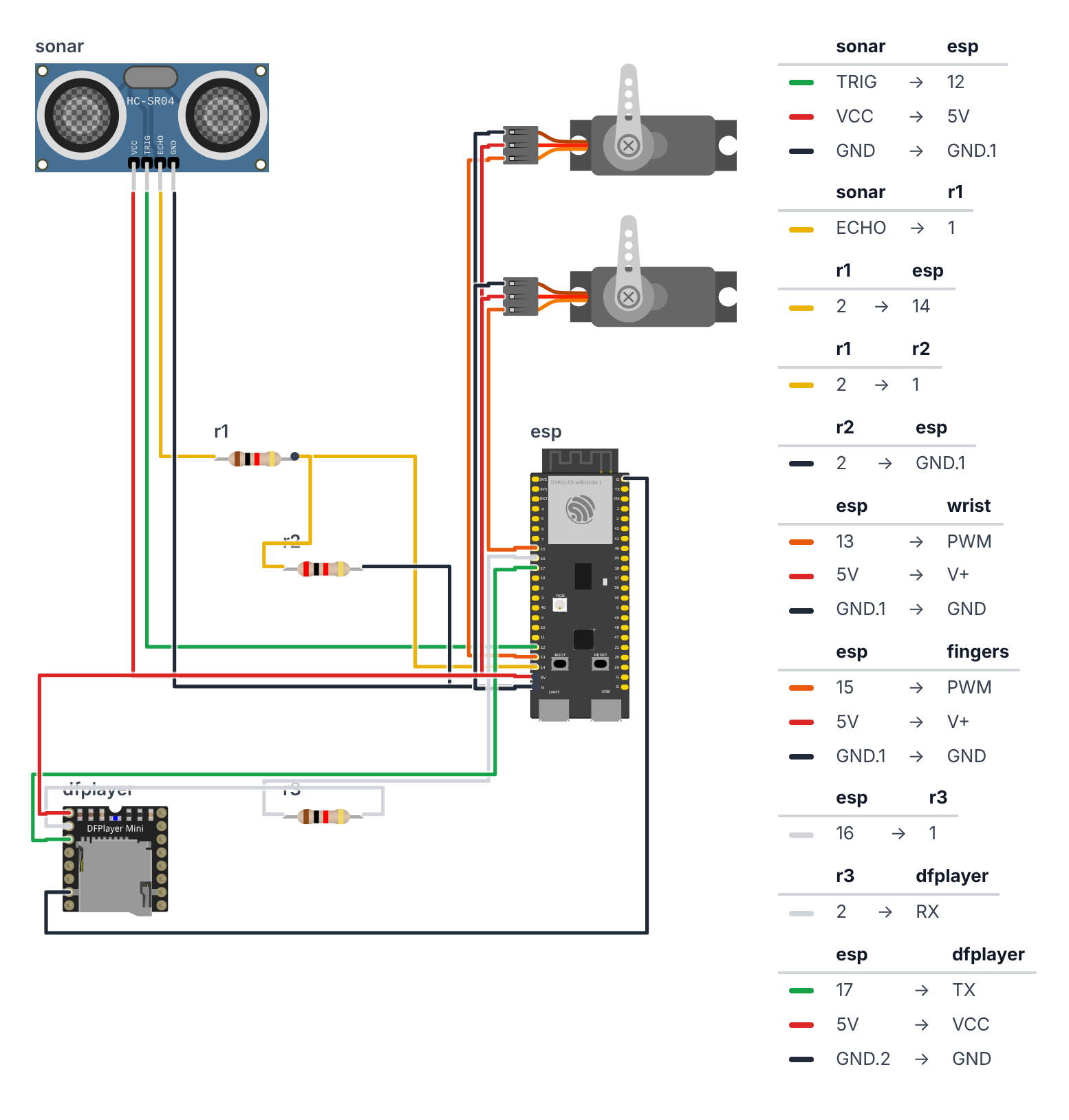
Step 1: Wire it up
Time: ~15 minutes
Pick the pin column for your board — the code at the top says which board you have (BOARD_S3 or BOARD_C6).
HC-SR04 Ultrasonic Sensor (4 wires + 2 resistors):
| HC-SR04 pin | ESP32-S3 | ESP32-C6 | Wire color |
|---|---|---|---|
| TRIG | GPIO 12 | GPIO 22 | green |
| ECHO | GPIO 14 through the voltage divider (below) | GPIO 23 through the voltage divider | yellow |
| VCC | 5V (VIN) | 5V | red |
| GND | GND | GND | black |
The voltage divider on ECHO:
- HC-SR04 ECHO → 1kΩ resistor → a free breadboard row. Call it the “middle row.”
- Middle row → board GPIO 14 (C6: GPIO 23).
- Middle row → 2kΩ resistor → GND.
Why the divider? The HC-SR04 runs on 5V, so its ECHO pin answers with 5V. ESP32 pins only like up to 3.3V — 5V can slowly damage them. Two resistors share the 5V like two kids sharing candy: the 1kΩ takes one third, the 2kΩ takes two thirds. The pin in the middle sees 5V × 2/3 ≈ 3.3V. Perfect. (A 3.3V sensor like the HC-SR04P or RCWL-1601 doesn’t need this.)
Servo 1 — Wrist (3 wires):
| Servo wire | ESP32-S3 | ESP32-C6 |
|---|---|---|
| Signal (orange) | GPIO 13 | GPIO 5 |
| VCC (red) | 5V (VIN) | 5V |
| GND (brown) | GND | GND |
Servo 2 — Fingers (3 wires):
| Servo wire | ESP32-S3 | ESP32-C6 |
|---|---|---|
| Signal (orange) | GPIO 15 | GPIO 3 |
| VCC (red) | 5V (VIN) | 5V |
| GND (brown) | GND | GND |
DFPlayer Mini (4 wires + speaker):
| DFPlayer pin | ESP32-S3 | ESP32-C6 | Notes |
|---|---|---|---|
| TX | GPIO 17 | GPIO 20 | direct wire — the ESP32 listens here |
| RX | GPIO 16 | GPIO 21 | through a 1kΩ resistor — the ESP32 talks here |
| VCC | 5V (VIN) | 5V | red |
| GND | GND | GND | black |
| SPK1 | Speaker + | ||
| SPK2 | Speaker − |
Check: Both servo VCC wires, the HC-SR04 VCC and the DFPlayer VCC go to 5V, not 3.3V. The 1kΩ resistor is on DFPlayer RX (the wire from the ESP32 to the DFPlayer), NOT on the TX wire. The ECHO wire goes through the 1kΩ + 2kΩ divider.
Step 2: Upload the code
Install libraries via Arduino IDE Library Manager:
ESP32Servoby Kevin HarringtonNewPingby Tim EckelDFRobotDFPlayerMiniby DFRobot
The Wi-Fi and web server parts (WiFi, WebServer, ESPmDNS) come built in with the ESP32 board package — nothing extra to install. Select your board under Tools → Board (ESP32S3 Dev Module or ESP32C6 Dev Module).
The big picture first. This program turns the ESP32 into a distance-triggered grabbing machine:
- The ESP32 is the brain — it measures distance and decides when to grab.
- The HC-SR04 ultrasonic sensor is the eye — it sends invisible sound pulses and measures how long they take to bounce back.
- The two servos are the muscles — one moves the wrist, one curls the fingers.
- The DFPlayer is the voice — it says “Take only one!” (and other lines).
- The web page is your remote control — live distance, grab counter, and a Grab now! button.
A program is like a recipe. The computer reads it top to bottom and does exactly what’s written, nothing more.
Before you upload:
- At the top, leave
#define BOARD_S3as it is for an ESP32-S3. For an ESP32-C6, put//in front of#define BOARD_S3and remove the//in front of#define BOARD_C6. - Want the page on your home Wi-Fi? Replace
YOUR_WIFI_NAMEandYOUR_PASSWORDwith your Wi-Fi name and password. If you skip this, the hand makes its own Wi-Fi hotspot instead — that works too.
Copy this entire recipe into Arduino IDE and upload it:
// ========== CHOOSE YOUR BOARD ==========
// Uncomment the line for YOUR board:
#define BOARD_S3    // ESP32-S3-DevKitC-1
//#define BOARD_C6  // ESP32-C6-DevKitC-1
// ========================================

#ifdef BOARD_S3
  #define PIN_TRIG             12
  #define PIN_ECHO             14
  #define PIN_SERVO_WRIST      13
  #define PIN_SERVO_FINGERS    15
  #define PIN_DFPLAYER_RX      17
  #define PIN_DFPLAYER_TX      16
  #define PIN_BOARD_RGB        38
#endif
#ifdef BOARD_C6
  #define PIN_TRIG             22
  #define PIN_ECHO             23
  #define PIN_SERVO_WRIST      5
  #define PIN_SERVO_FINGERS    3
  #define PIN_DFPLAYER_RX      20
  #define PIN_DFPLAYER_TX      21
  #define PIN_BOARD_RGB        8
#endif

#include <ESP32Servo.h>
#include <NewPing.h>
#include <HardwareSerial.h>
#include <DFRobotDFPlayerMini.h>
#include <WiFi.h>
#include <WebServer.h>
#include <ESPmDNS.h>

// ---------- Settings ----------
#define DETECT_DISTANCE_CM  15
#define MAX_DISTANCE_CM     50
#define GRAB_DURATION_MS    2000
#define LOCKOUT_MS          3000
#define PING_INTERVAL_MS    100
#define HITS_NEEDED         2
#define FINGER_DELAY_MS     80
#define VOLUME              22
#define TOTAL_TRACKS        3

#define WRIST_REST          0
#define WRIST_GRAB          45
#define FINGERS_REST        0
#define FINGERS_GRAB        130

// ---------- Wi-Fi ----------
const char* WIFI_NAME = "YOUR_WIFI_NAME";
const char* WIFI_PASSWORD = "YOUR_PASSWORD";
const char* HOTSPOT_NAME = "BuildCool-Hand";
const char* HOTSPOT_PASSWORD = "buildcool";
const char* WEB_NAME = "hand";

// ---------- Parts ----------
Servo servoWrist;
Servo servoFingers;
NewPing sonar(PIN_TRIG, PIN_ECHO, MAX_DISTANCE_CM);
HardwareSerial mySerial(1);
DFRobotDFPlayerMini myDFPlayer;
WebServer server(80);

// ---------- Memory ----------
enum HandState { WAITING, LUNGING, GRABBING, COOLDOWN };
HandState handState = WAITING;
unsigned long stateStart = 0;
unsigned long lastPing = 0;
bool armed = true;
bool soundOk = false;
int detectDistance = DETECT_DISTANCE_CM;
int lastDistance = 0;
int closeHits = 0;
int grabCount = 0;
int lastTrack = 0;
String webAddress = "";

// ---------- Web page ----------
const char PAGE[] PROGMEM = R"rawliteral(
<!doctype html><html lang="en"><head><meta charset="utf-8">
<meta name="viewport" content="width=device-width,initial-scale=1">
<title>Skeleton Hand · BuildCool</title>
<style>
:root{--o:#f97316;--o6:#ea580c;--o7:#c2410c;--o50:#fff7ed;--o200:#fed7aa;--g9:#111827;--g7:#374151;--g5:#6b7280;--g2:#e5e7eb;--g0:#f9fafb;--ok:#16a34a;--bad:#dc2626}
*{box-sizing:border-box}
body{margin:0;font-family:-apple-system,BlinkMacSystemFont,"Segoe UI",Roboto,"Helvetica Neue",Arial,sans-serif;color:var(--g9);background:var(--g0)}
header{position:sticky;top:0;z-index:9;background:rgba(255,255,255,.9);backdrop-filter:blur(8px);border-bottom:1px solid var(--g2)}
.wrap{max-width:640px;margin:0 auto;padding:12px 16px}
.bar{display:flex;align-items:center;justify-content:space-between}
.logo{font-size:20px;font-weight:800;letter-spacing:-.02em;color:var(--g9);text-decoration:none}
.logo span{color:var(--o)}
.badge{display:inline-flex;align-items:center;gap:8px;background:var(--o50);border:1px solid var(--o200);color:var(--o7);font-size:13px;font-weight:500;padding:4px 12px;border-radius:999px}
.dot{width:8px;height:8px;border-radius:50%;background:var(--o);animation:p 2s infinite}
.off .dot{background:var(--g5);animation:none}
@keyframes p{50%{opacity:.35}}
h1{font-size:30px;font-weight:800;letter-spacing:-.02em;line-height:1.1;margin:20px 0 6px}
h1 span{color:var(--o)}
.sub{color:var(--g5);margin:0 0 20px}
.grid{display:grid;grid-template-columns:repeat(auto-fit,minmax(140px,1fr));gap:12px}
.card{background:#fff;border:1px solid var(--g2);border-radius:16px;padding:16px}
.wide{grid-column:1/-1}
.label{font-size:13px;color:var(--g5);font-weight:500}
.value{font-size:32px;font-weight:800;letter-spacing:-.02em;margin-top:4px}
.unit{font-size:16px;color:var(--g5);font-weight:600}
.row{display:flex;gap:8px;flex-wrap:wrap;margin-top:10px}
.btn{display:inline-flex;justify-content:center;align-items:center;padding:12px 20px;background:var(--o);color:#fff;font-weight:600;border:0;border-radius:12px;font-size:15px;text-decoration:none;cursor:pointer;box-shadow:0 10px 15px -3px var(--o200)}
.btn:active{transform:scale(.95)}
.btn.ghost{background:#fff;color:var(--g7);border:1px solid var(--g2);box-shadow:none}
.btn.big{width:100%;padding:18px;font-size:18px}
input[type=range]{width:100%;accent-color:var(--o);margin-top:12px}
.state{display:inline-block;font-size:13px;font-weight:600;padding:2px 10px;border-radius:999px;background:var(--g0);border:1px solid var(--g2)}
.state.ok{color:var(--ok);border-color:#bbf7d0;background:#f0fdf4}
.state.bad{color:var(--bad);border-color:#fecaca;background:#fef2f2}
footer{color:var(--g5);font-size:13px;text-align:center;padding:28px 16px}
footer a{color:var(--o);font-weight:600;text-decoration:none}
</style></head><body>
<header><div class="wrap bar"><a class="logo" href="https://buildcool.fun">Build<span>Cool</span></a>
<span class="badge" id="live"><span class="dot"></span><span id="livetxt">Live</span></span></div></header>
<main class="wrap">
<h1>Skeleton <span>Hand</span></h1>
<p class="sub">The candy bowl that grabs back</p>
<div class="grid">
<div class="card"><div class="label">Hand is</div><div class="value" id="st" style="font-size:24px">–</div></div>
<div class="card"><div class="label">Grabs tonight</div><div class="value" id="n">0</div></div>
<div class="card"><div class="label">Distance</div><div class="value"><span id="d">–</span><span class="unit"> cm</span></div></div>
<div class="card"><div class="label">Sound</div><div style="margin-top:12px"><span class="state" id="snd">–</span></div></div>
<div class="card wide"><div class="label">Scare controls</div>
<button class="btn big" style="margin-top:12px" onclick="act('grab',1)">Grab now!</button>
<div class="row"><button class="btn ghost" id="arm" onclick="act('armed',armed?0:1)">Disarm</button>
<button class="btn ghost" onclick="act('say',1)">Say something</button></div></div>
<div class="card wide"><div class="label">Grab when closer than <b id="tv">–</b> cm</div>
<input type="range" min="5" max="40" id="th" onchange="act('distance',this.value)"></div>
</div></main>
<footer>Made with <a href="https://buildcool.fun">buildcool.fun</a></footer>
<script>
const $=id=>document.getElementById(id);
const ST=["Waiting","Lunging!","Grabbing!","Resting"];
let armed=true;
function live(ok){$("live").classList.toggle("off",!ok);$("livetxt").textContent=ok?"Live":"Offline"}
async function act(k,v){try{await fetch("/api/set?"+k+"="+encodeURIComponent(v),{method:"POST"});tick()}catch(e){live(false)}}
async function tick(){
 try{const d=await (await fetch("/api")).json();
  armed=d.armed;
  $("st").textContent=d.armed?ST[d.state]:"Asleep";
  $("n").textContent=d.grabs;
  $("d").textContent=d.distance>0?d.distance:"–";
  $("snd").textContent=d.sound?"Ready":"Not found";
  $("snd").className="state "+(d.sound?"ok":"bad");
  $("arm").textContent=d.armed?"Disarm":"Arm";
  $("tv").textContent=d.threshold;
  if(document.activeElement!==$("th"))$("th").value=d.threshold;
  live(true)}catch(e){live(false)}
}
tick();setInterval(tick,1000);
</script></body></html>
)rawliteral";

// ---------- Helpers ----------
void blinkError(int times) {
  for (int i = 0; i < times; i++) {
    rgbLedWrite(PIN_BOARD_RGB, 64, 0, 0);
    delay(150);
    rgbLedWrite(PIN_BOARD_RGB, 0, 0, 0);
    delay(150);
  }
  delay(700);
}

// ---------- Sound ----------
void startSound() {
  mySerial.begin(9600, SERIAL_8N1, PIN_DFPLAYER_RX, PIN_DFPLAYER_TX);
  delay(1000);
  for (int attempt = 1; attempt <= 3; attempt++) {
    if (myDFPlayer.begin(mySerial)) {
      myDFPlayer.volume(VOLUME);
      soundOk = true;
      Serial.println("# DFPlayer ready");
      return;
    }
    Serial.println("# DFPlayer not found! Check TX/RX wires, 1k resistor and SD card (FAT32, 0001.mp3).");
    blinkError(4);
  }
  Serial.println("# Running without sound. The hand still grabs.");
}

void playRandomLine() {
  if (!soundOk) return;
  int track = random(1, TOTAL_TRACKS + 1);
  if (track == lastTrack) track = track % TOTAL_TRACKS + 1;
  lastTrack = track;
  myDFPlayer.play(track);
}

// ---------- Hand moves ----------
void startGrab() {
  grabCount++;
  Serial.print("# HAND ACTIVATED! Grab number ");
  Serial.println(grabCount);
  servoWrist.write(WRIST_GRAB);
  playRandomLine();
  handState = LUNGING;
  stateStart = millis();
  closeHits = 0;
}

void updateHand() {
  unsigned long now = millis();
  if (handState == LUNGING && now - stateStart >= FINGER_DELAY_MS) {
    servoFingers.write(FINGERS_GRAB);
    handState = GRABBING;
    stateStart = now;
  } else if (handState == GRABBING && now - stateStart >= GRAB_DURATION_MS) {
    servoWrist.write(WRIST_REST);
    servoFingers.write(FINGERS_REST);
    handState = COOLDOWN;
    stateStart = now;
    Serial.println("# Hand reset.");
  } else if (handState == COOLDOWN && now - stateStart >= LOCKOUT_MS) {
    handState = WAITING;
  }
}

void checkSensor() {
  if (millis() - lastPing < PING_INTERVAL_MS) return;
  lastPing = millis();

  lastDistance = sonar.ping_cm();
  Serial.print("# Distance: ");
  Serial.print(lastDistance);
  Serial.println(" cm");

  if (!armed || handState != WAITING) return;
  if (lastDistance > 0 && lastDistance <= detectDistance) closeHits++;
  else closeHits = 0;
  if (closeHits >= HITS_NEEDED) startGrab();
}

// ---------- Wi-Fi and web server ----------
void startWiFi() {
  if (String(WIFI_NAME) != "YOUR_WIFI_NAME") {
    WiFi.mode(WIFI_STA);
    WiFi.begin(WIFI_NAME, WIFI_PASSWORD);
    Serial.print("# Joining Wi-Fi");
    unsigned long start = millis();
    while (WiFi.status() != WL_CONNECTED && millis() - start < 15000) {
      delay(250);
      Serial.print(".");
    }
    Serial.println();
    if (WiFi.status() == WL_CONNECTED) {
      webAddress = WiFi.localIP().toString();
      if (MDNS.begin(WEB_NAME)) {
        Serial.print("# Also try: http://");
        Serial.print(WEB_NAME);
        Serial.println(".local");
      }
      Serial.print("# Open in your browser: http://");
      Serial.println(webAddress);
      return;
    }
    Serial.println("# Could not join Wi-Fi, starting own hotspot instead");
  }
  WiFi.mode(WIFI_AP);
  WiFi.softAP(HOTSPOT_NAME, HOTSPOT_PASSWORD);
  webAddress = WiFi.softAPIP().toString();
  Serial.print("# Connect your phone to Wi-Fi \"");
  Serial.print(HOTSPOT_NAME);
  Serial.print("\" (password: ");
  Serial.print(HOTSPOT_PASSWORD);
  Serial.print("), then open http://");
  Serial.println(webAddress);
}

void handlePage() {
  server.send(200, "text/html", PAGE);
}

void handleApi() {
  String json = "{";
  json += "\"state\":" + String((int)handState);
  json += ",\"armed\":" + String(armed ? "true" : "false");
  json += ",\"distance\":" + String(lastDistance);
  json += ",\"threshold\":" + String(detectDistance);
  json += ",\"grabs\":" + String(grabCount);
  json += ",\"sound\":" + String(soundOk ? "true" : "false");
  json += "}";
  server.send(200, "application/json", json);
}

void handleSet() {
  if (server.hasArg("armed")) {
    armed = server.arg("armed").toInt() == 1;
    closeHits = 0;
  }
  if (server.hasArg("distance")) {
    detectDistance = constrain(server.arg("distance").toInt(), 5, 40);
  }
  if (server.hasArg("grab") && handState == WAITING) {
    startGrab();
  }
  if (server.hasArg("say")) {
    playRandomLine();
  }
  handleApi();
}

void startWebServer() {
  server.on("/", handlePage);
  server.on("/api", handleApi);
  server.on("/api/set", HTTP_POST, handleSet);
  server.begin();
}

// ---------- Setup ----------
void setup() {
  Serial.begin(115200);
  randomSeed(esp_random());
  rgbLedWrite(PIN_BOARD_RGB, 0, 0, 0);

  servoWrist.attach(PIN_SERVO_WRIST, 500, 2400);
  servoFingers.attach(PIN_SERVO_FINGERS, 500, 2400);
  servoWrist.write(WRIST_REST);
  servoFingers.write(FINGERS_REST);
  delay(500);

  startSound();
  startWiFi();
  startWebServer();

  stateStart = millis();
  handState = COOLDOWN;
  Serial.println("# Skeleton Hand armed. Try to take candy.");
}

// ---------- Loop ----------
void loop() {
  server.handleClient();
  updateHand();
  checkSensor();
}
Line-by-line: what every line does and why
The board chooser and pin names
#define BOARD_S3    // ESP32-S3-DevKitC-1
//#define BOARD_C6  // ESP32-C6-DevKitC-1

#ifdef BOARD_S3
  #define PIN_TRIG             12
  #define PIN_ECHO             14
  ...
The two boards have their metal legs (pins) in different places, so the code carries two lists of pin numbers. #define BOARD_S3 switches on the S3 list. #ifdef BOARD_S3 means “only read the next lines if BOARD_S3 is switched on.” Lines starting with // are switched off.
#define gives each pin number a nickname. The ultrasonic sensor has two legs: TRIG sends the sound pulse, ECHO receives the bounce-back. Both servos get their own signal pins. PIN_DFPLAYER_RX is where the ESP32 receives — so the DFPlayer’s TX (its mouth) is wired there. PIN_BOARD_RGB is the tiny color LED that is already soldered onto the board — GPIO 38 on the S3, GPIO 8 on the C6. Nothing to wire: we use it to blink error codes.
Borrowing instruction books
#include <ESP32Servo.h>
#include <NewPing.h>
#include <HardwareSerial.h>
#include <DFRobotDFPlayerMini.h>
#include <WiFi.h>
#include <WebServer.h>
#include <ESPmDNS.h>
#include means “grab this instruction book.” ESP32Servo knows how to control servo motors. NewPing knows how to use the HC-SR04 — it handles all the timing math so you just get distance in centimeters. HardwareSerial is for the communication channel to the DFPlayer. DFRobotDFPlayerMini is the command language for the audio module. The last three join Wi-Fi, run a tiny website, and give the ESP32 the name hand.local.
Settings for behavior
#define DETECT_DISTANCE_CM  15
#define MAX_DISTANCE_CM     50
#define GRAB_DURATION_MS    2000
#define LOCKOUT_MS          3000
#define PING_INTERVAL_MS    100
#define HITS_NEEDED         2
#define FINGER_DELAY_MS     80
#define VOLUME              22
#define TOTAL_TRACKS        3
DETECT_DISTANCE_CM 15— grab when something comes within 15 centimeters. (You can change this live on the phone page, too.)MAX_DISTANCE_CM 50— the sensor stops listening after 50cm. Anything farther counts as “nothing there.”GRAB_DURATION_MS 2000— hold the grab pose for 2 seconds.LOCKOUT_MS 3000— rest 3 seconds after a grab before watching again.PING_INTERVAL_MS 100— measure every 100 ms, so 10 times per second.HITS_NEEDED 2— how many close readings in a row we need before grabbing.FINGER_DELAY_MS 80— the fingers close 80 ms after the wrist lunges.VOLUME 22— out of 30. Audible but not ear-splitting — perfect for a candy bowl.TOTAL_TRACKS 3— how many voice lines are on the SD card.
#define WRIST_REST          0
#define WRIST_GRAB          45
#define FINGERS_REST        0
#define FINGERS_GRAB        130
Servo positions: wrist rests at 0°, lunges to 45°. Fingers open at 0°, clench to 130°.
Wi-Fi names
const char* WIFI_NAME = "YOUR_WIFI_NAME";
const char* WIFI_PASSWORD = "YOUR_PASSWORD";
const char* HOTSPOT_NAME = "BuildCool-Hand";
const char* HOTSPOT_PASSWORD = "buildcool";
const char* WEB_NAME = "hand";
The first two are your home Wi-Fi. The next two are the hand’s own Wi-Fi, which it makes if it can’t join yours. WEB_NAME gives it the address http://hand.local on your home Wi-Fi.
Creating the parts
Servo servoWrist;
Servo servoFingers;
NewPing sonar(PIN_TRIG, PIN_ECHO, MAX_DISTANCE_CM);
HardwareSerial mySerial(1);
DFRobotDFPlayerMini myDFPlayer;
WebServer server(80);
We create named objects for each piece of hardware. servoWrist and servoFingers are the two servo motors. sonar is the ultrasonic sensor — we tell it which pins to use and the maximum range. mySerial(1) is communication channel number 1 — it exists on both the S3 and the C6. myDFPlayer is the audio module. server(80) is the tiny website; 80 is the “door number” every browser knocks on.
The hand’s moods: a state machine
enum HandState { WAITING, LUNGING, GRABBING, COOLDOWN };
HandState handState = WAITING;
unsigned long stateStart = 0;
The hand is always in exactly one of four moods:
WAITING— watching the bowl.LUNGING— the wrist just jumped; the fingers are about to close.GRABBING— fingers clenched, holding for 2 seconds.COOLDOWN— back to rest, taking a 3-second break.
enum makes a list of names, like the floors in an elevator. handState remembers which floor we’re on, and stateStart remembers when we arrived there. This is called a state machine. Instead of freezing with delay(), the code just asks “what mood am I in, and how long have I been in it?” — over and over, very fast.
unsigned long lastPing = 0;
bool armed = true;
bool soundOk = false;
int detectDistance = DETECT_DISTANCE_CM;
int lastDistance = 0;
int closeHits = 0;
int grabCount = 0;
int lastTrack = 0;
More memory boxes: when we last measured, whether the trap is switched on (armed), whether the DFPlayer answered (soundOk), the current trigger distance, the last measured distance, how many close readings in a row we’ve seen, how many grabs so far, and which voice line played last.
The web page
const char PAGE[] PROGMEM = R"rawliteral(
<!doctype html><html lang="en"><head>...
)rawliteral";
This long block is a whole web page, stored inside the ESP32. PROGMEM keeps it in the big flash memory. R"rawliteral( … )rawliteral" means “everything between these markers is just text.” The page has its own little program (JavaScript) that asks the hand “what’s going on?” every second and updates the cards. If the hand doesn’t answer, the badge at the top switches from Live to Offline.
blinkError(): a secret code
void blinkError(int times) {
  for (int i = 0; i < times; i++) {
    rgbLedWrite(PIN_BOARD_RGB, 64, 0, 0);
    delay(150);
    rgbLedWrite(PIN_BOARD_RGB, 0, 0, 0);
    delay(150);
  }
  delay(700);
}
The prop has no screen, so when something is wrong it blinks the board’s RGB LED in a code. It’s a color LED, so digitalWrite can’t switch it: rgbLedWrite(PIN_BOARD_RGB, 64, 0, 0) mixes red 64, green 0 and blue 0 (each from 0 to 255) — red, the color for “error” — and rgbLedWrite(PIN_BOARD_RGB, 0, 0, 0) turns it off. for (int i = 0; i < times; i++) means “repeat this times times.” Each repeat: on, wait, off, wait. Then a longer pause, so you can count. 4 blinks = “the DFPlayer isn’t answering.”
startSound(): waking up the DFPlayer — with a plan B
mySerial.begin(9600, SERIAL_8N1, PIN_DFPLAYER_RX, PIN_DFPLAYER_TX);
delay(1000);
for (int attempt = 1; attempt <= 3; attempt++) {
  if (myDFPlayer.begin(mySerial)) {
    myDFPlayer.volume(VOLUME);
    soundOk = true;
    return;
  }
  Serial.println("# DFPlayer not found! ...");
  blinkError(4);
}
Serial.println("# Running without sound. The hand still grabs.");
Open the channel to the DFPlayer at 9,600 bits per second and give it 1 second to read the SD card. Then knock on its door up to 3 times. If it answers: set the volume, remember that sound works, and return (leave the function — we’re done). If it never answers, we don’t freeze the whole prop. A grabbing skeleton hand is scary even without a voice! The phone page shows “Sound: Not found” so you know what to fix.
playRandomLine(): never the same line twice
int track = random(1, TOTAL_TRACKS + 1);
if (track == lastTrack) track = track % TOTAL_TRACKS + 1;
lastTrack = track;
myDFPlayer.play(track);
random(1, TOTAL_TRACKS + 1) picks 1, 2 or 3 (the second number is “stop before this one”). If that’s the same line as last time, we take the next one instead: % TOTAL_TRACKS is the remainder after dividing by 3, so 3 → 0 + 1 = 1 and 1 → 2. It wraps around like a clock. In setup(), randomSeed(esp_random()) shakes the dice first, using a real random-number generator inside the ESP32.
startGrab() and updateHand(): moving through the moods
void startGrab() {
  grabCount++;
  servoWrist.write(WRIST_GRAB);
  playRandomLine();
  handState = LUNGING;
  stateStart = millis();
  closeHits = 0;
}
Add one to the grab counter (++ means “plus one”), lunge the wrist, start a voice line, and switch to the LUNGING mood. Write down the time.
if (handState == LUNGING && now - stateStart >= FINGER_DELAY_MS) {
  servoFingers.write(FINGERS_GRAB);
  handState = GRABBING;
  stateStart = now;
} else if (handState == GRABBING && now - stateStart >= GRAB_DURATION_MS) {
  servoWrist.write(WRIST_REST);
  servoFingers.write(FINGERS_REST);
  handState = COOLDOWN;
  stateStart = now;
} else if (handState == COOLDOWN && now - stateStart >= LOCKOUT_MS) {
  handState = WAITING;
}
Each line asks: “Am I in this mood, and (&&) have I been in it long enough?”
- Lunging for 80 ms → close the fingers, switch to grabbing. This stagger — wrist first, fingers a moment later — makes the motion feel alive instead of robotic.
- Grabbing for 2 seconds → open everything, switch to cooldown.
- Cooling down for 3 seconds → back to waiting.
The old code used delay(80) for the stagger. A delay freezes the whole ESP32 — even the web page. The state machine gets the same 80 ms without ever freezing.
checkSensor(): two hits in a row
if (millis() - lastPing < PING_INTERVAL_MS) return;
lastPing = millis();
lastDistance = sonar.ping_cm();
Only measure if 100 ms have passed since the last measurement. sonar.ping_cm() fires the ultrasonic pulse and returns the distance in centimeters. When nothing is in range, it returns 0.
if (!armed || handState != WAITING) return;
if (lastDistance > 0 && lastDistance <= detectDistance) closeHits++;
else closeHits = 0;
if (closeHits >= HITS_NEEDED) startGrab();
If the trap is switched off or (||) the hand is busy, stop here — we still measured, so the phone page shows the live distance. Otherwise: is something closer than the trigger distance? lastDistance > 0 filters out “nothing there” readings. If yes, count one more close hit. If no, reset the count to 0. Only when we get 2 close hits in a row does the hand grab. A single weird echo from a candy wrapper or the bowl wall gets ignored — a real hand stays there longer than 100 ms.
startWiFi(): home Wi-Fi or own hotspot
if (String(WIFI_NAME) != "YOUR_WIFI_NAME") {
  WiFi.mode(WIFI_STA);
  WiFi.begin(WIFI_NAME, WIFI_PASSWORD);
  ...
  while (WiFi.status() != WL_CONNECTED && millis() - start < 15000) { delay(250); ... }
If you typed in your Wi-Fi name, the ESP32 tries to join it — for at most 15 seconds, printing a dot every quarter second. If it works, it prints the address (like http://192.168.1.57) and starts the hand.local name.
WiFi.mode(WIFI_AP);
WiFi.softAP(HOTSPOT_NAME, HOTSPOT_PASSWORD);
If you didn’t change the Wi-Fi name, or joining failed, the ESP32 creates its own Wi-Fi network called BuildCool-Hand with password buildcool. This is called a hotspot fallback — plan B, so the phone page always works, even on a porch far from your router. In hotspot mode, the page is always at http://192.168.4.1.
The web server: three addresses
server.on("/", handlePage);
server.on("/api", handleApi);
server.on("/api/set", HTTP_POST, handleSet);
Like a receptionist with three desks:
/hands out the web page itself./apianswers “what’s going on?” with a short text called JSON. It looks like this (state0 = waiting, 1 = lunging, 2 = grabbing, 3 = resting):
{"state":0,"armed":true,"distance":23,"threshold":15,"grabs":12,"sound":true}/api/settakes orders from the buttons:grab=1,say=1,armed=0orarmed=1, anddistance=5todistance=40.
if (server.hasArg("distance")) {
  detectDistance = constrain(server.arg("distance").toInt(), 5, 40);
}
if (server.hasArg("grab") && handState == WAITING) {
  startGrab();
}
Never trust what comes from outside! constrain(..., 5, 40) squeezes any trigger distance into 5–40cm, even if someone sends distance=9999. And Grab now! only works while the hand is waiting — not in the middle of another grab.
setup(): runs once at power-on
Serial.begin(115200);
randomSeed(esp_random());
rgbLedWrite(PIN_BOARD_RGB, 0, 0, 0);

servoWrist.attach(PIN_SERVO_WRIST, 500, 2400);
servoFingers.attach(PIN_SERVO_FINGERS, 500, 2400);
servoWrist.write(WRIST_REST);
servoFingers.write(FINGERS_REST);
delay(500);
Start the Serial Monitor channel, shake the random dice, switch the board’s RGB LED off. attach(pin, 500, 2400) tells each servo which pin its signal wire is on, and that a 500-microsecond pulse means 0° and 2400 means 180° — the range an SG90 really uses. Then both servos go to rest, and delay(500) gives them half a second to get there.
startSound();
startWiFi();
startWebServer();

stateStart = millis();
handState = COOLDOWN;
Wake up the voice, the Wi-Fi and the website. Then start in the cooldown mood, not waiting. Why? Right after power-on the servos are still settling and you’re still placing the bowl. 3 seconds of rest means no surprise grab while your hands are near it.
loop(): repeats forever
void loop() {
  server.handleClient();
  updateHand();
  checkSensor();
}
Three jobs, thousands of times per second: answer the phone, move the hand through its moods, and measure the distance when it’s time. No delay() anywhere — nothing ever waits. That’s why the phone page stays fast even while the hand is grabbing. This is called non-blocking code.
The whole thing in one sentence
When powered on, both servos go to rest and the voice, Wi-Fi and phone page start (setup); then forever (loop) it answers the phone, moves the hand through waiting → lunging → grabbing → resting, and measures the distance 10 times per second — grabbing only after two close readings in a row (or when you press Grab now!).
First thing to try: open Serial Monitor at 115200. Hold your hand 20cm above the sensor and slowly lower it toward 15cm. Watch the distance numbers drop. When it says # HAND ACTIVATED! both servos will fire.
Check: Open Serial Monitor at 115200. You should see
# DFPlayer ready, the web address, and distance readings printing every 100ms. Hold your hand 20cm above the sensor — you should see# Distance: 20 cm. Then move it closer than 15cm — you should see# HAND ACTIVATED! Grab number 1and both servos should fire.
Step 3: Deploy the trap!
Place the hand in or beside the candy bowl. Tuck the forearm/servo housing behind the bowl.
The ultrasonic sensor sits on the bowl rim pointing up. Arrange some candy around it so it’s hidden — but leave both “eyes” of the sensor clear.
Power the prop from a 5V 2A USB phone charger or a power bank. Two servos jumping at once can pull more power than a laptop port gives, and the ESP32 restarts.
Test sequence:
- Power on, wait 3 seconds (the hand starts in its rest mood).
- Hold your hand 20cm above the sensor — no trigger (too far).
- Slowly lower your hand to 14cm — the hand should grab and a voice line should play.
- After 2 seconds, the hand resets.
- Wait 3 seconds, then test again.
Adjusting the grab angles: If the wrist doesn’t look threatening enough, increase WRIST_GRAB beyond 45. If the fingers don’t close convincingly, increase FINGERS_GRAB toward 150. Print-in-place joints vary — tune these values to your specific build.
Step 4: Control it from your phone
If you did NOT change the Wi-Fi name in the code:
- On your phone, open Wi-Fi settings and join BuildCool-Hand (password: buildcool).
- Open the browser and go to http://192.168.4.1
If you entered your home Wi-Fi:
- Keep your phone on the same home Wi-Fi.
- Open http://hand.local — or the number address the Serial Monitor printed (like
http://192.168.1.57).
On the page you see:
- Hand is — Waiting, Lunging!, Grabbing!, Resting or Asleep (disarmed).
- Grabs tonight — your score since power-on.
- Distance — what the sensor sees right now. Super handy while you hide it in the candy: if it shows a small number with nobody there, the bowl wall or a candy bar is in the way.
- Sound — Ready or Not found.
- Grab now! — make the hand grab by hand, at the perfect moment.
- Disarm / Arm — disarmed, the hand ignores the sensor, but Grab now! still works. Great for little kids who’d be too scared.
- Say something — play a voice line without grabbing.
- Grab when closer than … cm — slide the trigger distance from 5 to 40cm.
For parents: Anyone who is on the same Wi-Fi can open the page and press Grab now!. If you use the hotspot at a party, change
HOTSPOT_PASSWORDin the code to your own password (at least 8 characters). The SG90 servos are weak, so the fingers can’t hurt anyone — but a surprise grab can really frighten small children. Use Disarm when toddlers come to the door.
What just happened (what you learned)
-
Ultrasonic distance sensing — the HC-SR04 sends a 40kHz sound pulse and measures how long it takes to bounce back. Distance = (time × speed of sound) / 2. NewPing handles this math; you just get centimeters back. It’s how parking sensors in cars work.
-
Voltage dividers — two resistors turn the sensor’s 5V answer into 3.3V the ESP32 can safely read. Engineers use this trick everywhere two chips with different voltages talk to each other.
-
State machines — the hand is always in one of four moods, and
millis()decides when to move to the next one. Traffic lights, elevators and vending machines all work this way. -
Filtering noisy sensors — “two hits in a row” ignores single bad readings. Real products filter sensor data all the time; your phone’s screen rotation does it too.
-
Staggered servo timing for natural motion — moving two servos simultaneously looks mechanical. Adding 80ms between them creates a sequential motion that reads as biological — wrist lunges, then fingers grab. This is the same principle animators use: secondary actions follow primary ones with a slight lag.
-
A web server with a hotspot fallback — the ESP32 joins your Wi-Fi if it can, and makes its own if it can’t. Your phone talks to it with a tiny JSON “API,” just like real apps talk to real servers.
Level Up
Warning zone: Between 15–30cm, play a warning sound (“don’t even think about it”) but don’t grab yet. Only grab when they enter the 15cm zone. Two distance thresholds, two different responses. Add a check in checkSensor() — and remember a bool so the warning plays only once per visitor.
The fake reset: 20% of the time, after the real grab completes and the hand resets, wait 1 second, then do a tiny twitch (wrist to 15° and back in 200ms). Use if (random(1, 6) == 1) to make it happen randomly. Add a fifth mood, TWITCHING, to the state machine. Unpredictable behavior is more unsettling than a pattern people learn.
Candy counter: grabCount already counts every grab. After 10 grabs, play a special track (0004.mp3): “The candy is gone.” Then set armed = false. Real Halloween props run out of candy.
★★ You completed: Skeleton Hand Candy Dispenser!
Troubleshooting
Blink codes: if something is wrong at startup, the board’s RGB LED blinks red in groups. Count the blinks. (Very early S3 boards, v1.0, have this LED on GPIO 48 instead of 38 — if yours stays dark, change 38 to 48, or just watch the Serial Monitor.)
| Blinks | Meaning | Fix |
|---|---|---|
| 4 | DFPlayer not answering | SD card FAT32, files 0001.mp3–0003.mp3 in the root folder, DFPlayer TX → GPIO 17 (C6: 20), DFPlayer RX → GPIO 16 (C6: 21) through the 1kΩ resistor, DFPlayer VCC on 5V. After 3 tries the hand runs without sound. |
| Problem | Fix |
|---|---|
| Distance always reads 0 | HC-SR04 VCC should be on 5V, not 3.3V. Check TRIG (S3: GPIO 12, C6: GPIO 22) and ECHO (S3: GPIO 14, C6: GPIO 23). Check the voltage divider: ECHO → 1kΩ → middle row → GPIO; middle row → 2kΩ → GND. If the 1kΩ and 2kΩ are swapped, the pin only gets 1.7V and may not notice the echo. |
| Hand triggers too easily / too far | Slide the trigger distance down on the phone page (or change DETECT_DISTANCE_CM to 10). The bowl walls can reflect the ultrasonic beam — watch the Distance card while nobody is near. Raise HITS_NEEDED to 3 for even more filtering. |
| Servos twitch but don’t reach correct angle | Servo angles depend on how the servo horn is mounted. Adjust WRIST_GRAB and FINGERS_GRAB in small steps. Some SG90 servos have different gear ratios. |
| DFPlayer plays no sound | Phone page says “Sound: Not found”? See blink code 4 above. Otherwise check the speaker wires on SPK1/SPK2 and turn up VOLUME. |
| Hand re-triggers immediately after reset | The 3-second LOCKOUT_MS should prevent this. If it still triggers, the sensor sees the hand’s own resting position. Move the sensor, or lower the trigger distance. |
| Board restarts when the hand grabs | Not enough power. Use a 5V 2A charger or power bank instead of a laptop USB port. A 470µF capacitor across the servos’ 5V and GND helps too. |
| Servo buzzes continuously | Servo is stalling against the mechanism. Reduce the angle (lower FINGERS_GRAB). Check the pushrod isn’t binding in the joint. |
| Phone can’t find the page | Hotspot mode: join BuildCool-Hand (password buildcool) and open http://192.168.4.1. Some phones switch back to mobile data on a Wi-Fi without internet — tap “Stay connected.” Home Wi-Fi mode: use the number address from the Serial Monitor if hand.local doesn’t work. |
| Serial Monitor says “Could not join Wi-Fi” | Check the Wi-Fi name and password (they’re case-sensitive). The ESP32 only works with 2.4 GHz Wi-Fi, not 5 GHz. The hand still works with its own hotspot. |