Parent info
Parts you need
Affiliate links — we may earn a small commission
Try this circuit in your browser!
Run the code, press the buttons and watch what happens — before you buy any parts. No account needed.
Open in Simulator →The jaw moves when it talks. The head sweeps. The eyes glow.
Imagine this: you bring out the skull on Halloween night. It’s sitting on a table. The head slowly sweeps left, then right. Red light pulses in the eye sockets. Then after 8 seconds of watching the room, it starts to speak. The jaw opens and closes with the words.
People ask if you bought it somewhere. You built it.
In 4 hours. Plus 12–16 hours of 3D printing time. For about $52.
What you’ll need
| Part | What it does | Price |
|---|---|---|
| ESP32-S3-DevKitC-1 or ESP32-C6-DevKitC-1 | Runs all animations, audio, the microphone and the phone remote | ~$12 |
| MG90S Metal Gear Servo × 2 | Metal gears handle the repeated jaw and head movement without stripping | ~$10 |
| DFPlayer Mini MP3 Module | Plays the voice tracks and audio | ~$5 |
| Speaker (4Ω 3W) | Mounted inside the skull — 3W for full room presence | ~$4 |
| MAX4466 Microphone Amplifier | Reads audio amplitude to drive jaw position in real time | ~$8 |
| Red LEDs × 2 | Eye sockets — pulse in WATCHING mode | ~$3 |
| White LEDs × 2 | Interior dome — glow during TALKING mode | ~$2 |
| 5V 3A Power Supply | Two MG90S servos + LEDs need more current than USB can provide | ~$8 |
| Capacitor 470–1000µF (10V or more) | Sits across the servo power wires and stops resets when the servos jump | ~$1 |
Total: ~$52 | Time: ~4 hours build + print time | Difficulty: ●●●●○
The skull: Search Thingiverse for “animatronic skull servo Halloween.” Look for designs with jaw hinges, servo mounting bosses, and eye cavities already designed in. Print skull halves in bone-white PLA at 0.15mm for smooth surface finish. Total print time: 12–16 hours across all parts.
Why MG90S instead of SG90: The jaw opens and closes hundreds of times on Halloween night. Plastic gear servos (SG90) strip under repeated load. Metal gear servos (MG90S) handle it without complaint.
How it works (60 seconds)
The skull runs two modes that take turns:
WATCHING mode (8 seconds): Head servo sweeps slowly left and right (55° to 125°), about 1.3 seconds each way, like a guard scanning the room. Red LEDs in the eye sockets pulse in a slow sine wave — brightening and dimming like something breathing. The skull looks alive and aware.
TALKING mode (until the voice track ends): A random voice track plays from the DFPlayer Mini. White LEDs inside the skull dome turn on solid — the skull glows from within. The MAX4466 microphone picks up the speaker sound and the ESP32 measures how loud it is. Loud = open jaw, quiet = closed jaw. A smoothing filter makes the jaw move organically, not jerkily. When the DFPlayer reports “track finished” (or after 15 seconds at most), the skull goes back to WATCHING.
Your phone is the remote: the skull also runs a small web page. From your phone you can make it talk right now (perfect when someone walks past), pick a track, change the volume, or put it to sleep.
Step 0: Print and assemble the skull
Time: ~16 hours print + 1 hour assembly
Search Thingiverse for “animatronic skull servo Halloween.” Download a design with:
- Separate jaw with hinge points
- Servo mounting boss inside the skull base (jaw servo)
- Eye cavities for LED placement
- Separate base for the head rotation servo
Print skull halves in bone-white PLA at 0.15mm layer height for smooth surface. 40% infill for jaw and hinges, 20% infill for decorative surfaces.
Painting:
- Base coat in off-white
- Dry-brush dark brown acrylic into eye sockets, nasal cavity, and between teeth
- Seal with matte varnish
The difference between “3D printed prop” and “professional haunt piece” is the paint job. Take an extra hour here.
Assembly:
- Jaw servo (Servo 1): Mounts inside the skull base. Horn connects to the jaw via the printed pushrod. Test: 0° = closed, 45° = fully open.
- Head servo (Servo 2): Mounts on the base stand beneath the skull. The skull sits on top, and the servo rotates the whole head assembly.
- MAX4466 mic: Mounts inside the skull body near the speaker. Run one signal wire out to the board’s mic pin (GPIO 1 on ESP32-S3, GPIO 2 on ESP32-C6).
- Speaker: Inside the skull, DFPlayer SPK output connects directly.
- Red LEDs: In the eye sockets pointing outward.
- White LEDs: Inside the dome pointing inward.
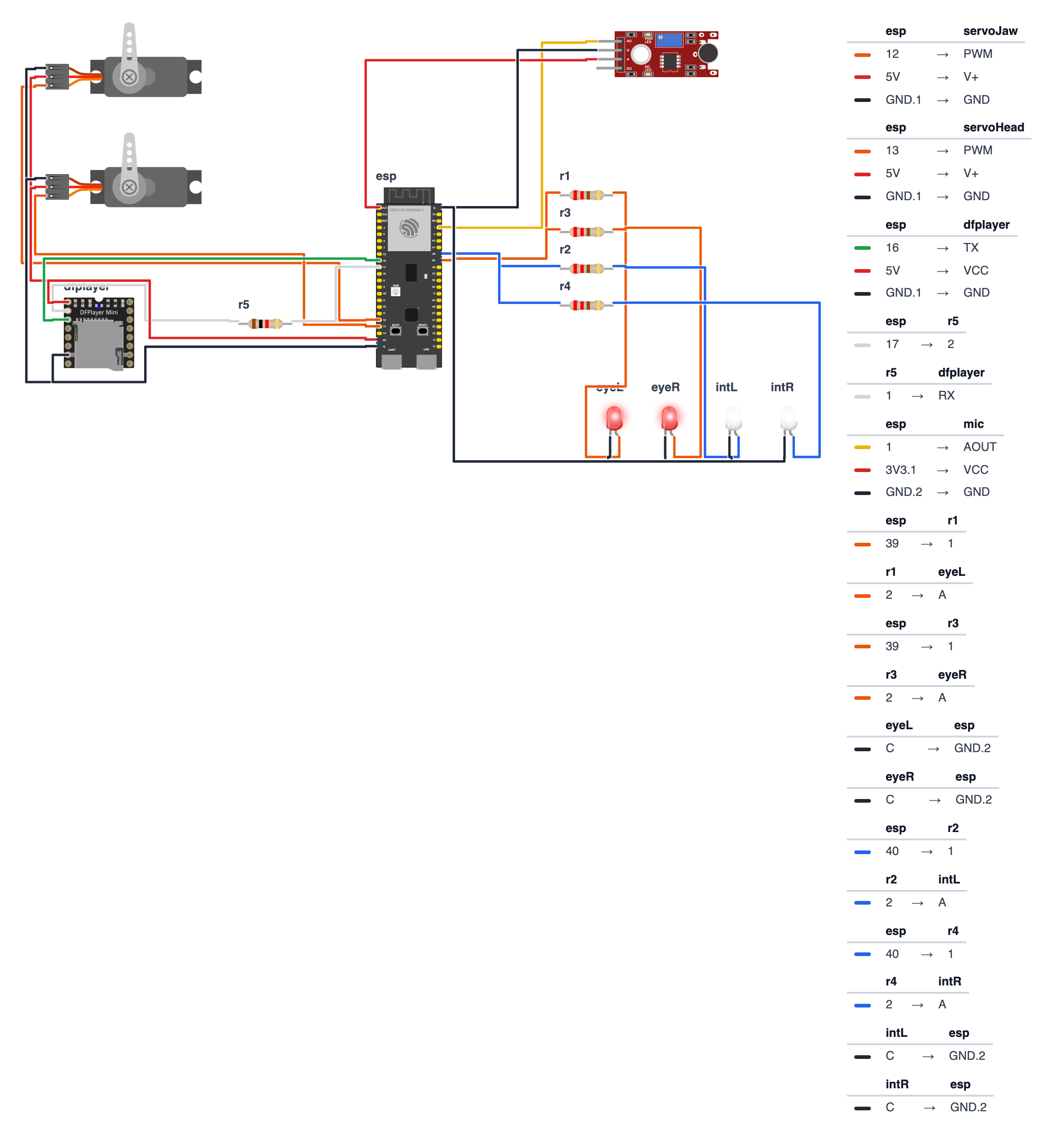
Step 1: Wire it up
Time: ~20 minutes
The code works on two boards. Use the pin numbers from the column for your board:
| Wire | ESP32-S3-DevKitC-1 | ESP32-C6-DevKitC-1 |
|---|---|---|
| DFPlayer TX → board | GPIO 16 | GPIO 20 |
| DFPlayer RX → 1kΩ resistor → board | GPIO 17 | GPIO 21 |
| Jaw servo signal | GPIO 12 | GPIO 4 |
| Head servo signal | GPIO 13 | GPIO 5 |
| MAX4466 OUT (microphone) | GPIO 1 | GPIO 2 |
| Red eye LEDs (each through 220Ω) | GPIO 39 | GPIO 10 |
| White interior LEDs (each through 220Ω) | GPIO 40 | GPIO 11 |
The steps below use the ESP32-S3 numbers. On a C6, swap in the numbers from the right column.
DFPlayer Mini (4 wires + speaker):
- DFPlayer TX → board GPIO 16 — green wire
- DFPlayer RX → board GPIO 17 via 1kΩ resistor — white wire
- DFPlayer VCC → 5V power supply positive
- DFPlayer GND → 5V power supply negative (common GND)
- Speaker + → DFPlayer SPK1
- Speaker − → DFPlayer SPK2
Servo Jaw (3 wires — MG90S #1): 7. Servo Signal → board GPIO 12 — orange wire 8. Servo VCC → 5V power supply positive — red wire 9. Servo GND → 5V power supply negative (common GND) — black wire
Servo Head (3 wires — MG90S #2): 10. Servo Signal → board GPIO 13 — orange wire 11. Servo VCC → 5V power supply positive — red wire 12. Servo GND → 5V power supply negative (common GND) — black wire
MAX4466 Microphone Amplifier (3 wires): 13. MAX4466 OUT → board GPIO 1 (analog input) — yellow wire 14. MAX4466 VCC → board 3.3V pin — red wire 15. MAX4466 GND → board GND — black wire
Red Eye LEDs (2 wires each): 16. Red LED 1 anode (long leg) → 220Ω resistor → board GPIO 39 17. Red LED 2 anode (long leg) → its own 220Ω resistor → board GPIO 39 (both on same pin) 18. Both cathodes (short legs) → board GND
White Interior LEDs (2 wires each): 19. White LED 1 anode → 220Ω resistor → board GPIO 40 20. White LED 2 anode → its own 220Ω resistor → board GPIO 40 (both on same pin) 21. Both cathodes → board GND
Power the ESP32: 22. Board 5V pin → 5V power supply positive 23. Board GND → 5V power supply negative (common GND)
Critical: Both MG90S servos must connect to the external 5V power supply, NOT the board’s 3.3V pin or a USB port. Under load, two metal gear servos can draw 1.5A combined. The board can’t supply that. A shared power supply for servos, DFPlayer, and ESP32 is fine — just make sure it’s rated at 3A minimum. Add a 470–1000µF capacitor across the 5V and GND wires near the servos (long leg / + to 5V). It soaks up the current spikes when the servos jump, so the board doesn’t reset.
Check: MAX4466 VCC goes to 3.3V, not 5V. The mic’s output can swing all the way up to its supply voltage — on 5V it would push 5V into a pin that only tolerates 3.3V and could damage the board. The MAX4466 works fine from 3.3V. The 1kΩ resistor is on DFPlayer RX. The mic pin (GPIO 1 on S3, GPIO 2 on C6) is an analog pin that keeps working while Wi-Fi is on.
Step 2: Upload the code
Install libraries via Arduino IDE Library Manager:
ESP32Servoby Kevin HarringtonDFRobotDFPlayerMiniby DFRobot
The Wi-Fi, web server and .local name libraries are already built into the ESP32 board package — nothing extra to install.
Before uploading:
- At the top of the code, keep
#define BOARD_S3for an ESP32-S3 board. For an ESP32-C6, put//in front of the S3 line and remove the//in front of#define BOARD_C6. - Optional: type your home Wi-Fi name and password into
WIFI_NAMEandWIFI_PASSWORD. If you leave them as they are, the skull makes its own Wi-Fi hotspot instead.
The big picture first. This program turns the ESP32 into the brain of an animatronic skull with two personalities that take turns:
- The ESP32 is the brain — it runs the show, keeps time, and controls everything.
- The servos are the muscles — one moves the jaw, one sweeps the head left and right.
- The microphone is the ear — it listens to the speaker and tells the jaw how wide to open.
- The LEDs are the mood — red eyes pulse when watching, white interior glows when talking.
- The web page is a remote control — your phone can make the skull talk, change the volume or put it to sleep.
A program is like a recipe. The computer reads it top to bottom and does exactly what’s written, nothing more. Copy this entire recipe into Arduino IDE and upload it:
// ========== CHOOSE YOUR BOARD ==========
// Uncomment the line for YOUR board:
#define BOARD_S3    // ESP32-S3-DevKitC-1
//#define BOARD_C6  // ESP32-C6-DevKitC-1
// ========================================

#ifdef BOARD_S3
  #define PIN_DFPLAYER_RX      16
  #define PIN_DFPLAYER_TX      17
  #define PIN_SERVO_JAW        12
  #define PIN_SERVO_HEAD       13
  #define PIN_MIC              1
  #define PIN_LED_EYES         39
  #define PIN_LED_INTERIOR     40
  #define PIN_BOARD_RGB        38
#endif
#ifdef BOARD_C6
  #define PIN_DFPLAYER_RX      20
  #define PIN_DFPLAYER_TX      21
  #define PIN_SERVO_JAW        4
  #define PIN_SERVO_HEAD       5
  #define PIN_MIC              2
  #define PIN_LED_EYES         10
  #define PIN_LED_INTERIOR     11
  #define PIN_BOARD_RGB        8
#endif

#include <ESP32Servo.h>
#include <HardwareSerial.h>
#include <DFRobotDFPlayerMini.h>
#include <WiFi.h>
#include <WebServer.h>
#include <ESPmDNS.h>

// ---------- Pins ----------
#define DFPLAYER_RX     PIN_DFPLAYER_RX
#define DFPLAYER_TX     PIN_DFPLAYER_TX
#define SERVO_JAW       PIN_SERVO_JAW
#define SERVO_HEAD      PIN_SERVO_HEAD
#define MIC_PIN         PIN_MIC
#define LED_EYES        PIN_LED_EYES
#define LED_INTERIOR    PIN_LED_INTERIOR

// ---------- Settings ----------
#define WATCH_MODE_MS 8000
#define TALK_MAX_MS 15000
#define TOTAL_TRACKS 5
#define START_VOLUME 28

#define JAW_CLOSED 0
#define JAW_MAX_OPEN 45
#define MIC_QUIET 80
#define MIC_LOUD 1500
#define MIC_WINDOW_MS 30

#define HEAD_CENTER 90
#define HEAD_LEFT 55
#define HEAD_RIGHT 125
#define HEAD_STEP_DELAY 18

// ---------- Wi-Fi ----------
const char* WIFI_NAME = "YOUR_WIFI_NAME";
const char* WIFI_PASSWORD = "YOUR_PASSWORD";
const char* HOTSPOT_NAME = "BuildCool-Skull";
const char* HOTSPOT_PASSWORD = "buildcool";
const char* WEB_NAME = "skull";

// ---------- Parts ----------
Servo servoJaw;
Servo servoHead;
HardwareSerial mySerial(1);
DFRobotDFPlayerMini myDFPlayer;
WebServer server(80);

// ---------- Memory ----------
enum SkullMode { WATCHING, TALKING };
SkullMode mode = WATCHING;
unsigned long modeStart = 0;
bool asleep = false;
int volume = START_VOLUME;
int currentTrack = 0;
int talkCount = 0;

float jawAngle = 0.0;
int micMin = 4095, micMax = 0;
int micLevel = 0;
unsigned long micWindowStart = 0;
unsigned long lastMicPrint = 0;

int headPos = HEAD_CENTER;
int headDir = 1;
unsigned long lastHeadStep = 0;
String webAddress = "";

// ---------- Web page ----------
const char PAGE[] PROGMEM = R"rawliteral(
<!doctype html><html lang="en"><head><meta charset="utf-8">
<meta name="viewport" content="width=device-width,initial-scale=1">
<title>Animatronic Skull · BuildCool</title>
<style>
:root{--o:#f97316;--o6:#ea580c;--o7:#c2410c;--o50:#fff7ed;--o200:#fed7aa;--g9:#111827;--g7:#374151;--g5:#6b7280;--g2:#e5e7eb;--g0:#f9fafb;--ok:#16a34a;--bad:#dc2626}
*{box-sizing:border-box}
body{margin:0;font-family:-apple-system,BlinkMacSystemFont,"Segoe UI",Roboto,"Helvetica Neue",Arial,sans-serif;color:var(--g9);background:var(--g0)}
header{position:sticky;top:0;z-index:9;background:rgba(255,255,255,.9);backdrop-filter:blur(8px);border-bottom:1px solid var(--g2)}
.wrap{max-width:640px;margin:0 auto;padding:12px 16px}
.bar{display:flex;align-items:center;justify-content:space-between}
.logo{font-size:20px;font-weight:800;letter-spacing:-.02em;color:var(--g9);text-decoration:none}
.logo span{color:var(--o)}
.badge{display:inline-flex;align-items:center;gap:8px;background:var(--o50);border:1px solid var(--o200);color:var(--o7);font-size:13px;font-weight:500;padding:4px 12px;border-radius:999px}
.dot{width:8px;height:8px;border-radius:50%;background:var(--o);animation:p 2s infinite}
.off .dot{background:var(--g5);animation:none}
@keyframes p{50%{opacity:.35}}
h1{font-size:30px;font-weight:800;letter-spacing:-.02em;line-height:1.1;margin:20px 0 6px}
h1 span{color:var(--o)}
.sub{color:var(--g5);margin:0 0 20px}
.grid{display:grid;grid-template-columns:repeat(auto-fit,minmax(140px,1fr));gap:12px}
.card{background:#fff;border:1px solid var(--g2);border-radius:16px;padding:16px}
.wide{grid-column:1/-1}
.label{font-size:13px;color:var(--g5);font-weight:500}
.value{font-size:32px;font-weight:800;letter-spacing:-.02em;margin-top:4px}
.unit{font-size:16px;color:var(--g5);font-weight:600}
.row{display:flex;gap:8px;flex-wrap:wrap;margin-top:10px}
.btn{display:inline-flex;justify-content:center;align-items:center;padding:12px 20px;background:var(--o);color:#fff;font-weight:600;border:0;border-radius:12px;font-size:15px;text-decoration:none;cursor:pointer;box-shadow:0 10px 15px -3px var(--o200)}
.btn:active{transform:scale(.95)}
.btn.ghost{background:#fff;color:var(--g7);border:1px solid var(--g2);box-shadow:none}
.btn.big{width:100%;padding:18px;font-size:18px}
input[type=range]{width:100%;accent-color:var(--o);margin-top:12px}
.meter{height:12px;background:var(--g2);border-radius:999px;overflow:hidden;margin-top:12px}
.meter div{height:100%;width:0;background:var(--o);transition:width .3s}
footer{color:var(--g5);font-size:13px;text-align:center;padding:28px 16px}
footer a{color:var(--o);font-weight:600;text-decoration:none}
</style></head><body>
<header><div class="wrap bar"><a class="logo" href="https://buildcool.fun">Build<span>Cool</span></a>
<span class="badge" id="live"><span class="dot"></span><span id="livetxt">Live</span></span></div></header>
<main class="wrap">
<h1>Animatronic <span>Skull</span></h1>
<p class="sub">Make it talk from across the room</p>
<div class="grid">
<div class="card"><div class="label">Skull is</div><div class="value" id="m" style="font-size:24px">–</div></div>
<div class="card"><div class="label">Times talked</div><div class="value" id="n">0</div></div>
<div class="card wide"><div class="label">Jaw · <span id="jaw">0</span>° open</div><div class="meter"><div id="jm"></div></div>
<div class="label" style="margin-top:12px">Microphone loudness · <span id="mic">0</span></div><div class="meter"><div id="mm"></div></div></div>
<div class="card wide"><button class="btn big" onclick="act('talk',0)">Talk now!</button>
<div class="label" style="margin-top:14px">Or pick a voice track</div><div class="row" id="tr"></div></div>
<div class="card wide"><div class="label">Volume · <span id="vv">–</span> / 30</div>
<input type="range" min="0" max="30" id="vol" onchange="act('volume',this.value)"></div>
<div class="card wide"><div class="label">Sleep mode: stops moving and goes dark</div>
<div class="row"><button class="btn ghost" id="sl" onclick="act('sleep',asleep?0:1)">Sleep</button></div></div>
</div></main>
<footer>Made with <a href="https://buildcool.fun">buildcool.fun</a></footer>
<script>
const $=id=>document.getElementById(id);
let asleep=false;
for(let i=1;i<=5;i++)$("tr").innerHTML+='<button class="btn ghost" onclick="act(\'talk\','+i+')">'+i+'</button>';
function live(ok){$("live").classList.toggle("off",!ok);$("livetxt").textContent=ok?"Live":"Offline"}
async function act(k,v){try{await fetch("/api/set?"+k+"="+encodeURIComponent(v),{method:"POST"});tick()}catch(e){live(false)}}
async function tick(){
 try{const d=await (await fetch("/api")).json();
  asleep=d.asleep;
  $("m").textContent=d.asleep?"Asleep":(d.mode=="talking"?"Talking (track "+d.track+")":"Watching");
  $("n").textContent=d.talks;
  $("jaw").textContent=d.jaw;$("jm").style.width=(d.jaw/45*100)+"%";
  $("mic").textContent=d.mic;$("mm").style.width=Math.min(100,d.mic/15)+"%";
  $("vv").textContent=d.volume;
  if(document.activeElement!==$("vol"))$("vol").value=d.volume;
  $("sl").textContent=d.asleep?"Wake up":"Sleep";
  live(true)}catch(e){live(false)}
}
tick();setInterval(tick,1000);
</script></body></html>
)rawliteral";

// ---------- Helpers ----------
void blinkError(int times) {
  for (int i = 0; i < times; i++) {
    rgbLedWrite(PIN_BOARD_RGB, 64, 0, 0);
    ledcWrite(LED_EYES, 255);
    delay(150);
    rgbLedWrite(PIN_BOARD_RGB, 0, 0, 0);
    ledcWrite(LED_EYES, 0);
    delay(150);
  }
  delay(700);
}

// ---------- Modes ----------
void startTalking(int track) {
  if (track < 1 || track > TOTAL_TRACKS) track = random(1, TOTAL_TRACKS + 1);
  mode = TALKING;
  modeStart = millis();
  currentTrack = track;
  talkCount++;
  Serial.print("# Mode: TALKING, track ");
  Serial.println(track);
  while (myDFPlayer.available()) myDFPlayer.readType();
  myDFPlayer.play(track);
  ledcWrite(LED_EYES, 0);
  digitalWrite(LED_INTERIOR, HIGH);
}

void startWatching() {
  mode = WATCHING;
  modeStart = millis();
  Serial.println("# Mode: WATCHING");
  servoJaw.write(JAW_CLOSED);
  jawAngle = 0;
  digitalWrite(LED_INTERIOR, LOW);
}

void goToSleep(bool sleepNow) {
  asleep = sleepNow;
  if (asleep) {
    myDFPlayer.stop();
    startWatching();
    servoHead.write(HEAD_CENTER);
    headPos = HEAD_CENTER;
    ledcWrite(LED_EYES, 0);
    Serial.println("# Sleeping");
  } else {
    modeStart = millis();
    Serial.println("# Awake again");
  }
}

bool trackFinished() {
  if (millis() - modeStart < 1000) return false;
  if (!myDFPlayer.available()) return false;
  return myDFPlayer.readType() == DFPlayerPlayFinished;
}

// ---------- Jaw follows the microphone ----------
void updateJaw(unsigned long now) {
  int value = analogRead(MIC_PIN);
  if (value < micMin) micMin = value;
  if (value > micMax) micMax = value;
  if (now - micWindowStart < MIC_WINDOW_MS) return;

  micLevel = micMax - micMin;
  micMin = 4095;
  micMax = 0;
  micWindowStart = now;

  if (mode != TALKING) return;
  int level = constrain(micLevel, MIC_QUIET, MIC_LOUD);
  float targetJaw = map(level, MIC_QUIET, MIC_LOUD, JAW_CLOSED, JAW_MAX_OPEN);
  jawAngle = (jawAngle * 0.6f) + (targetJaw * 0.4f);
  servoJaw.write((int)jawAngle);

  if (now - lastMicPrint >= 200) {
    lastMicPrint = now;
    Serial.print("# mic: ");
    Serial.print(micLevel);
    Serial.print("  jaw: ");
    Serial.println((int)jawAngle);
  }
}

// ---------- Head and eyes ----------
void updateHead(unsigned long now) {
  if (now - lastHeadStep < HEAD_STEP_DELAY) return;
  lastHeadStep = now;
  headPos += headDir;
  if (headPos >= HEAD_RIGHT) headDir = -1;
  if (headPos <= HEAD_LEFT) headDir = 1;
  servoHead.write(headPos);
}

void updateEyes(unsigned long now) {
  if (mode != WATCHING) return;
  int brightness = (int)((sin(now / 1000.0) + 1.0) * 127.5);
  ledcWrite(LED_EYES, brightness);
}

// ---------- Wi-Fi and web server ----------
void startWiFi() {
  if (String(WIFI_NAME) != "YOUR_WIFI_NAME") {
    WiFi.mode(WIFI_STA);
    WiFi.begin(WIFI_NAME, WIFI_PASSWORD);
    Serial.print("# Joining Wi-Fi");
    unsigned long start = millis();
    while (WiFi.status() != WL_CONNECTED && millis() - start < 15000) {
      delay(250);
      Serial.print(".");
    }
    Serial.println();
    if (WiFi.status() == WL_CONNECTED) {
      webAddress = WiFi.localIP().toString();
      if (MDNS.begin(WEB_NAME)) {
        Serial.print("# Also try: http://");
        Serial.print(WEB_NAME);
        Serial.println(".local");
      }
      Serial.print("# Open in your browser: http://");
      Serial.println(webAddress);
      return;
    }
    Serial.println("# Could not join Wi-Fi, starting own hotspot instead");
  }
  WiFi.mode(WIFI_AP);
  WiFi.softAP(HOTSPOT_NAME, HOTSPOT_PASSWORD);
  webAddress = WiFi.softAPIP().toString();
  Serial.print("# Connect your phone to Wi-Fi \"");
  Serial.print(HOTSPOT_NAME);
  Serial.print("\" (password: ");
  Serial.print(HOTSPOT_PASSWORD);
  Serial.print("), then open http://");
  Serial.println(webAddress);
}

void handlePage() {
  server.send(200, "text/html", PAGE);
}

void handleApi() {
  String json = "{";
  json += "\"mode\":\"" + String(mode == TALKING ? "talking" : "watching") + "\"";
  json += ",\"asleep\":" + String(asleep ? "true" : "false");
  json += ",\"track\":" + String(currentTrack);
  json += ",\"talks\":" + String(talkCount);
  json += ",\"jaw\":" + String((int)jawAngle);
  json += ",\"mic\":" + String(micLevel);
  json += ",\"volume\":" + String(volume);
  json += "}";
  server.send(200, "application/json", json);
}

void handleSet() {
  if (server.hasArg("volume")) {
    volume = constrain(server.arg("volume").toInt(), 0, 30);
    myDFPlayer.volume(volume);
  }
  if (server.hasArg("sleep")) {
    goToSleep(server.arg("sleep").toInt() == 1);
  }
  if (server.hasArg("talk")) {
    if (asleep) goToSleep(false);
    startTalking(server.arg("talk").toInt());
  }
  handleApi();
}

void startWebServer() {
  server.on("/", handlePage);
  server.on("/api", handleApi);
  server.on("/api/set", handleSet);
  server.begin();
}

// ---------- Setup ----------
void setup() {
  Serial.begin(115200);

  servoJaw.attach(SERVO_JAW);
  servoHead.attach(SERVO_HEAD);
  servoJaw.write(JAW_CLOSED);
  servoHead.write(HEAD_CENTER);
  delay(500);

  ledcAttach(LED_EYES, 5000, 8);
  ledcWrite(LED_EYES, 255);
  pinMode(LED_INTERIOR, OUTPUT);
  digitalWrite(LED_INTERIOR, LOW);
  analogSetPinAttenuation(MIC_PIN, ADC_11db);

  mySerial.begin(9600, SERIAL_8N1, DFPLAYER_RX, DFPLAYER_TX);
  delay(1000);
  while (!myDFPlayer.begin(mySerial)) {
    Serial.println("# DFPlayer not found! Check TX/RX wires, 5V and the SD card. Trying again...");
    blinkError(4);
  }
  myDFPlayer.volume(volume);

  startWiFi();
  startWebServer();

  ledcWrite(LED_EYES, 0);
  modeStart = millis();
  Serial.println("# Animatronic Skull online.");
}

// ---------- Loop ----------
void loop() {
  server.handleClient();
  unsigned long now = millis();

  if (asleep) return;

  if (mode == WATCHING && now - modeStart >= WATCH_MODE_MS) {
    startTalking(0);
  } else if (mode == TALKING && (trackFinished() || now - modeStart >= TALK_MAX_MS)) {
    myDFPlayer.stop();
    startWatching();
  }

  updateJaw(now);
  updateHead(now);
  updateEyes(now);
}
Line-by-line: what every line does and why
Lines 1–26: Choosing your board
#define BOARD_S3    // ESP32-S3-DevKitC-1
//#define BOARD_C6  // ESP32-C6-DevKitC-1

#ifdef BOARD_S3
  #define PIN_MIC              1
  ...
  #define PIN_BOARD_RGB        38
#endif
The same skull code works on two different boards, but each board has its pins in different places. #ifdef BOARD_S3 means “only read this part if BOARD_S3 is defined.” Think of it like a choose-your-own-adventure book: the line you un-comment at the top decides which page of pin numbers the computer reads. The other page is skipped completely.
PIN_BOARD_RGB is the pin of the tiny color LED that is already soldered onto the board — GPIO 38 on the S3, GPIO 8 on the C6. Nothing to wire: we use it to blink secret error codes.
Lines 28–33: Borrowing ready-made instruction books
#include <ESP32Servo.h>
#include <HardwareSerial.h>
#include <DFRobotDFPlayerMini.h>
#include <WiFi.h>
#include <WebServer.h>
#include <ESPmDNS.h>
#include means “grab this instruction book.” Someone already wrote how to spin a servo motor, how to talk through a serial wire, and how to control the DFPlayer Mini — so we don’t have to figure it out ourselves. The last three books are for Wi-Fi, for serving a web page, and for giving the skull a friendly name (skull.local) on your network.
Lines 35–42: Naming the legs (pins)
#define SERVO_JAW       PIN_SERVO_JAW
#define MIC_PIN         PIN_MIC
...
#define gives a number a name, like a nickname. The ESP32 has many little metal legs called pins. Instead of writing a pin number everywhere, we write SERVO_JAW — much easier to read. The real number comes from your board’s page at the top.
Lines 44–59: Settings for timing, jaw and head
#define WATCH_MODE_MS 8000
#define TALK_MAX_MS 15000
#define START_VOLUME 28
#define JAW_MAX_OPEN 45
#define MIC_QUIET 80
#define MIC_LOUD 1500
#define MIC_WINDOW_MS 30
#define HEAD_STEP_DELAY 18
More nicknames, but for settings instead of pins. The skull watches for 8,000 milliseconds (8 seconds). It talks until the track ends, but never longer than 15 seconds — a safety net in case the “track finished” message gets lost. JAW_MAX_OPEN 45 means the jaw servo opens up to 45 degrees. HEAD_STEP_DELAY 18 means the head moves 1 degree every 18 milliseconds — 70 steps from left to right takes about 1.3 seconds.
MIC_QUIET and MIC_LOUD are the calibration knobs for the jaw. A loudness of 80 or less means “silence, keep the jaw shut.” A loudness of 1500 or more means “shouting, open the jaw all the way.” Everything in between opens the jaw part of the way. You will tune these two numbers in Step 3.
Lines 61–66: Wi-Fi names and passwords
const char* WIFI_NAME = "YOUR_WIFI_NAME";
const char* WIFI_PASSWORD = "YOUR_PASSWORD";
const char* HOTSPOT_NAME = "BuildCool-Skull";
const char* HOTSPOT_PASSWORD = "buildcool";
const char* WEB_NAME = "skull";
The first two lines are for your home Wi-Fi. If you leave YOUR_WIFI_NAME unchanged, the skull doesn’t even try — it creates its own Wi-Fi network called BuildCool-Skull (password buildcool). That’s called a hotspot: the skull becomes a tiny Wi-Fi router your phone can join. Handy when you set up the skull in a garden or a garage far from your router. WEB_NAME gives the skull a name on your home network, so you can type skull.local instead of a long number.
Lines 68–73: Creating objects to talk to the hardware
Servo servoJaw;
Servo servoHead;
HardwareSerial mySerial(1);
DFRobotDFPlayerMini myDFPlayer;
WebServer server(80);
Servo is a type, like “dog” or “car.” servoJaw is the name we give to one specific servo — the jaw one. From now on, servoJaw.write(45) means “hey jaw servo, go to 45 degrees.”
mySerial is a communication channel — like a walkie-talkie between the ESP32 and the DFPlayer. The (1) picks the chip’s built-in radio number 1. Both the S3 and the C6 have a channel 1 that can use any pins. server is the web server. 80 is the “door number” every web browser knocks on by default.
Lines 75–93: Memory boxes
enum SkullMode { WATCHING, TALKING };
SkullMode mode = WATCHING;
bool asleep = false;
int volume = START_VOLUME;
int talkCount = 0;
float jawAngle = 0.0;
int micMin = 4095, micMax = 0;
int micLevel = 0;
enum creates a list of named options, like a set of labeled switches. The skull can be WATCHING or TALKING. Names are much clearer than 0 and 1.
The rest are memory boxes:
asleep—truewhen you put the skull to sleep from your phone.volume,currentTrack,talkCount— what the phone page shows.jawAngle— the current jaw angle.floatmeans it can hold decimals like 23.7, which the smoothing math needs.micMinandmicMax— the lowest and highest microphone readings in the current measuring window.micLevelis the loudness we worked out from them.headPosandheadDir— where the head is and which way it’s sweeping (1= right,-1= left), like a windshield wiper.
Lines 95–171: The web page stored inside the chip
const char PAGE[] PROGMEM = R"rawliteral(
<!doctype html> ...
)rawliteral";
This is a whole web page — the BuildCool remote control — saved as one long piece of text. PROGMEM says “keep it in the big flash memory, not in the small working memory.” R"rawliteral( ... )rawliteral" means “everything between these markers is plain text, don’t try to understand it as code.” When your phone visits the skull, the ESP32 simply sends this text.
The page has a little JavaScript program at the bottom. Every second it asks the skull “how are you?” (fetch("/api")) and updates the jaw meter, the mic meter and the counters. If the skull doesn’t answer, the badge at the top switches from Live to Offline.
Lines 173–184: blinkError() — secret blink codes
void blinkError(int times) {
  for (int i = 0; i < times; i++) {
    rgbLedWrite(PIN_BOARD_RGB, 64, 0, 0);
    ledcWrite(LED_EYES, 255);
    delay(150);
    ...
  }
  delay(700);
}
The skull has no screen, so how can it tell you something is wrong? It blinks a code — with the board’s RGB LED and its red eyes. The board LED is a color LED, so digitalWrite can’t switch it. rgbLedWrite(PIN_BOARD_RGB, 64, 0, 0) mixes red 64, green 0 and blue 0 (each from 0 to 255) — a red glow — and rgbLedWrite(PIN_BOARD_RGB, 0, 0, 0) turns it off. blinkError(4) flashes 4 times, waits, and then the code tries again. 4 blinks means “I can’t find the DFPlayer.” Count the blinks and look up the meaning in the Troubleshooting table at the bottom.
Lines 186–229: Switching modes
void startTalking(int track) {
  if (track < 1 || track > TOTAL_TRACKS) track = random(1, TOTAL_TRACKS + 1);
  ...
  while (myDFPlayer.available()) myDFPlayer.readType();
  myDFPlayer.play(track);
  ledcWrite(LED_EYES, 0);
  digitalWrite(LED_INTERIOR, HIGH);
}
startTalking() is a mini-recipe we can call from different places — from the timer and from the phone’s “Talk now!” button. If the track number is not between 1 and 5 (|| means OR), it picks a random one. random(1, 6) gives 1, 2, 3, 4 or 5 — never 6. Before playing, the while line throws away old messages the DFPlayer sent earlier, so an old “finished” message can’t stop the new track by mistake. Then: eyes off, white interior glow on.
startWatching() does the opposite: jaw closed, interior glow off. goToSleep() stops the music, centers the head and turns all lights off.
bool trackFinished() {
  if (millis() - modeStart < 1000) return false;
  if (!myDFPlayer.available()) return false;
  return myDFPlayer.readType() == DFPlayerPlayFinished;
}
The DFPlayer sends a little message back when a song ends. This function checks the walkie-talkie: “Did you just say finished?” It ignores the first second, because the DFPlayer sometimes needs a moment to start. bool means the answer is just true or false.
Lines 231–256: The jaw follows the microphone
int value = analogRead(MIC_PIN);
if (value < micMin) micMin = value;
if (value > micMax) micMax = value;
if (now - micWindowStart < MIC_WINDOW_MS) return;

micLevel = micMax - micMin;
Here’s the tricky part. A microphone signal does not sit at 0 in silence. It sits in the middle (around 2048 out of 4095) and wiggles up and down around it when there’s sound — like the surface of a pond. A quiet whisper makes tiny ripples, a scream makes big waves. So the height of the water tells you nothing, but the size of the waves tells you how loud it is.
That’s why we remember the lowest (micMin) and highest (micMax) reading during a 30-millisecond window, then subtract: micMax - micMin is the size of the waves — the loudness. Each pass through loop() adds just one reading, and only when 30 ms are over do we work out the loudness and start a new window. No waiting, so the head and the web page keep running smoothly.
int level = constrain(micLevel, MIC_QUIET, MIC_LOUD);
float targetJaw = map(level, MIC_QUIET, MIC_LOUD, JAW_CLOSED, JAW_MAX_OPEN);
jawAngle = (jawAngle * 0.6f) + (targetJaw * 0.4f);
servoJaw.write((int)jawAngle);
constrain() keeps the loudness inside the 80–1500 range — like a fence. map() is a scaling function: it turns 80…1500 into 0°…45°. Quiet = jaw shut. Loud = jaw wide open.
jawAngle = (jawAngle * 0.6f) + (targetJaw * 0.4f) is a low-pass filter — a one-line formula that smooths rapid changes. The jaw “remembers” 60% of where it just was and only moves 40% toward the new target. Without this, the jaw would jerk with every tiny sound. (int) turns the decimal angle into a whole number for the servo.
Five times per second the code also prints a line like # mic: 640 jaw: 18 to the Serial Monitor. That’s your calibration helper.
Lines 258–272: Head sweep and breathing eyes
if (now - lastHeadStep < HEAD_STEP_DELAY) return;
lastHeadStep = now;
headPos += headDir;
if (headPos >= HEAD_RIGHT) headDir = -1;
if (headPos <= HEAD_LEFT) headDir = 1;
servoHead.write(headPos);
millis() is a built-in stopwatch that counts milliseconds since power-on. Every 18 milliseconds the head moves 1 degree in the current direction. When it reaches the right limit (125°), headDir flips to -1 and the head goes left. At the left limit (55°) it flips back. A smooth, continuous sweep — like a radar dish.
int brightness = (int)((sin(now / 1000.0) + 1.0) * 127.5);
ledcWrite(LED_EYES, brightness);
sin() makes a smooth wave between -1 and +1. Dividing the time by 1,000 slows the wave to about a 6-second cycle. Adding 1 shifts it to 0…2, multiplying by 127.5 scales it to 0…255 — the brightness range of the LED. The red eyes slowly brighten and dim like something breathing.
Lines 274–308: startWiFi() — home Wi-Fi or own hotspot
if (String(WIFI_NAME) != "YOUR_WIFI_NAME") {
  WiFi.begin(WIFI_NAME, WIFI_PASSWORD);
  while (WiFi.status() != WL_CONNECTED && millis() - start < 15000) {
    ...
  }
  ...
}
WiFi.mode(WIFI_AP);
WiFi.softAP(HOTSPOT_NAME, HOTSPOT_PASSWORD);
If you typed in your home Wi-Fi, the skull tries to join it for up to 15 seconds. != means “is NOT equal to.” If it joins, it prints its address and also starts the skull.local name. If you didn’t type anything, or the password was wrong, it doesn’t give up — it switches to plan B and becomes its own hotspot (softAP = “software access point”) at the address 192.168.4.1. Either way, you always get a remote control.
Lines 310–347: The web server’s three doors
server.on("/", handlePage);
server.on("/api", handleApi);
server.on("/api/set", handleSet);
The web server has three doors. / sends the web page. /api answers with the skull’s status in a short text format called JSON, for example {"mode":"talking","jaw":23,"mic":640,"volume":28}. /api/set is where the buttons send commands like talk=3 or volume=20.
volume = constrain(server.arg("volume").toInt(), 0, 30);Never trust what arrives from outside! Someone could send volume=9999. constrain() makes sure the volume always stays between 0 and 30, and startTalking() swaps any strange track number for a random one. This is called input validation, and every real app does it.
Lines 349–379: setup() — runs once when you power on
servoJaw.attach(SERVO_JAW);
servoHead.attach(SERVO_HEAD);
servoJaw.write(JAW_CLOSED);
servoHead.write(HEAD_CENTER);
delay(500);
ledcAttach(LED_EYES, 5000, 8);
analogSetPinAttenuation(MIC_PIN, ADC_11db);
void setup() is the morning routine. attach tells each servo which pin its signal wire is on, then both servos go to their start positions: jaw closed, head centered. ledcAttach(LED_EYES, 5000, 8) sets up hardware PWM on the eye pin — very rapid blinking (5,000 times per second) with 256 brightness levels. Blink fast enough and your eye sees a steady glow. analogSetPinAttenuation(..., ADC_11db) lets the mic pin measure the full 0–3.3V range.
mySerial.begin(9600, SERIAL_8N1, DFPLAYER_RX, DFPLAYER_TX);
delay(1000);
while (!myDFPlayer.begin(mySerial)) {
  Serial.println("# DFPlayer not found! ...");
  blinkError(4);
}
Open the walkie-talkie to the DFPlayer at 9,600 bits per second and give it 1 second to read the SD card. while (!myDFPlayer.begin(...)) reads “as long as the DFPlayer does NOT answer, keep doing this.” So the skull prints a hint, blinks 4 times, and tries again — forever, until you fix the wire. The moment it answers, the skull continues by itself. No need to restart.
Then startWiFi() and startWebServer() turn on the remote control.
Lines 381–398: loop() — repeats forever
server.handleClient();
unsigned long now = millis();
if (asleep) return;

if (mode == WATCHING && now - modeStart >= WATCH_MODE_MS) {
  startTalking(0);
} else if (mode == TALKING && (trackFinished() || now - modeStart >= TALK_MAX_MS)) {
  myDFPlayer.stop();
  startWatching();
}
void loop() is the heartbeat — it runs thousands of times per second. First it checks if the phone sent anything (handleClient). If the skull is asleep, return ends this round early, so nothing moves.
Then it asks: “Am I WATCHING and have 8 seconds passed?” && means AND — both must be true. If yes, start talking with a random track (0 = “you choose”). Otherwise: “Am I TALKING and did the track finish OR did 15 seconds pass?” If yes, stop and go back to watching.
This is a state machine: the skull is always in exactly one state, and clear rules decide when it jumps to the other one. Finally the jaw, head and eyes each get a tiny update. Because nothing in loop() waits with a long delay(), everything seems to happen at the same time.
The whole thing in one sentence
When powered on, the skull arms its servos, finds the audio player and opens a Wi-Fi remote control (setup). Then forever (loop), it answers your phone, sweeps the head, switches between watching and talking, moves the jaw with the loudness of the voice, and lets the red eyes breathe.
First thing to try: change WATCH_MODE_MS from 8000 to 3000 and upload. The skull will start talking every 3 seconds — much faster for testing. Change it back to 8000 for the real Halloween setup.
Check: Upload and open Serial Monitor at 115200. You should see
# Mode: TALKING, track Nand# Mode: WATCHING, plus# mic: … jaw: …lines while it talks. The Serial Monitor also tells you how to reach the web page. Check the head servo is sweeping slowly and the eye LEDs pulse during WATCHING mode and turn off during TALKING mode.
Step 3: Control the skull from your phone
- Open Serial Monitor at 115200 and press the board’s RESET button. Read the address it prints.
- No home Wi-Fi typed in? On your phone, join the Wi-Fi network BuildCool-Skull (password buildcool), then open http://192.168.4.1 in the browser.
- Home Wi-Fi typed in? Keep your phone on the same Wi-Fi and open http://skull.local or the number the Serial Monitor printed (like
http://192.168.1.42). - Press Talk now! — the skull starts talking immediately. The buttons 1–5 pick a specific track.
- Drag the Volume slider (0–30) and use Sleep to make the skull go still and dark, for example while you answer the door.
Note for parents: anyone who knows the Wi-Fi password can open the page and make the skull talk. Before Halloween night, change
HOTSPOT_PASSWORDin the code to your own password (at least 8 characters).
Step 4: Calibrate and deploy
Time: ~20 minutes
Calibrate the jaw:
Let the skull talk and watch the Microphone loudness meter on the phone page (or the # mic: lines in Serial Monitor).
- Write down the number when the skull is silent — set
MIC_QUIETa little above it (silence should keep the jaw shut). - Write down the number at the loudest words — set
MIC_LOUDclose to it (shouts should open the jaw fully). - If the numbers stay tiny even when it’s loud, turn the small gain knob on the MAX4466 a bit clockwise. If they hit the top all the time, turn it back.
Tune the low-pass filter:
If the jaw jerks: increase the old-angle weight from 0.6f toward 0.8f (and the new one from 0.4f down to 0.2f — the two must add up to 1). Lazier, smoother. If the jaw feels sluggish: go the other way, toward 0.4f / 0.6f. The default 0.6/0.4 split works well for most speech at volume 28.
Positioning: Place the skull at eye level on a table or shelf near where people will stand. The head sweep is most impressive when you can see the skull from the side — people notice the rotation. Position the speaker facing the room for maximum audio presence.
Sound files:
Load 0001.mp3 through 0005.mp3 (in the root folder of a FAT32 SD card) with voice monologues, screams, or Halloween music. Record your own voice saying creepy things, download effects from freesound.org, or mix music with spoken lines. The more natural the voice sounds, the more unsettling the jaw sync effect.
What just happened (what you learned)
-
Measuring loudness (peak-to-peak) — a microphone signal wiggles around the middle, not around zero. The loudness is the distance between the highest and the lowest reading in a short window (
max − min). Sound meters, voice-activated lights and guitar tuners all start with this trick. -
Low-pass filtering for smooth servo motion —
jawAngle = (jawAngle * 0.6) + (target * 0.4)passes slow changes but softens rapid spikes. This same algorithm smooths sensor data in weather stations and gyroscope readings. -
State machines with
enum— the skull is always WATCHING or TALKING, and clear rules (timer, track finished, phone button) decide when it switches. Robots, traffic lights and video game characters are built the same way. -
LEDC (LED Control) hardware PWM — the ESP32 has hardware PWM circuits that run on their own. Your jaw animation won’t make the eyes flicker.
-
A web remote with a hotspot fallback — the ESP32 can be a tiny web server and its own Wi-Fi router. Your phone becomes the control panel, with no app to install.
-
Blink codes and retry loops — instead of freezing when a part is missing, the program tells you what’s wrong and keeps trying until you fix it.
Level Up
PIR-triggered talking: Add a PIR motion sensor to a free pin (for example GPIO 4 on the S3 or GPIO 0 on the C6). When someone approaches, call startTalking(0) immediately, no matter where in the WATCHING cycle the skull is. The skull talks to people who are actually there.
Syllable-based jaw: The jaw currently tracks continuous loudness. For more distinct syllable movement: open fully only when micLevel is above 800 and snap shut when it drops below 200. The jaw clicks open and shut with each syllable rather than drifting.
Personality over the evening: The code already counts how often the skull talked in talkCount. After 5 talks, enter “tired” mode: head sweeps at half speed (HEAD_STEP_DELAY 36), volume drops to 15, eye pulse slows (divide now by 2000 instead of 1000 in the sin formula). After 2 more talks, wake up again. The skull has an arc.
★★ You completed: Animatronic Skull!
Troubleshooting
Secret blink codes: if something is missing, the board’s RGB LED (red) and the red eyes blink a code over and over. Very early S3 boards (v1.0) have the RGB LED on GPIO 48 instead of 38 — if only the eyes blink, change 38 to 48, or just watch the Serial Monitor:
| Blinks | Meaning | What to check |
|---|---|---|
| 4 | DFPlayer not found | DFPlayer TX/RX wires (TX → GPIO 16 on S3 / 20 on C6, RX through 1kΩ → GPIO 17 / 21), 5V and GND on the DFPlayer, SD card inserted |
| Problem | Fix |
|---|---|
| Jaw doesn’t move during TALKING mode | Check the MAX4466 OUT wire goes to GPIO 1 (S3) or GPIO 2 (C6) and its VCC is on 3.3V. Watch the mic meter on the phone page or the # mic: lines in Serial Monitor. If the number barely changes when the skull talks, turn up the gain knob on the MAX4466 or lower MIC_LOUD. |
| Jaw is open even when the skull is silent | Your silence number is above MIC_QUIET. Raise MIC_QUIET a little above the silence value, or turn the gain knob down. |
| Jaw jerks violently | Make the filter lazier: change 0.6f to 0.8f and 0.4f to 0.2f. |
| Skull keeps talking with its mouth shut / stops mid-sentence | Very long tracks are cut at 15 seconds (TALK_MAX_MS). Raise it, or use shorter tracks. |
| Head servo strips gears | You’re using SG90 (plastic gears). Use MG90S (metal gears) — they’re the same size and drop-in compatible. |
| No audio from speaker | Look at Serial Monitor for “DFPlayer not found” (4 blinks). SD card FAT32, files in root, named 0001.mp3. Speaker wires on SPK1/SPK2. Check the volume slider on the phone page is not at 0. |
| Can’t find the web page | Without home Wi-Fi: join BuildCool-Skull (password buildcool) and open http://192.168.4.1. Some phones switch back to mobile data on a Wi-Fi without internet — tap “stay connected.” With home Wi-Fi: use the number from Serial Monitor if skull.local doesn’t work. |
| Program too big / “Sketch too big” error | Select Tools → Partition Scheme → Huge APP. |
| ESP32 resets under load | Two MG90S servos drawing current can brownout a USB power source. Use the dedicated 5V 3A power supply on the 5V pin and add the 470–1000µF capacitor near the servos. |