Parent info
Parts you need
Affiliate links — we may earn a small commission
Try this circuit in your browser!
Run the code, press the buttons and watch what happens — before you buy any parts. No account needed.
Open in Simulator →Something about the painting is wrong. You can’t tell what. Then it speaks.
Imagine this: a Victorian portrait in a dark hallway. People walk past. Nothing happens. Then, after 20 seconds of people feeling slightly uncomfortable without knowing why, the portrait says: “I’ve been watching you.”
Here’s the secret: the eyes have been following them the whole time. Slowly. Smoothly. Just enough movement to register in peripheral vision but not enough to consciously notice.
And you hold the secret remote: a web page on your phone that makes the portrait speak whenever you decide.
That’s what we’re building. In 2.5 hours. For about $36.
What you’ll need
| Part | What it does | Price |
|---|---|---|
| ESP32-S3-DevKitC-1 (or an ESP32-C6-DevKitC-1) | Runs the eye movement, PIR detection and the phone remote simultaneously | ~$12 |
| PIR Motion Sensor (HC-SR501) | Detects when someone walks past the portrait | ~$4 |
| DFPlayer Mini MP3 Module | Plays the creepy voice lines | ~$5 |
| Speaker (4Ω) | Mounted inside the frame — acts as a small resonance chamber | ~$4 |
| SG90 Micro Servo × 2 | One for pan (left-right), one for tilt (up-down) | ~$6 |
| Breadboard + jumper wires | Connects everything | ~$5 |
Total: ~$36 | Time: ~2.5 hours | Difficulty: ●●●○○
You also need: A picture frame (thrift store,
$3), a printed Victorian portrait ($3 at a print shop), and a 3D-printed frame backing with servo mounts. Sound files (7 creepy voice lines on a FAT32 SD card), a 1kΩ resistor, and a 5V 2A USB phone charger (two servos plus a speaker need more power than a laptop USB port can give).
Sound file suggestions: “I’ve been watching you,” “Get out of my house,” “Don’t turn around,” “I see you,” a slow wet laugh, a whisper, and one loud sudden shriek (track 7 — for the end-of-evening escalation).
How it works (60 seconds)
The portrait has two servos mounted behind it, each attached to a printed eye disc (a white circle with a painted pupil). One servo pans left-right, the other tilts up-down. Every 1.5–5 seconds, the code picks a new random gaze direction. The eyes move toward it at 1 degree per 20ms — too slow to obviously notice, fast enough that something feels wrong.
When the PIR detects someone walking past, the portrait sets both eye targets to center (looking directly at the viewer) and plays a random voice line. The eyes glide smoothly to center from wherever they were — and then they stare at the victim for 3 seconds before wandering again.
The ESP32 also runs a small web page. On your phone you can make the portrait speak, pick a specific voice line, put it to sleep, change the volume, and see how many people you scared.
The frame’s interior air space acts as a small resonance chamber, making the speaker sound better than it would in the open.
Step 0: Build the frame assembly
Time: ~45 minutes
Step 1 — Choose the portrait: Search for free Victorian portrait paintings in the public domain (try Wikimedia Commons). Print at A4 or US Letter size at a print shop for about $3. Choose something with clearly visible, slightly unsettling eyes — ideally looking slightly sideways rather than straight ahead.
Step 2 — Print the frame backing: Print a panel sized to your frame’s interior dimensions. Include:
- Mounting posts for the DFPlayer and speaker
- Two servo brackets positioned behind where the eye holes will be
- A small hole (10mm diameter) for the PIR sensor dome Look for “animatronic portrait eyes mechanism” on Thingiverse for the eye assembly design. Print in black PLA — nothing should show through any gaps.
Step 3 — Cut the eye holes and build the eye discs: Cut two oval holes in the portrait print where the eyes are. Print or cut white cardboard discs with painted pupils. Connect each disc to a servo horn via a short stiff wire (a paperclip works). When the servo moves, the eye disc slides.
Step 4 — Mount components: PIR sensor dome should align with the hole in the backing. Speaker mounts against the backing — the frame’s air space resonates. Servos mount in their brackets directly behind each eye hole.
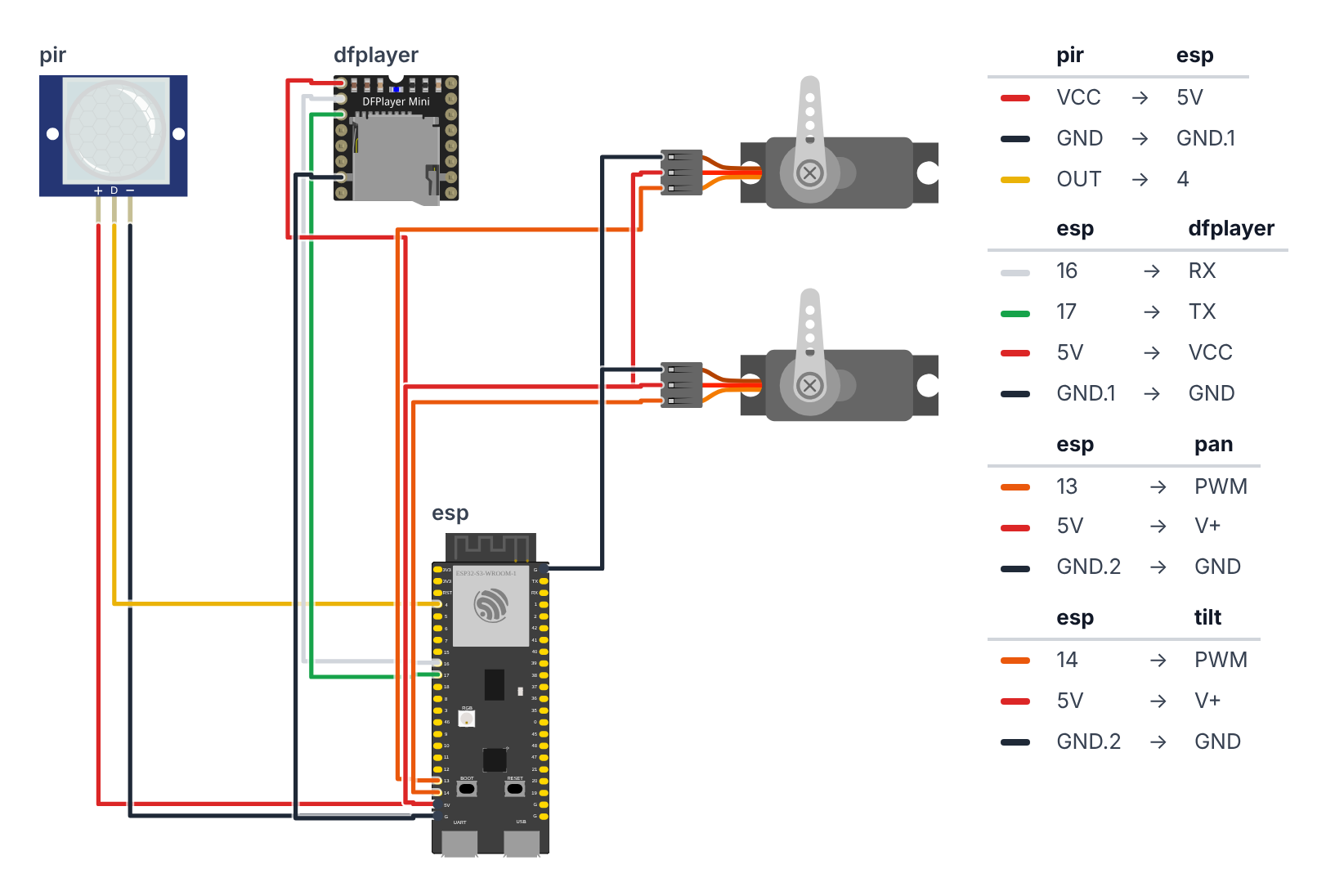
Step 1: Wire it up
Time: ~15 minutes
The pin numbers depend on your board:
| Wire | ESP32-S3 | ESP32-C6 |
|---|---|---|
| PIR signal | GPIO 4 | GPIO 0 |
| DFPlayer TX (DFPlayer talks → board listens) | GPIO 17 | GPIO 20 |
| DFPlayer RX via 1kΩ (board talks → DFPlayer listens) | GPIO 16 | GPIO 21 |
| Pan servo signal | GPIO 13 | GPIO 5 |
| Tilt servo signal | GPIO 14 | GPIO 4 |
PIR Sensor (3 wires):
- PIR Signal → board GPIO 4 (C6: GPIO 0) — yellow wire
- PIR VCC → board 5V (also labeled VIN or 5V0) — red wire
- PIR GND → board GND — black wire
DFPlayer Mini (4 wires + speaker): 4. DFPlayer TX → board GPIO 17 (C6: GPIO 20) — green wire 5. DFPlayer RX → board GPIO 16 (C6: GPIO 21) via 1kΩ resistor — white wire 6. DFPlayer VCC → board 5V — red wire 7. DFPlayer GND → board GND — black wire 8. Speaker + → DFPlayer SPK1 9. Speaker − → DFPlayer SPK2
Servo Pan — left/right eyes (3 wires): 10. Servo Signal → board GPIO 13 (C6: GPIO 5) — orange wire 11. Servo VCC → board 5V — red wire 12. Servo GND → board GND — black wire
Servo Tilt — up/down eyes (3 wires): 13. Servo Signal → board GPIO 14 (C6: GPIO 4) — orange wire 14. Servo VCC → board 5V — red wire 15. Servo GND → board GND — black wire
Check: Everything that needs power — PIR, DFPlayer and both servos — goes to 5V. The HC-SR501 PIR has its own little voltage regulator inside and is made for 4.5–20 V; on 3.3V it triggers by itself or not at all. Its signal wire still only sends 3.3V, so it’s safe for the ESP32. The 1kΩ resistor is on DFPlayer RX. TX and RX cross over: the DFPlayer’s “talk” wire (TX) goes to the board’s “listen” pin, and the other way round. 15 total connections.
Power tip: Two servos and a speaker at full volume can pull more than 500 mA in short bursts. On a weak USB port the ESP32 restarts (a “brownout”). Use a 5V 2A phone charger. If you have one, a 470–1000 µF capacitor across the servo 5V and GND rails (long leg to 5V) smooths out the bursts.
Step 2: Upload the code
Install libraries via Arduino IDE Library Manager:
ESP32Servoby Kevin HarringtonDFRobotDFPlayerMiniby DFRobot
WiFi, WebServer and ESPmDNS are already built into the ESP32 board package — nothing more to install.
The big picture first. This program turns the ESP32 into the brain of a haunted portrait that does several things at once:
- The ESP32 is the brain — it runs eye animation, PIR detection and a web page simultaneously.
- The two servos are the eye muscles — one moves the eyes left and right, one moves them up and down.
- The PIR sensor is the trigger — when it detects someone walking past, the eyes turn toward them and a voice plays.
- The DFPlayer is the voice — “I’ve been watching you,” “Get out of my house,” and more.
- The web page is your secret remote — make the portrait speak from across the room.
A program is like a recipe. The computer reads it top to bottom and does exactly what’s written, nothing more. Copy this entire recipe into Arduino IDE.
Before you upload:
- At the top, leave
#define BOARD_S3as it is for an ESP32-S3. For an ESP32-C6, put//in front of#define BOARD_S3and remove the//in front of#define BOARD_C6. - Want the remote on your home Wi-Fi? Replace
YOUR_WIFI_NAMEandYOUR_PASSWORDwith your Wi-Fi name and password. If you skip this, the portrait makes its own Wi-Fi hotspot instead — that works too.
// ========== CHOOSE YOUR BOARD ==========
// Uncomment the line for YOUR board:
#define BOARD_S3    // ESP32-S3-DevKitC-1
//#define BOARD_C6  // ESP32-C6-DevKitC-1
// ========================================

#ifdef BOARD_S3
  #define PIN_PIR              4
  #define PIN_DFPLAYER_RX      17
  #define PIN_DFPLAYER_TX      16
  #define PIN_SERVO_PAN        13
  #define PIN_SERVO_TILT       14
  #define PIN_BOARD_RGB        38
#endif
#ifdef BOARD_C6
  #define PIN_PIR              0
  #define PIN_DFPLAYER_RX      20
  #define PIN_DFPLAYER_TX      21
  #define PIN_SERVO_PAN        5
  #define PIN_SERVO_TILT       4
  #define PIN_BOARD_RGB        8
#endif

#include <ESP32Servo.h>
#include <HardwareSerial.h>
#include <DFRobotDFPlayerMini.h>
#include <WiFi.h>
#include <WebServer.h>
#include <ESPmDNS.h>

// ---------- Settings ----------
#define SOUND_LOCKOUT_MS    6000
#define TOTAL_TRACKS           7
#define VOLUME                25
#define PIR_WARMUP_MS      30000

#define PAN_CENTER      90
#define PAN_RANGE       35
#define TILT_CENTER     90
#define TILT_RANGE      20

#define EYE_SWEEP_SPEED  1
#define EYE_LOOP_DELAY  20
#define STARE_MS      3000

// ---------- Wi-Fi ----------
const char* WIFI_NAME = "YOUR_WIFI_NAME";
const char* WIFI_PASSWORD = "YOUR_PASSWORD";
const char* HOTSPOT_NAME = "BuildCool-Portrait";
const char* HOTSPOT_PASSWORD = "buildcool";
const char* WEB_NAME = "portrait";

// ---------- Parts ----------
Servo servoPan;
Servo servoTilt;
HardwareSerial mySerial(1);
DFRobotDFPlayerMini myDFPlayer;
WebServer server(80);

// ---------- Memory ----------
bool soundOk = false;
bool armed = true;
int volume = VOLUME;
int scareCount = 0;
int lastTrack = 0;
unsigned long lastSoundTime = 0;
bool ledIsOn = false;
bool motionNow = false;
String webAddress = "";

int panTarget    = PAN_CENTER;
int tiltTarget   = TILT_CENTER;
int panCurrent   = PAN_CENTER;
int tiltCurrent  = TILT_CENTER;

unsigned long eyeLastStep    = 0;
unsigned long nextEyeTarget  = 0;

// ---------- Web page ----------
const char PAGE[] PROGMEM = R"rawliteral(
<!doctype html><html lang="en"><head><meta charset="utf-8">
<meta name="viewport" content="width=device-width,initial-scale=1">
<title>Haunted Portrait · BuildCool</title>
<style>
:root{--o:#f97316;--o6:#ea580c;--o7:#c2410c;--o50:#fff7ed;--o200:#fed7aa;--g9:#111827;--g7:#374151;--g5:#6b7280;--g2:#e5e7eb;--g0:#f9fafb;--ok:#16a34a;--bad:#dc2626}
*{box-sizing:border-box}
body{margin:0;font-family:-apple-system,BlinkMacSystemFont,"Segoe UI",Roboto,"Helvetica Neue",Arial,sans-serif;color:var(--g9);background:var(--g0)}
header{position:sticky;top:0;z-index:9;background:rgba(255,255,255,.9);backdrop-filter:blur(8px);border-bottom:1px solid var(--g2)}
.wrap{max-width:640px;margin:0 auto;padding:12px 16px}
.bar{display:flex;align-items:center;justify-content:space-between}
.logo{font-size:20px;font-weight:800;letter-spacing:-.02em;color:var(--g9);text-decoration:none}
.logo span{color:var(--o)}
.badge{display:inline-flex;align-items:center;gap:8px;background:var(--o50);border:1px solid var(--o200);color:var(--o7);font-size:13px;font-weight:500;padding:4px 12px;border-radius:999px}
.dot{width:8px;height:8px;border-radius:50%;background:var(--o);animation:p 2s infinite}
.off .dot{background:var(--g5);animation:none}
@keyframes p{50%{opacity:.35}}
h1{font-size:30px;font-weight:800;letter-spacing:-.02em;line-height:1.1;margin:20px 0 6px}
h1 span{color:var(--o)}
.sub{color:var(--g5);margin:0 0 20px}
.grid{display:grid;grid-template-columns:repeat(auto-fit,minmax(140px,1fr));gap:12px}
.card{background:#fff;border:1px solid var(--g2);border-radius:16px;padding:16px}
.wide{grid-column:1/-1}
.label{font-size:13px;color:var(--g5);font-weight:500}
.value{font-size:32px;font-weight:800;letter-spacing:-.02em;margin-top:4px}
.row{display:flex;gap:8px;flex-wrap:wrap;margin-top:10px}
.btn{display:inline-flex;justify-content:center;align-items:center;padding:12px 20px;background:var(--o);color:#fff;font-weight:600;border:0;border-radius:12px;font-size:15px;text-decoration:none;cursor:pointer;box-shadow:0 10px 15px -3px var(--o200)}
.btn:active{transform:scale(.95)}
.btn.ghost{background:#fff;color:var(--g7);border:1px solid var(--g2);box-shadow:none}
.btn.big{width:100%;padding:18px;font-size:18px}
input[type=range]{width:100%;accent-color:var(--o);margin-top:12px}
.state{display:inline-block;font-size:13px;font-weight:600;padding:2px 10px;border-radius:999px;background:var(--g0);border:1px solid var(--g2)}
.state.ok{color:var(--ok);border-color:#bbf7d0;background:#f0fdf4}
.state.bad{color:var(--bad);border-color:#fecaca;background:#fef2f2}
footer{color:var(--g5);font-size:13px;text-align:center;padding:28px 16px}
footer a{color:var(--o);font-weight:600;text-decoration:none}
</style></head><body>
<header><div class="wrap bar"><a class="logo" href="https://buildcool.fun">Build<span>Cool</span></a>
<span class="badge" id="live"><span class="dot"></span><span id="livetxt">Live</span></span></div></header>
<main class="wrap">
<h1>Haunted <span>Portrait</span></h1>
<p class="sub">The painting is watching. You hold the remote.</p>
<div class="grid">
<div class="card"><div class="label">People scared</div><div class="value" id="n">–</div></div>
<div class="card"><div class="label">Motion sensor</div><div class="row"><span class="state" id="pir">–</span></div></div>
<div class="card wide"><button class="btn big" onclick="act('scare','1')">Scare now!</button>
<div class="row"><span class="state" id="snd">–</span></div></div>
<div class="card wide"><div class="label">Play a voice line</div><div class="row" id="tracks"></div></div>
<div class="card wide"><div class="label">Automatic scares</div>
<div class="row"><button class="btn" id="arm" onclick="act('armed','1')">Armed</button><button class="btn ghost" id="dis" onclick="act('armed','0')">Sleeping</button></div></div>
<div class="card wide"><div class="label">Volume · <span id="vv">–</span> / 30</div>
<input type="range" min="0" max="30" id="vol" onchange="act('volume',this.value)"></div>
</div></main>
<footer>Made with <a href="https://buildcool.fun">buildcool.fun</a></footer>
<script>
const $=id=>document.getElementById(id);
let t="";for(let i=1;i<=7;i++)t+='<button class="btn ghost" onclick="act(\'track\','+i+')">'+i+'</button>';$("tracks").innerHTML=t;
function live(ok){$("live").classList.toggle("off",!ok);$("livetxt").textContent=ok?"Live":"Offline"}
async function act(k,v){try{await fetch("/api/set?"+k+"="+encodeURIComponent(v),{method:"POST"});tick()}catch(e){live(false)}}
async function tick(){
 try{const d=await (await fetch("/api")).json();
  $("n").textContent=d.scares;
  $("pir").textContent=d.warmup?"Warming up…":(d.motion?"Someone is there!":"Nobody");
  $("pir").className="state "+(d.motion?"bad":"ok");
  $("snd").textContent=d.sound?(d.track?"Last voice line: "+d.track:"Sound ready"):"Sound module not found";
  $("snd").className="state "+(d.sound?"ok":"bad");
  $("arm").className="btn"+(d.armed?"":" ghost");$("dis").className="btn"+(d.armed?" ghost":"");
  $("vv").textContent=d.volume;if(document.activeElement!==$("vol"))$("vol").value=d.volume;
  live(true)}catch(e){live(false)}
}
tick();setInterval(tick,1000);
</script></body></html>
)rawliteral";

// ---------- Helpers ----------
void setLed(bool on) {
  if (on == ledIsOn) return;
  ledIsOn = on;
  rgbLedWrite(PIN_BOARD_RGB, on ? 64 : 0, 0, 0);
}

void blinkError(int times) {
  for (int i = 0; i < times; i++) {
    setLed(true);
    delay(150);
    setLed(false);
    delay(150);
  }
  delay(700);
}

void startSound() {
  mySerial.begin(9600, SERIAL_8N1, PIN_DFPLAYER_RX, PIN_DFPLAYER_TX);
  delay(1000);
  for (int tries = 0; tries < 5; tries++) {
    if (myDFPlayer.begin(mySerial)) {
      soundOk = true;
      myDFPlayer.volume(volume);
      Serial.println("# DFPlayer OK");
      return;
    }
    Serial.println("# DFPlayer not found! Check TX/RX wires, the 1k resistor, 5V and the SD card (FAT32, 0001.mp3...). Trying again...");
    blinkError(4);
  }
  Serial.println("# Starting without sound. The eyes still work.");
}

void playTrack(int track) {
  track = constrain(track, 1, TOTAL_TRACKS);
  lastTrack = track;
  lastSoundTime = millis();
  panTarget  = PAN_CENTER;
  tiltTarget = TILT_CENTER;
  nextEyeTarget = millis() + STARE_MS;
  Serial.print("# Playing track: ");
  Serial.println(track);
  if (soundOk) myDFPlayer.play(track);
}

void scare() {
  scareCount++;
  playTrack(random(1, TOTAL_TRACKS + 1));
}

// ---------- Wi-Fi and web server ----------
void startWiFi() {
  if (String(WIFI_NAME) != "YOUR_WIFI_NAME") {
    WiFi.mode(WIFI_STA);
    WiFi.begin(WIFI_NAME, WIFI_PASSWORD);
    Serial.print("# Joining Wi-Fi");
    unsigned long start = millis();
    while (WiFi.status() != WL_CONNECTED && millis() - start < 15000) {
      delay(250);
      Serial.print(".");
    }
    Serial.println();
    if (WiFi.status() == WL_CONNECTED) {
      webAddress = WiFi.localIP().toString();
      if (MDNS.begin(WEB_NAME)) {
        Serial.print("# Also try: http://");
        Serial.print(WEB_NAME);
        Serial.println(".local");
      }
      Serial.print("# Open in your browser: http://");
      Serial.println(webAddress);
      return;
    }
    Serial.println("# Could not join Wi-Fi, starting own hotspot instead");
  }
  WiFi.mode(WIFI_AP);
  WiFi.softAP(HOTSPOT_NAME, HOTSPOT_PASSWORD);
  webAddress = WiFi.softAPIP().toString();
  Serial.print("# Connect your phone to Wi-Fi \"");
  Serial.print(HOTSPOT_NAME);
  Serial.print("\" (password: ");
  Serial.print(HOTSPOT_PASSWORD);
  Serial.print("), then open http://");
  Serial.println(webAddress);
}

void handlePage() {
  server.send(200, "text/html", PAGE);
}

void handleApi() {
  String json = "{";
  json += "\"scares\":" + String(scareCount);
  json += ",\"motion\":" + String(motionNow ? "true" : "false");
  json += ",\"warmup\":" + String(millis() < PIR_WARMUP_MS ? "true" : "false");
  json += ",\"armed\":" + String(armed ? "true" : "false");
  json += ",\"sound\":" + String(soundOk ? "true" : "false");
  json += ",\"track\":" + String(lastTrack);
  json += ",\"volume\":" + String(volume);
  json += "}";
  server.send(200, "application/json", json);
}

void handleSet() {
  if (server.hasArg("scare")) scare();
  if (server.hasArg("track")) playTrack(server.arg("track").toInt());
  if (server.hasArg("armed")) armed = server.arg("armed") == "1";
  if (server.hasArg("volume")) {
    volume = constrain(server.arg("volume").toInt(), 0, 30);
    if (soundOk) myDFPlayer.volume(volume);
  }
  server.send(200, "application/json", "{\"ok\":true}");
}

void startWebServer() {
  server.on("/", handlePage);
  server.on("/api", handleApi);
  server.on("/api/set", HTTP_POST, handleSet);
  server.begin();
}

// ---------- Setup ----------
void setup() {
  Serial.begin(115200);
  rgbLedWrite(PIN_BOARD_RGB, 0, 0, 0);
  pinMode(PIN_PIR, INPUT_PULLDOWN);

  servoPan.setPeriodHertz(50);
  servoTilt.setPeriodHertz(50);
  servoPan.attach(PIN_SERVO_PAN, 500, 2400);
  servoTilt.attach(PIN_SERVO_TILT, 500, 2400);
  servoPan.write(PAN_CENTER);
  servoTilt.write(TILT_CENTER);
  delay(300);

  startSound();
  startWiFi();
  startWebServer();

  Serial.println("# Creepy Portrait active. It's watching.");
  Serial.println("# Motion sensor warms up for 30 seconds...");
}

// ---------- Eyes ----------
void moveEyes(unsigned long now) {
  if (now - eyeLastStep < EYE_LOOP_DELAY) return;
  eyeLastStep = now;

  if ((long)(now - nextEyeTarget) > 0) {
    panTarget  = PAN_CENTER  + random(-PAN_RANGE,  PAN_RANGE  + 1);
    tiltTarget = TILT_CENTER + random(-TILT_RANGE, TILT_RANGE + 1);
    nextEyeTarget = now + random(1500, 5000);
  }

  if (panCurrent  < panTarget)  panCurrent  += EYE_SWEEP_SPEED;
  if (panCurrent  > panTarget)  panCurrent  -= EYE_SWEEP_SPEED;
  if (tiltCurrent < tiltTarget) tiltCurrent += EYE_SWEEP_SPEED;
  if (tiltCurrent > tiltTarget) tiltCurrent -= EYE_SWEEP_SPEED;

  servoPan.write(panCurrent);
  servoTilt.write(tiltCurrent);
}

// ---------- Motion ----------
void checkMotion(unsigned long now) {
  motionNow = digitalRead(PIN_PIR) == HIGH;
  setLed(motionNow);
  if (!motionNow || now < PIR_WARMUP_MS || !armed) return;
  if (now - lastSoundTime < SOUND_LOCKOUT_MS) return;
  Serial.println("# Detected!");
  scare();
}

// ---------- Loop ----------
void loop() {
  server.handleClient();
  unsigned long now = millis();
  moveEyes(now);
  checkMotion(now);
}
Line-by-line: what every line does and why
The board selector: telling the code which ESP32 you have
#define BOARD_S3    // ESP32-S3-DevKitC-1
//#define BOARD_C6  // ESP32-C6-DevKitC-1
Different ESP32 boards have their pins in different places, like two houses with the kitchen in a different room. Only one of these lines may be “switched on” (no // in front). The matching #ifdef block then gives every pin its number for that board:
#define PIN_PIR              4
#define PIN_DFPLAYER_RX      17
#define PIN_DFPLAYER_TX      16
#define PIN_SERVO_PAN        13
#define PIN_SERVO_TILT       14
#define PIN_BOARD_RGB        38
#define gives each pin number a nickname. The PIR sensor is on pin 4. The DFPlayer talks through two pins, named from the board’s point of view: PIN_DFPLAYER_RX (17) is where the board receives — the DFPlayer’s TX wire goes here. PIN_DFPLAYER_TX (16) is where the board transmits — it goes to the DFPlayer’s RX through the resistor. The pan servo (left-right) is on pin 13, tilt (up-down) on pin 14. PIN_BOARD_RGB is the tiny color LED already soldered onto your board — GPIO 38 on the S3, GPIO 8 on the C6. Nothing to wire.
Borrowing instruction books
#include <ESP32Servo.h>
#include <HardwareSerial.h>
#include <DFRobotDFPlayerMini.h>
#include <WiFi.h>
#include <WebServer.h>
#include <ESPmDNS.h>
#include means “grab this instruction book.” ESP32Servo knows how to control servo motors. HardwareSerial is for using a built-in communication channel to the DFPlayer. DFRobotDFPlayerMini is the command language for the audio module. WiFi connects to (or creates) a Wi-Fi network, WebServer turns the ESP32 into a tiny website, and ESPmDNS gives it the friendly name portrait.local.
Settings that control personality
#define SOUND_LOCKOUT_MS    6000
#define TOTAL_TRACKS           7
#define VOLUME                25
#define PIR_WARMUP_MS      30000
#define PAN_CENTER      90
#define PAN_RANGE       35
#define TILT_CENTER     90
#define TILT_RANGE      20
#define EYE_SWEEP_SPEED  1
#define EYE_LOOP_DELAY  20
#define STARE_MS      3000
SOUND_LOCKOUT_MS 6000— at least 6 seconds between automatic voice lines (no rapid-fire spam).TOTAL_TRACKS 7— there are 7 creepy phrases on the SD card.VOLUME 25— starting volume, 25 out of 30. Audible from across a hallway but not painfully loud. You can change it later from your phone.PIR_WARMUP_MS 30000— the PIR sensor needs about 30 seconds after power-on to “get used to” the room. During that time it sends random signals, so the code ignores it.PAN_CENTER 90— straight-ahead position for the pan servo (90° is center for standard servos).PAN_RANGE 35— eyes wander up to 35 degrees left and right from center.TILT_RANGE 20— eyes wander up to 20 degrees up and down.EYE_SWEEP_SPEED 1— move exactly 1 degree per update step. Small = very smooth motion.EYE_LOOP_DELAY 20— update the eyes every 20 milliseconds (50 times per second).STARE_MS 3000— after a scare, the eyes stare straight at the victim for 3 seconds before they wander again.
Wi-Fi settings
const char* WIFI_NAME = "YOUR_WIFI_NAME";
const char* WIFI_PASSWORD = "YOUR_PASSWORD";
const char* HOTSPOT_NAME = "BuildCool-Portrait";
const char* HOTSPOT_PASSWORD = "buildcool";
const char* WEB_NAME = "portrait";
The first two lines are for your home Wi-Fi. The next two are the portrait’s own Wi-Fi network, which it creates when it can’t join yours — like a lemonade stand that brings its own table. WEB_NAME becomes the address http://portrait.local.
Objects
Servo servoPan;
Servo servoTilt;
HardwareSerial mySerial(1);
DFRobotDFPlayerMini myDFPlayer;
WebServer server(80);
Named objects for each piece of hardware. servoPan is the left-right servo, servoTilt is up-down. mySerial(1) opens UART channel 1 — a second built-in communication “radio” (channel 0 is busy talking to your computer). Channel 1 exists on both the S3 and the C6. myDFPlayer is the audio module. WebServer server(80) creates the website; 80 is the “door number” every browser knocks on by default.
Memory boxes
bool soundOk = false;
bool armed = true;
int volume = VOLUME;
int scareCount = 0;
int lastTrack = 0;
unsigned long lastSoundTime = 0;
bool ledIsOn = false;
bool motionNow = false;
String webAddress = "";soundOk— did the DFPlayer answer at startup? If not, the portrait still moves its eyes, it just stays silent.armed— may the PIR trigger voice lines? On your phone, “Sleeping” switches this off.volume,scareCount,lastTrack— current volume, your score, and the last voice line played.lastSoundTime— when the last voice line started (for the 6-second lockout).ledIsOn— remembers whether the board LED is on, so we only switch it when it changes.motionNow— does the PIR see someone right now?webAddress— the number address of the web page, like192.168.4.1.
int panTarget    = PAN_CENTER;
int tiltTarget   = TILT_CENTER;
int panCurrent   = PAN_CENTER;
int tiltCurrent  = TILT_CENTER;
These four boxes are the heart of the smooth eye movement. Target is where you want the eye to go. Current is where the eye actually is right now. They start at the same value (both centered). Every 20ms, Current steps 1 degree closer to Target. When the PIR fires, Target jumps to center instantly — but Current smoothly glides there because it can only move 1 degree at a time.
unsigned long eyeLastStep    = 0;
unsigned long nextEyeTarget  = 0;
Timer boxes: eyeLastStep remembers when we last moved the eye. nextEyeTarget is the moment when we should pick the next random gaze direction.
The web page
const char PAGE[] PROGMEM = R"rawliteral(
<!doctype html><html lang="en"><head>...
)rawliteral";
This long block is a whole web page — written in HTML (the language of websites), CSS (colors and layout) and JavaScript (the part that updates the numbers and makes the buttons work). It is stored inside the ESP32 as one giant piece of text. R"rawliteral( … )rawliteral" means “everything in between is plain text, don’t read it as C++.” PROGMEM says “keep it in the big flash memory, not in the small working memory.”
The JavaScript asks the ESP32 for fresh numbers every second. If the ESP32 doesn’t answer, the badge at the top switches from Live to Offline.
Helpers: LED and blink codes
void setLed(bool on) {
  if (on == ledIsOn) return;
  ledIsOn = on;
  rgbLedWrite(PIN_BOARD_RGB, on ? 64 : 0, 0, 0);
}
Switches the board’s RGB LED on (red) or off — but only if it’s actually changing. It’s a color LED, so digitalWrite can’t switch it: rgbLedWrite(PIN_BOARD_RGB, red, green, blue) mixes a color from three numbers between 0 and 255. on ? 64 : 0 means “if on is true, use 64, otherwise 0” — so it’s red 64 or completely off. Every change sends a special message to the LED; sending it thousands of times per second for nothing would slow the eyes down.
void blinkError(int times) {
  for (int i = 0; i < times; i++) {
    setLed(true);
    delay(150);
    setLed(false);
    delay(150);
  }
  delay(700);
}
A blink code — a secret message from the board. It flashes the LED a certain number of times, then pauses. Like Morse code for “something’s wrong.” In this project, 4 blinks means “I can’t talk to the DFPlayer.”
startSound(): wake up the voice — and don’t give up too fast
mySerial.begin(9600, SERIAL_8N1, PIN_DFPLAYER_RX, PIN_DFPLAYER_TX);
delay(1000);
for (int tries = 0; tries < 5; tries++) {
  if (myDFPlayer.begin(mySerial)) {
    soundOk = true;
    myDFPlayer.volume(volume);
    ...
    return;
  }
  Serial.println("# DFPlayer not found! Check TX/RX wires, ...");
  blinkError(4);
}
Serial.println("# Starting without sound. The eyes still work.");
First, open the communication channel at 9600 bits per second (the speed the DFPlayer understands) on our two pins, and give the DFPlayer a second to wake up. Then try to say hello to it — up to 5 times. If it answers, remember soundOk = true, set the volume and we’re done (return leaves the function).
If it doesn’t answer, print a hint about what to check and blink 4 times. After 5 failed tries, the portrait doesn’t freeze — it keeps going without sound. The eyes still move and the web page still works, and the page shows “Sound module not found.” A broken speaker shouldn’t kill the whole haunted house!
playTrack() and scare(): the moment of truth
void playTrack(int track) {
  track = constrain(track, 1, TOTAL_TRACKS);
  lastTrack = track;
  lastSoundTime = millis();
  panTarget  = PAN_CENTER;
  tiltTarget = TILT_CENTER;
  nextEyeTarget = millis() + STARE_MS;
  ...
  if (soundOk) myDFPlayer.play(track);
}
constrain(track, 1, TOTAL_TRACKS) squeezes the track number into 1–7, even if a strange number comes from the phone — never trust input from outside! Then remember the track and the time, and set both eye targets to straight ahead. nextEyeTarget = millis() + STARE_MS is the stare trick: “don’t pick a new random direction for 3 seconds.” So the eyes glide to the center and hold there, looking right at the victim. Finally — only if the DFPlayer is working — play the voice line.
void scare() {
  scareCount++;
  playTrack(random(1, TOTAL_TRACKS + 1));
}
A scare = add 1 to the score and play a random track. random(1, 8) gives 1–7, never 8.
startWiFi(): home Wi-Fi or own hotspot
if (String(WIFI_NAME) != "YOUR_WIFI_NAME") {
  WiFi.mode(WIFI_STA);
  WiFi.begin(WIFI_NAME, WIFI_PASSWORD);
  ...
  while (WiFi.status() != WL_CONNECTED && millis() - start < 15000) { delay(250); ... }
If you typed in your Wi-Fi name, the ESP32 tries to join it — for at most 15 seconds, printing a dot every quarter second. If it works, it prints the address (like http://192.168.1.57) and starts the portrait.local name.
WiFi.mode(WIFI_AP);
WiFi.softAP(HOTSPOT_NAME, HOTSPOT_PASSWORD);
If you didn’t change the Wi-Fi name, or joining failed, the ESP32 creates its own Wi-Fi network called BuildCool-Portrait with password buildcool. This is a hotspot fallback — plan B, so your remote always works. In hotspot mode, the page is always at http://192.168.4.1.
The web server: three addresses
server.on("/", handlePage);
server.on("/api", handleApi);
server.on("/api/set", HTTP_POST, handleSet);
Like a receptionist with three desks:
/hands out the web page./apianswers “what’s going on?” with a short text called JSON, for example{"scares":3,"motion":false,"warmup":false,"armed":true,"sound":true,"track":5,"volume":25}. The page reads it every second./api/settakes orders from the buttons:scare=1,track=4,armed=0orarmed=1,volume=20.
if (server.hasArg("volume")) {
  volume = constrain(server.arg("volume").toInt(), 0, 30);
  if (soundOk) myDFPlayer.volume(volume);
}
Every value from the phone is checked: the volume is squeezed into 0–30 (the DFPlayer’s range), and the track number is squeezed into 1–7 inside playTrack().
setup(): runs once at power-on
rgbLedWrite(PIN_BOARD_RGB, 0, 0, 0);
pinMode(PIN_PIR, INPUT_PULLDOWN);
The board’s RGB LED starts off (no red, no green, no blue). The PIR pin reads voltage in. INPUT_PULLDOWN adds a tiny invisible resistor that gently pulls the pin to LOW, so a loose PIR wire reads “nobody” instead of random ghost signals.
servoPan.setPeriodHertz(50);
servoTilt.setPeriodHertz(50);
servoPan.attach(PIN_SERVO_PAN, 500, 2400);
servoTilt.attach(PIN_SERVO_TILT, 500, 2400);
servoPan.write(PAN_CENTER);
servoTilt.write(TILT_CENTER);
delay(300);
Servos listen for a pulse 50 times per second (50 Hz). attach(pin, 500, 2400) connects each servo and tells the library the SG90’s real pulse range: 500 microseconds = 0°, 2400 microseconds = 180°. Then write both to center (90°) — the eyes look straight ahead at startup. delay(300) gives the motors 300ms to get there.
startSound();
startWiFi();
startWebServer();
Wake up the voice, start Wi-Fi, start the website. Then print that the portrait is active and the PIR is warming up.
moveEyes(): the slow, creepy glances (every 20ms)
if (now - eyeLastStep < EYE_LOOP_DELAY) return;
eyeLastStep = now;
This function is called thousands of times per second, but it only does something every 20 milliseconds. “Has it been 20ms since the last eye step? No? Then leave right away.”
if ((long)(now - nextEyeTarget) > 0) {
  panTarget  = PAN_CENTER  + random(-PAN_RANGE,  PAN_RANGE  + 1);
  tiltTarget = TILT_CENTER + random(-TILT_RANGE, TILT_RANGE + 1);
  nextEyeTarget = now + random(1500, 5000);
}
Has the time come to pick a new gaze direction? now - nextEyeTarget is how far past the planned moment we are; if it’s more than 0, it’s time. (Writing it as a subtraction instead of now > nextEyeTarget keeps it working even after 49 days, when the millis() stopwatch runs out of digits and starts again at 0.) random(-PAN_RANGE, PAN_RANGE + 1) gives a number from -35 to +35. Adding it to PAN_CENTER (90) gives a target between 55° and 125° — safely within servo range. Then schedule the next gaze change in 1.5 to 5 seconds.
if (panCurrent  < panTarget)  panCurrent  += EYE_SWEEP_SPEED;
if (panCurrent  > panTarget)  panCurrent  -= EYE_SWEEP_SPEED;
if (tiltCurrent < tiltTarget) tiltCurrent += EYE_SWEEP_SPEED;
if (tiltCurrent > tiltTarget) tiltCurrent -= EYE_SWEEP_SPEED;
This is the smooth-move algorithm — just four if statements. “Is Current less than Target?” Add 1 degree. “Is Current greater than Target?” Subtract 1 degree. Since we move only 1 degree at a time, 50 times per second, the maximum speed is 50°/second — slow enough to look deliberate and alive.
servoPan.write(panCurrent);
servoTilt.write(tiltCurrent);
Send the updated positions to the physical servos. Without these two lines, all the math above would happen invisibly in memory and the eyes would never move.
checkMotion(): is someone there?
motionNow = digitalRead(PIN_PIR) == HIGH;
setLed(motionNow);
if (!motionNow || now < PIR_WARMUP_MS || !armed) return;
if (now - lastSoundTime < SOUND_LOCKOUT_MS) return;
Serial.println("# Detected!");
scare();
Read the PIR: HIGH means “body heat moving!” The board LED copies the PIR — on when it sees someone. That’s super handy for aiming the sensor at the hallway.
Then four “not now” checks, each one can stop the scare: nobody there, still warming up (first 30 seconds), portrait is sleeping, or the last voice line was less than 6 seconds ago. If all four checks pass — scare!
loop(): repeats forever
void loop() {
  server.handleClient();
  unsigned long now = millis();
  moveEyes(now);
  checkMotion(now);
}
Three jobs, thousands of times per second: answer the phone if it’s asking something, move the eyes a tiny bit, and check for victims. There is no long delay() here — nothing ever waits — so the eyes stay smooth while the web page answers. This is called non-blocking code.
The whole thing in one sentence
When powered on, both eye servos center, the voice module and Wi-Fi start, and the PIR warms up (setup); then forever (loop) the code answers your phone, moves the eyes 1 degree closer to a randomly changing gaze target every 20ms, AND checks the PIR — when someone walks past (or you press Scare now!), the eyes glide to center, stare, and a creepy voice plays.
First thing to try: upload the code and just watch the servos for 30 seconds. You should see tiny, slow, purposeful movements every 1.5–5 seconds. That’s the portrait’s resting gaze. After the 30-second warm-up, walk in front of it — both servos should smoothly swing toward center and you should hear a voice line.
Check: Open Serial Monitor at 115200. You should see
# DFPlayer OK, the Wi-Fi address and# Creepy Portrait active. It's watching.After 30 seconds, walk in front of the portrait — you should see# Detected!and# Playing track: Nand hear the voice line. The board LED lights up whenever the PIR sees you.
Step 3: Your secret remote
If you did NOT change the Wi-Fi name in the code:
- On your phone, join the Wi-Fi BuildCool-Portrait (password: buildcool).
- Open the browser and go to http://192.168.4.1
If you entered your home Wi-Fi:
- Keep your phone on the same home Wi-Fi.
- Open http://portrait.local — or the number address the Serial Monitor printed.
On the page you see:
- People scared — your score since power-on.
- Motion sensor — “Warming up…”, “Nobody” or “Someone is there!”, live.
- Scare now! — the portrait speaks a random line right now. Perfect timing, every time. The sound status below it tells you if the DFPlayer is working.
- Play a voice line — buttons 1–7 to pick a specific line (save the shriek on track 7 for the grand finale).
- Automatic scares — “Armed” lets the PIR trigger voices; “Sleeping” means only your phone can make it speak. The eyes keep moving either way.
- Volume — slide between 0 and 30.
For parents: Anyone who is on the same Wi-Fi can open the page and press the buttons. If you use the hotspot at a party, change
HOTSPOT_PASSWORDin the code to your own password (at least 8 characters).
Step 4: Hang it and adjust
Time: ~15 minutes
Hang the portrait at eye level in a hallway. The closer it is to the walking path, the better the PIR detection works. Watch the board LED (or the Motion sensor card on your phone) while a friend walks past to check that the PIR sees the path.
Safety for parents: Never hang the portrait at the top of stairs or next to steps — a startled guest can stumble and fall. Hang it securely (the servos make it heavier than a normal picture), and keep it away from small children or anyone who may be truly frightened.
Adjusting eye range:
If the eye discs hit the edge of their holes, reduce PAN_RANGE from 35 to 25. If the movement looks too subtle, increase it. The sweet spot is “noticeable in peripheral vision but not obvious when looking directly.”
Testing the full effect: Turn off the hallway light (this project is best in near-darkness). Have someone walk past the portrait without telling them about the voice. Watch their face when the portrait speaks.
A note on setup: Don’t tell people there’s a talking portrait. Don’t tell them there’s anything in the hallway. Let them walk past and discover it themselves. The delayed realization — “wait, did that painting just…?” — is the entire experience. Even better: switch to Sleeping and fire Scare now! from your phone at the perfect moment.
What just happened (what you learned)
-
Smooth animation through incremental stepping — instead of
servo.write(target)which snaps instantly and sounds like grinding, the code moves 1 degree per 20ms. At 50 updates/second that’s 50°/second — slow enough to look intentional and biological. -
Separating target from current state —
panTargetandpanCurrentare two different variables. The target can change instantly (eyes jump toward center when PIR fires), but the current position changes gradually. This decoupled design means you can update the destination at any moment and the motion redirects smoothly. -
Randomness with bounded ranges —
random(-PAN_RANGE, PAN_RANGE + 1)generates a number from -35 to +35. Adding this toPAN_CENTER(90) keeps the eye between 55° and 125° — never exceeding physical limits that would stall or damage the servo. Always constrain randomness when hardware limits matter. -
Graceful failure — when the DFPlayer doesn’t answer, the code retries, blinks a code, and then keeps running without sound instead of freezing. Real products do this too: if one part breaks, the rest keeps working.
-
A web remote with a hotspot fallback — the ESP32 joins your Wi-Fi if it can, and makes its own if it can’t. The phone talks to it through a tiny JSON “API,” and every value from outside is checked with
constrain(). -
The psychology of subtle wrong motion — the portrait is disturbing because the eyes move slowly and purposefully, not because they move fast. Smooth, lifelike motion triggers the “uncanny valley” response — something looks almost alive, which is more unsettling than obviously mechanical motion.
Level Up
Two-PIR tracking: Add a second PIR facing the other side of the hallway (S3: GPIO 5, C6: GPIO 1 — add it as PIN_PIR2 to both board blocks). When only the left PIR detects motion, move eyes left. When only the right fires, move eyes right. When both fire, go to center. Creates the illusion of actual tracking.
Startled response: When PIR fires, temporarily increase EYE_SWEEP_SPEED to 5 for 500ms, then slow back to 1. Makes the portrait look like it was startled, then pretends not to care.
Rare personalized message: scareCount already counts the scares. When it reaches 5, play a special track that only says “You keep coming back,” and make STARE_MS longer for that one scare. People notice being singled out.
★★ You completed: Creepy Talking Portrait!
Troubleshooting
Blink codes — the board’s RGB LED (red) tells you what’s wrong:
| LED | Meaning | Fix |
|---|---|---|
| 4 blinks, repeated 5 times at startup | DFPlayer not answering | Check TX/RX are crossed (DFPlayer TX → board GPIO 17 / C6 GPIO 20), the 1kΩ resistor is on DFPlayer RX, DFPlayer VCC on 5V, and the SD card. After 5 tries the portrait runs without sound. |
| On while someone moves in front | PIR sees motion | That’s normal — use it to aim the sensor. |
| Problem | Fix |
|---|---|
| Eyes not moving | Check both servo VCC wires are on 5V. Verify the servo signal wires are on GPIO 13 and 14 (C6: GPIO 5 and 4). Upload test code that just does servo.write(45) then servo.write(135) to confirm basic servo function. |
| Eye movement too jittery | Increase EYE_LOOP_DELAY to 30 (EYE_SWEEP_SPEED is already at its smallest, 1). Also check servo VCC is on 5V, not 3.3V — insufficient voltage causes servo jitter. |
| Voice doesn’t play | Look for # DFPlayer not found! in Serial Monitor, or “Sound module not found” on the phone page. SD card must be FAT32, files in root named 0001.mp3 to 0007.mp3 (or in a folder /mp3/0001.mp3). Check the 1kΩ resistor on DFPlayer RX and that TX/RX cross over. Some cheap DFPlayer copies don’t answer the “hello” — try myDFPlayer.begin(mySerial, false). |
| Nothing happens for the first 30 seconds | That’s the PIR warm-up. The phone page shows “Warming up…”. |
| PIR fires too often / by itself | Make sure PIR VCC is on 5V, not 3.3V. Adjust sensitivity pot on back of PIR. Set lockout higher (SOUND_LOCKOUT_MS 10000). If the portrait is near a vent or heat source, move it — PIR responds to temperature changes. |
| Portrait never speaks on its own, but “Scare now!” works | It’s set to Sleeping — tap Armed on the phone page. |
| ESP32 restarts when the voice plays or the eyes move | Brownout: not enough power. Use a 5V 2A phone charger instead of a laptop port, and add a 470–1000 µF capacitor across the servo 5V/GND. |
| C6 board won’t boot or upload with the servos connected | GPIO 4 and 5 are special “boot” pins on the C6. Unplug the servo signal wires while uploading, then plug them back in. |
| Eye discs hitting edges of holes | Reduce PAN_RANGE from 35 to 20–25 and TILT_RANGE from 20 to 15. |
| Speaker is muffled | The frame backing might be blocking too much sound. Add a small cutout or grill in the backing panel directly in front of the speaker cone. |
| Phone can’t find the page | Hotspot mode: join BuildCool-Portrait (password buildcool) and open http://192.168.4.1. Some phones switch back to mobile data on a Wi-Fi without internet — tap “Stay connected.” Home Wi-Fi mode: use the number address from the Serial Monitor if portrait.local doesn’t work. The ESP32 only works with 2.4 GHz Wi-Fi. |
| “Sketch too big” when uploading | Tools → Partition Scheme → Huge APP (3MB No OTA/1MB SPIFFS). |
| Board LED doesn’t light | Very early S3 boards (v1.0) have the RGB LED on GPIO 48 instead of 38 — change 38 to 48 in the S3 block. Everything else still works without it — watch the Serial Monitor and the phone page instead. |