Parent info
Parts you need
Affiliate links — we may earn a small commission
Try this circuit in your browser!
Run the code, press the buttons and watch what happens — before you buy any parts. No account needed.
Open in Simulator →The wand only moves when your cat is actually there.
Imagine this: your cat walks into the living room. A feather on a wire suddenly starts sweeping left and right in an unpredictable arc — slow, then fast, then it freezes and darts the other direction. Your cat never saw it start. It’s just there, waiting for them.
That’s the trick: a PIR motion sensor detects your cat’s body heat and wakes the servo up. When your cat leaves the room, the wand stops after 30 seconds. It only runs when there’s actually a cat to play with.
Build time: 1 hour. Cost: ~$20.
What you’ll need
| Part | What it does | Price |
|---|---|---|
| ESP32-S3 Dev Board | The brain. Reads the sensor and drives the servo. | ~$12 |
| SG90 Servo Motor | Sweeps the wand in arcs. | ~$3 |
| PIR Motion Sensor HC-SR501 | Detects your cat’s body heat entering the room. | ~$2 |
| Feather toy or craft feathers + wire | The actual wand. Attach to servo horn. | ~$3 |
| Breadboard + jumper wires | Connects everything. No soldering. | ~$5 |
You also need: the free Arduino IDE and a USB-C cable.
Total: ~$20 | Time: ~1 hour | Difficulty: ●○○○○
How it works (60 seconds)
Think of it like a motion-activated light, but instead of turning on a bulb, it starts a toy. The HC-SR501 PIR sensor has a dome that detects infrared radiation — which is just heat. When a warm body (your cat) moves across its field of view, the sensor outputs a HIGH signal. The ESP32 reads that and starts the wand sweeping.
The clever part: the ESP32 picks a new random speed and direction every 2–5 seconds. Cats are incredibly good at predicting repetitive motion — the moment they figure out a pattern, they lose interest. Randomness keeps them guessing indefinitely.
Step 0: Prepare the wand
Time: ~10 minutes
Before any electronics, build the physical wand:
- Attach the servo to a table edge, door frame, or a shelf edge. The servo body stays fixed. The servo horn (the rotating arm) points outward into open air.
- Zip-tie a 30cm length of lightweight wire or stiff string to the servo horn. Use two zip ties crossing at the tip of the horn for a secure hold.
- Attach a feather toy to the end of the wire. Craft feathers from a fabric store work great. A small knot or bead holds them in place.
- Place the PIR sensor nearby with a clear view of the room entrance. It has a 7-meter detection range and 120-degree angle.
Check: Move the servo horn by hand to roughly 30° and 150°. The wand should sweep freely without tangling around the servo body. Adjust the mounting height if needed.
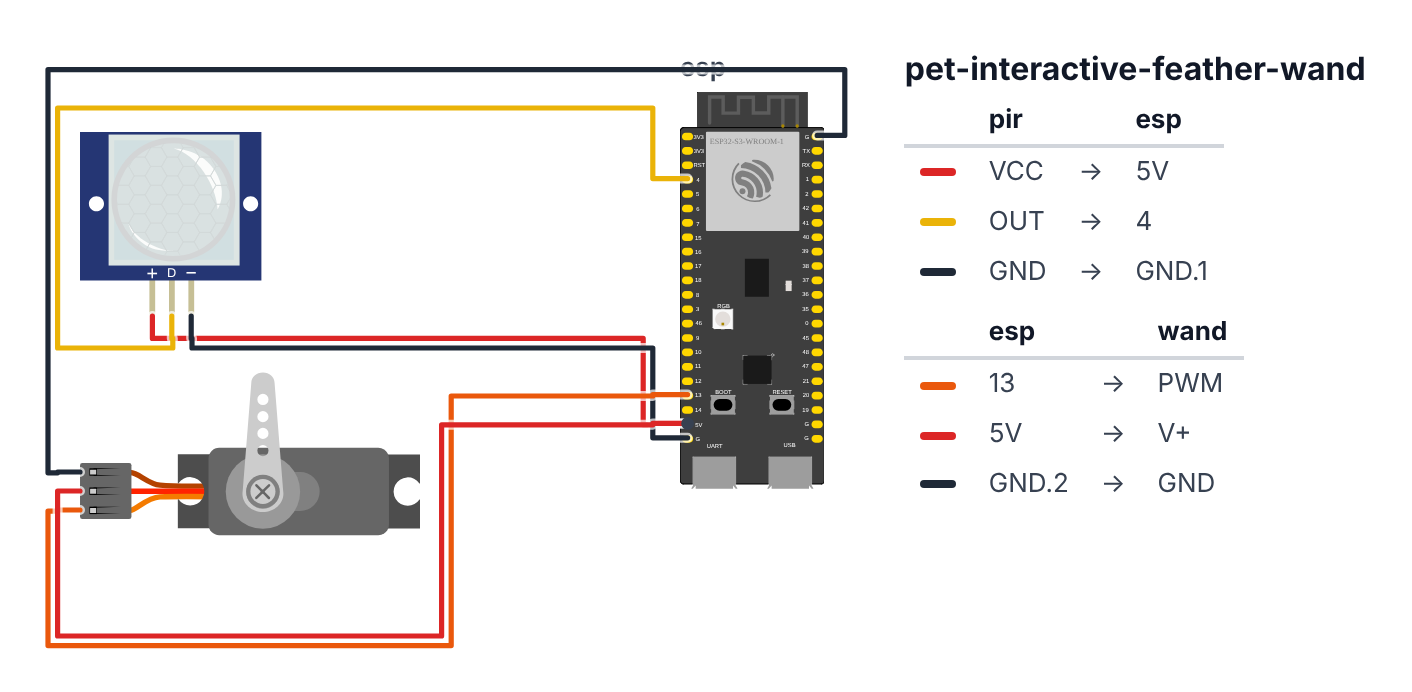
Step 1: Wire it up
Time: ~5 minutes
You’re connecting 6 wires total.
PIR Sensor HC-SR501 (3 wires):
- PIR VCC → board VIN (5V) — red wire
- PIR OUT → board GPIO 4 (C6: GPIO 0) — yellow wire
- PIR GND → board GND — black wire
SG90 Servo (3 wires): 4. Servo Signal (orange wire) → board GPIO 13 (C6: GPIO 5) — orange wire 5. Servo VCC (red wire) → board VIN (5V) — red wire 6. Servo GND (brown wire) → board GND — black wire
Check: The HC-SR501 has 3 pins. Facing the dome side: left is VCC, middle is OUT, right is GND. Verify before connecting.
Check: 6 wires total: 2 red (power), 2 black/brown (ground), 1 yellow (PIR signal), 1 orange (servo signal). Board NOT plugged in yet.
Step 2: Upload the code
Time: ~5 minutes
Install ESP32Servo by Kevin Harrington in Arduino IDE (Sketch > Manage Libraries), then upload:
The big picture first. This program has one clever trick: it only runs when a cat is actually in the room.
- The PIR sensor detects infrared heat — your cat’s body warmth. When the cat enters, the sensor pin goes HIGH. When the cat leaves, the sensor goes LOW.
- The servo motor sweeps the feather in arcs. Instead of a fixed pattern (which cats figure out in minutes), it picks a new random speed and direction every 2–5 seconds.
- The 30-second timeout is key: if no motion is detected for 30 seconds, the wand parks at center and stops. Your cat returns later and the wand surprises them again — because it was off.
// ========== CHOOSE YOUR BOARD ==========
// Uncomment the line for YOUR board:
#define BOARD_S3    // ESP32-S3-DevKitC-1
//#define BOARD_C6  // ESP32-C6-DevKitC-1
// ========================================

#ifdef BOARD_S3
  #define PIN_PIR              4
  #define PIN_SERVO            13
#endif
#ifdef BOARD_C6
  #define PIN_PIR              0
  #define PIN_SERVO            5
#endif

#include <ESP32Servo.h>

Servo wand;

bool catPresent        = false;
unsigned long lastDetected = 0;
const unsigned long stopDelay = 30000;

int currentAngle    = 90;
int targetAngle     = 90;
int sweepSpeed      = 1;
unsigned long lastUpdate      = 0;
unsigned long nextSpeedChange = 0;

void setup() {
  Serial.begin(115200);
  pinMode(PIN_PIR, INPUT);
  randomSeed(esp_random());

  wand.attach(PIN_SERVO);
  wand.write(90);
  delay(500);
}

void loop() {
  unsigned long now = millis();

  if (digitalRead(PIN_PIR) == HIGH) {
    catPresent   = true;
    lastDetected = now;
    Serial.println("Cat detected!");
  }

  if (catPresent && (now - lastDetected > stopDelay)) {
    catPresent = false;
    wand.write(90);
    Serial.println("Cat gone. Wand stopped.");
    return;
  }

  if (!catPresent) return;

  if (now > nextSpeedChange) {
    sweepSpeed      = random(1, 5);
    targetAngle     = random(30, 150);
    nextSpeedChange = now + random(2000, 5000);
  }

  if (now - lastUpdate > (20 / sweepSpeed)) {
    lastUpdate = now;

    if (currentAngle < targetAngle) currentAngle = min(currentAngle + 1, 150);
    if (currentAngle > targetAngle) currentAngle = max(currentAngle - 1, 30);

    wand.write(currentAngle);
  }
}
Line-by-line: what every line does and why
Line 1: The servo instruction book
#include <ESP32Servo.h>This gives the ESP32 the ability to control servo motors. Without it, wand.write(90) would mean nothing to the compiler.
Lines 3–4: Which pins
#ifdef BOARD_S3
  #define PIN_PIR              4
  #define PIN_SERVO            13
#endif
#define gives a number a permanent name. The PIR sensor’s output wire goes to pin 4. The servo’s orange signal wire goes to pin 13. (On the C6, the #ifdef BOARD_C6 block uses pins 0 and 5 instead.) Using names instead of bare numbers means if you ever change the wiring, you only update one line.
Line 6: Naming the servo
Servo wand;This creates a servo object called wand. From now on, wand.write(90) sends the feather servo to 90 degrees (center position).
Lines 8–15: The tracking variables
bool catPresent        = false;
unsigned long lastDetected = 0;
const unsigned long stopDelay = 30000;
catPresent is a flag — like a light switch. false means “no cat in room.” lastDetected is a timestamp of the last time motion was detected. stopDelay = 30000 is 30,000 milliseconds = 30 seconds. If 30 seconds pass since the last motion, the code assumes the cat left.
int currentAngle    = 90;
int targetAngle     = 90;
int sweepSpeed      = 1;
currentAngle is where the wand is right now. targetAngle is where it’s trying to go. sweepSpeed controls how often the code takes a step — like setting your walking pace. The wand glides by moving one degree at a time on a timer, rather than jumping instantly.
setup(): preparing to play
randomSeed(esp_random());esp_random() gets a number from the ESP32’s built-in random number maker, which listens to radio noise — pure static, different every time. This seeds the random number generator so the wand never repeats the same pattern between boots. Your cat gets a different toy personality every time the ESP32 restarts.
wand.attach(PIN_SERVO);
wand.write(90);
delay(500);
attach connects the servo object to the physical pin. wand.write(90) moves it to center. delay(500) waits 500 milliseconds — gives the servo time to physically reach center before the program continues.
loop(): checking for cats and moving the wand
if (digitalRead(PIN_PIR) == HIGH) {
  catPresent   = true;
  lastDetected = now;
}
digitalRead checks whether the pin is HIGH (3.3V = motion detected) or LOW (0V = no motion). When HIGH, two things happen: catPresent = true flips the switch, and lastDetected = now resets the 30-second countdown clock.
if (catPresent && (now - lastDetected > stopDelay)) {
  catPresent = false;
  wand.write(90);
  return;
}
“If a cat was present, but more than 30 seconds have passed since the last detection — stop.” wand.write(90) parks the feather at center. return exits the loop immediately — no further wand movement this cycle.
if (!catPresent) return;! means NOT. “If cat is NOT present, stop here.” This single line makes the entire rest of the loop skip when no cat is around. The wand stays parked.
if (now > nextSpeedChange) {
  sweepSpeed      = random(1, 5);
  targetAngle     = random(30, 150);
  nextSpeedChange = now + random(2000, 5000);
}
Every 2–5 seconds, pick a new random speed (1–4) and a new target angle (30°–150°). random(2000, 5000) means between 2 and 5 seconds until the next change. Cats predict patterns extremely well — this randomness is what keeps them hunting instead of getting bored.
if (now - lastUpdate > (20 / sweepSpeed)) {
  lastUpdate = now;
  if (currentAngle < targetAngle) currentAngle = min(currentAngle + 1, 150);
  if (currentAngle > targetAngle) currentAngle = max(currentAngle - 1, 30);
  wand.write(currentAngle);
}
“If enough time has passed since the last step, take one step toward the target.” 20 / sweepSpeed is the step interval in milliseconds. At speed 1: step every 20ms (slow). At speed 4: step every 5ms (fast — 4× faster). min(currentAngle + 1, 150) adds 1 but never goes above 150 degrees — the physical limit of the safe sweep range. wand.write(currentAngle) actually moves the servo.
The whole thing in one sentence
When the cat enters the room, the wand starts sweeping in random arcs at random speeds. When the cat leaves (or after 30 seconds of no motion), the wand parks and waits silently for the next visit.
First thing to try: walk in front of the PIR sensor. The servo should start moving within 1–2 seconds. Walk away and stay still — after 30 seconds, the servo should return to 90 degrees and stop.
Check: Open Serial Monitor at 115200 baud. Walk in front of the PIR sensor. You should see “Cat detected!” printed. Wait 30 seconds without moving — you should see “Cat gone. Wand stopped.” and the servo returns to center.
Step 3: Tune the PIR sensor
Time: ~5 minutes
The HC-SR501 has two small potentiometers on the back of the board:
- Left knob (sensitivity): Turn clockwise to increase range (up to 7 meters). For a small room, medium setting is fine.
- Right knob (hold time): Turn fully counter-clockwise for the fastest response. This controls how long the output stays HIGH after detecting motion.
There’s also a jumper on the board. Position H = the output pulses (better for this project). Position L = single trigger. Leave it on H.
Check: After adjusting, walk into the room from the doorway. The servo should start within 1–2 seconds of you entering. If it doesn’t trigger until you’re in the middle of the room, turn the sensitivity knob clockwise.
Step 4: Let your cat discover it!
Time: the fun part
Don’t introduce the toy — just set it up in a room your cat uses and leave. Discovery on their own terms gets far better engagement than being shown.
What to expect:
- First interaction: they’ll approach slowly, then pounce
- After a few minutes: full sprint mode
- When they leave: wand stops. They come back later and it surprises them again.
The random speed changes are the secret. Every 2–5 seconds the wand changes direction and pace. Cats figure out repetitive motion in minutes — the randomness keeps them hunting indefinitely.
What just happened (what you learned)
- PIR sensors detect infrared radiation — not movement exactly, but the temperature difference when a warm body crosses an infrared zone. Your cat doesn’t need to trigger a beam; they just need to enter the field of view. The HC-SR501 “feels” the cat before it sees the wand.
- Speed control without
delay()— the code never freezes withdelay(). Instead it tracks the last time it moved and only acts when enough time has passed (now - lastUpdate > 20/sweepSpeed). This is the standard pattern for all responsive Arduino projects. random(min, max)seeded from noise —esp_random()reads the ESP32’s hardware random number maker, which listens to radio static. That noise seeds the random number generator so the pattern is different every boot. Your cat gets a different toy every single time the ESP32 restarts.
Level Up
Excitement tracking: Add an excitement variable that increases each time the PIR fires within 2 seconds of the last detection (cat actively chasing). Multiply sweepSpeed by excitement. When the cat stops chasing and excitement decays, the wand slows to a stalking pace. The toy responds to your cat’s actual energy level.
Burst mode: After the wand reaches its target, 20% of the time (if (random(100) < 20)) set sweepSpeed = 4 and pick a target on the opposite side. This simulates prey suddenly bolting — the most exciting move cats ever see.
Add the laser chaser: If you already built the laser chaser (Project 1), wire the PIR from that project to the feather wand’s PIR pin. Both toys wake up when your cat enters the room. Chaos.
★★ You completed: Interactive Feather Wand!
Troubleshooting
| Problem | Fix |
|---|---|
| PIR never triggers | Check wiring: VCC on 5V (not 3.3V), OUT on GPIO 4 (C6: GPIO 0), GND on GND. Turn sensitivity knob clockwise. |
| Wand never stops | The HC-SR501 hold-time knob might be set very long. Turn it fully counter-clockwise. Also check stopDelay = 30000 (30 seconds) is in the code. |
| Servo twitches at startup then stops | Normal — it moves to 90° center on boot. If it keeps twitching, power issue: add a 100µF capacitor across servo VCC and GND. |
| PIR triggers from sunlight through a window | PIR sensors false-trigger from sunlight moving across the room. Angle the sensor away from windows. |
| Cat ignores the wand | Make sure the wand can actually swing freely and is within their reach height. Try moving the servo to a lower position — floor level for kittens. |
| Servo makes grinding noise | The wand is too heavy or tangled. Lighten the wire. Check nothing is blocking the swing range. |