Parent info
Parts you need
Affiliate links — we may earn a small commission
Try this circuit in your browser!
Run the code, press the buttons and watch what happens — before you buy any parts. No account needed.
Open in Simulator →Go on vacation. Your fish will be fine.
Imagine this: you’re at the airport, and the thought hits you — did I remember to ask someone to feed the fish? Pull out your phone, check the feeder dashboard: “Fed at 8:00 AM — all good.” You board the plane with zero anxiety.
That’s what this builds. An ESP32 syncs its clock to the internet, rotates a food wheel at 8am and 6pm every day, and logs every feeding with a timestamp. You can also trigger a manual feed from anywhere with WiFi, just by opening a web page.
Build time: 90 minutes. Cost: ~$20.
What you’ll need
| Part | What it does | Price |
|---|---|---|
| ESP32-S3 Dev Board | The brain. Checks the time and controls the servo. Runs for weeks on a USB charger. | ~$12 |
| SG90 Servo Motor | Rotates the food wheel. One 60° rotation = one portion of food falls. | ~$3 |
| 3D printed feeder wheel | Wheel with small compartments — each holds one food portion. Free from Printables.com. | Free |
| USB phone charger | Powers the ESP32. Any 5V charger works — even a 5W one. | ~$5 |
You also need: home WiFi, the free Arduino IDE, and a USB-C cable.
Total: ~$20 | Time: ~90 minutes | Difficulty: ●●○○○
How it works (60 seconds)
Think of it like an alarm clock that feeds your fish instead of waking you up. The ESP32 connects to WiFi, then fetches the exact current time from the internet (NTP — the same servers your phone uses). Every 30 seconds it checks: is it 8am? Is it 6pm? If yes, rotate the servo 60 degrees. One food wheel compartment tips over the tank opening. Food falls. Servo returns to starting position. Done.
The fedToday flag prevents double-feeding: even if the check runs twice at exactly 8:00, the flag ensures the servo only moves once.
Step 0: Print and assemble the food wheel
Time: ~10 minutes (not counting print time)
Search Printables.com for: “fish feeder servo wheel ESP32”
Look for a design with 4–6 small compartments around the rim — each compartment holds one food portion. Print in PLA or PETG (food-safe with proper settings).
- Attach the wheel to the SG90 servo horn — most designs use a press-fit or a single screw through the center.
- Position the feeder above the tank opening. The wheel should rotate so that one compartment tips over the opening with each 60° rotation.
- Secure the servo with hot glue or a 3D-printed mount. The servo body stays fixed; only the wheel rotates.
Check: Manually rotate the wheel 60 degrees. Food from one compartment should fall into the tank opening cleanly. Rotate back 60 degrees — next compartment is now in position. Adjust
WHEEL_DEGREESin the code if your wheel has a different number of compartments (e.g., 45° for 8 compartments, 90° for 4).
Step 1: Wire it up
Time: ~3 minutes
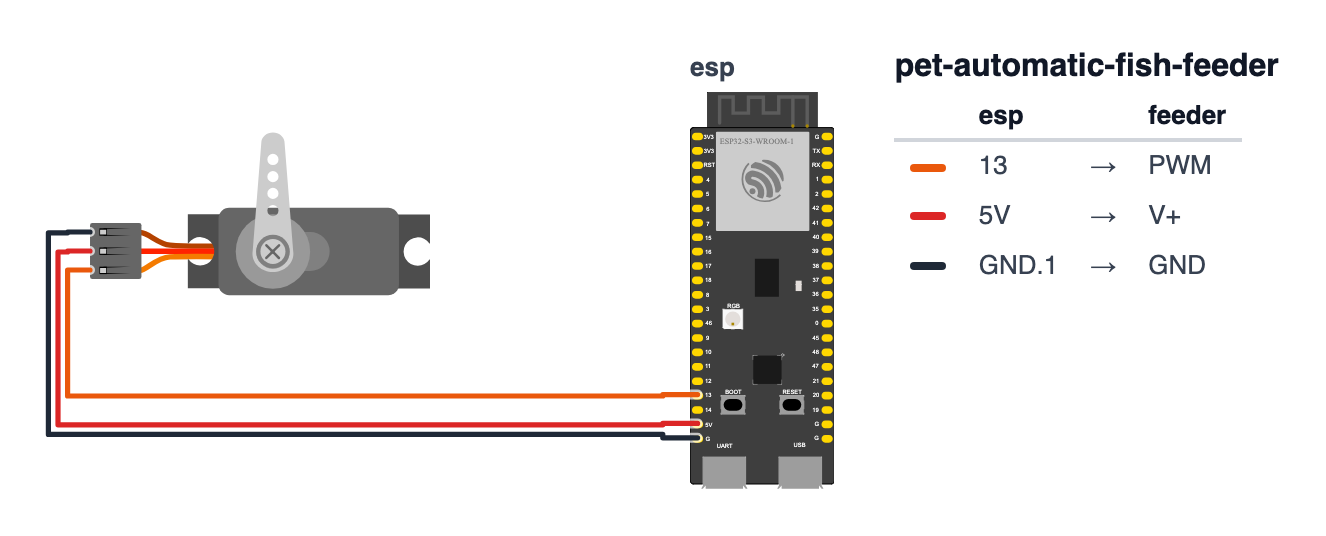
This is the simplest wiring in the entire pets series — just 3 wires.
SG90 Servo:
- Servo Signal (orange wire) → board GPIO 13 — orange wire
- Servo VCC (red wire) → board VIN (5V) — red wire
- Servo GND (brown wire) → board GND — black wire
That’s it. Then plug the board into a USB phone charger.
Check: 3 wires. Orange signal, red power, brown ground. The board can stay plugged in to USB while you test — it runs on any USB charger including a computer USB port.
Step 2: Upload the code
Time: ~10 minutes
Install these libraries in Arduino IDE (Sketch > Manage Libraries):
ESP32Servoby Kevin HarringtonESPAsyncWebServerby Me-No-Dev
Fill in your WiFi credentials and timezone before uploading:
The big picture first. This program is an alarm clock that feeds fish instead of waking you up.
- The ESP32 connects to WiFi, then asks a time server on the internet for the current time. This is called NTP — the same system your phone uses to always know the exact time.
- Every 30 seconds, the code checks: “Is it 8am? Is it 6pm?” If yes, it rotates the servo 60 degrees — one food portion falls into the tank. Then it goes back to waiting.
- A flag called
fedTodayprevents double-feeding. Even if the code checks time twice at exactly 8:00, it only feeds once. - A web page lets you hit “Feed Now” from anywhere with WiFi — including from your vacation hotel.
// ========== CHOOSE YOUR BOARD ==========
// Uncomment the line for YOUR board:
#define BOARD_S3    // ESP32-S3-DevKitC-1
//#define BOARD_C6  // ESP32-C6-DevKitC-1
// ========================================

#ifdef BOARD_S3
  #define PIN_SERVO            13
#endif
#ifdef BOARD_C6
  #define PIN_SERVO            5
#endif

#include <ESP32Servo.h>
#include <WiFi.h>
#include <ESPAsyncWebServer.h>
#include <SPIFFS.h>
#include <time.h>

const char* ssid      = "YourWiFiName";
const char* password  = "YourWiFiPassword";
const char* ntpServer = "pool.ntp.org";
const long  gmtOffset = 3600;

const int FEED_HOUR_1   = 8;
const int FEED_HOUR_2   = 18;
const int WHEEL_DEGREES = 60;

Servo feeder;
AsyncWebServer server(80);

bool fedToday[2] = {false, false};
int  lastDay     = -1;

void feed(String trigger) {
  Serial.println("Feeding! Triggered by: " + trigger);

  feeder.write(WHEEL_DEGREES);
  delay(600);
  feeder.write(0);

  struct tm t;
  getLocalTime(&t);
  String ts = String(t.tm_year + 1900) + "-" +
              String(t.tm_mon + 1) + "-" + String(t.tm_mday) + " " +
              String(t.tm_hour) + ":" + (t.tm_min < 10 ? "0" : "") + String(t.tm_min);

  File f = SPIFFS.open("/feed.txt", FILE_APPEND);
  if (f) { f.println(ts + " | " + trigger); f.close(); }
}

void setup() {
  Serial.begin(115200);
  SPIFFS.begin(true);

  feeder.attach(PIN_SERVO);
  feeder.write(0);

  WiFi.begin(ssid, password);
  while (WiFi.status() != WL_CONNECTED) delay(500);

  configTime(gmtOffset, 0, ntpServer);
  Serial.println("Fish feeder ready at: " + WiFi.localIP().toString());

  server.on("/", HTTP_GET, [](AsyncWebServerRequest *req){
    File f = SPIFFS.open("/feed.txt", FILE_READ);
    String log = "";
    while (f.available()) log += (char)f.read();
    f.close();

    req->send(200, "text/html",
      "<!DOCTYPE html><html><body style='font-family:Arial;background:#e8f4f8;padding:30px'>"
      "<h1>Fish Feeder</h1>"
      "<p>Scheduled: <b>8:00 AM</b> and <b>6:00 PM</b> daily</p>"
      "<form action='/feed' method='get'>"
      "<button style='padding:15px 30px;font-size:16px;background:#0077b6;"
      "color:white;border:none;border-radius:8px;cursor:pointer'>Feed Now</button></form>"
      "<h3>Feeding History</h3>"
      "<pre style='background:white;padding:15px;border-radius:8px'>" + log + "</pre>"
      "</body></html>");
  });

  server.on("/feed", HTTP_GET, [](AsyncWebServerRequest *req){
    feed("Manual (web)");
    req->redirect("/");
  });

  server.begin();
}

void loop() {
  struct tm t;
  if (!getLocalTime(&t)) return;

  if (t.tm_mday != lastDay) {
    fedToday[0] = fedToday[1] = false;
    lastDay = t.tm_mday;
  }

  if (t.tm_hour == FEED_HOUR_1 && t.tm_min == 0 && !fedToday[0]) {
    fedToday[0] = true;
    feed("Schedule 8:00 AM");
  }

  if (t.tm_hour == FEED_HOUR_2 && t.tm_min == 0 && !fedToday[1]) {
    fedToday[1] = true;
    feed("Schedule 6:00 PM");
  }

  delay(30000);
}
Line-by-line: what every line does and why
Lines 1–5: Borrowing ready-made tools
#include <ESP32Servo.h>
#include <WiFi.h>
#include <ESPAsyncWebServer.h>
#include <SPIFFS.h>
#include <time.h>
Five instruction books. SPIFFS is the one that lets the ESP32 store files in its own flash memory — like a tiny hard drive inside the chip. The feeding log lives there and survives power outages. time.h provides the tools to fetch and read internet time.
Lines 7–13: Connections and schedule
const char* ntpServer = "pool.ntp.org";
const long  gmtOffset = 3600;
pool.ntp.org is a group of free public time servers anyone can ask for the current time. gmtOffset is your timezone in seconds. UTC+1 (Central Europe) = 3600 seconds. UTC-5 (US Eastern) = -18000 seconds. Change this to your timezone before uploading.
const int FEED_HOUR_1   = 8;
const int FEED_HOUR_2   = 18;
const int WHEEL_DEGREES = 60;
FEED_HOUR_1 = 8 means 8am. FEED_HOUR_2 = 18 means 6pm (18:00 in 24-hour time). WHEEL_DEGREES = 60 is how far the servo rotates — 60 degrees for a 6-slot wheel drops exactly one compartment’s worth of food.
Lines 19–20: The anti-double-feeding flags
bool fedToday[2] = {false, false};
int  lastDay     = -1;
fedToday[2] is like two checkbox cells on paper — one for morning, one for evening. Both start false (unchecked). lastDay = -1 is a value that can never be a real day number, so on first boot the daily reset code runs immediately.
feed(): the function that actually feeds
void feed(String trigger) {This is a function — a mini-recipe with its own name. Any time we write feed("Schedule 8:00 AM"), this whole recipe runs. The trigger text tells us later why the feed happened — scheduled, or manual from the web.
  feeder.write(WHEEL_DEGREES);
  delay(600);
  feeder.write(0);
Three steps: rotate the wheel 60 degrees, wait 600 milliseconds for the food to fall, then rotate back to 0 degrees (closed). Think of it like opening a trapdoor, waiting for one item to drop through, then closing it again.
  File f = SPIFFS.open("/feed.txt", FILE_APPEND);
  if (f) { f.println(ts + " | " + trigger); f.close(); }
FILE_APPEND means “add to the end of the file, never overwrite.” Like a journal where each new entry goes on a new line. f.close() is important — like clicking Save. Without it, the write might not be stored properly.
setup(): the morning routine
SPIFFS.begin(true);Start the flash filesystem. The true means: if no filesystem exists yet (first boot ever), format a fresh one automatically.
feeder.attach(13);
feeder.write(0);
Connect the servo object to GPIO 13, then park it at 0 degrees — the “closed, no food falls” position. Always start closed so no food spills when the device boots.
configTime(gmtOffset, 0, ntpServer);configTime is the magic line that syncs the ESP32’s clock to the internet. After WiFi connects, this sends a request to pool.ntp.org asking for the current time, adjusted for your timezone. From then on, getLocalTime(&t) fills a box called t with the current year, month, day, hour, and minute.
loop(): checking the clock every 30 seconds
struct tm t;
if (!getLocalTime(&t)) return;
struct tm is a container with many compartments — t.tm_hour, t.tm_min, t.tm_mday (day of month), etc. If NTP hasn’t synced yet, getLocalTime fails and we skip the rest with return.
if (t.tm_mday != lastDay) {
  fedToday[0] = fedToday[1] = false;
  lastDay = t.tm_mday;
}
“If today’s date is different from the last day we recorded — reset both fed flags.” This is the midnight reset. t.tm_mday is the day of the month (1–31). lastDay stores what day it was last time we checked. If they differ, a new day has started.
if (t.tm_hour == FEED_HOUR_1 && t.tm_min == 0 && !fedToday[0]) {
  fedToday[0] = true;
  feed("Schedule 8:00 AM");
}
Read this in plain English: “If it is exactly hour 8, AND minute 0, AND we haven’t fed yet this morning — feed the fish.” fedToday[0] = true is set before calling feed() — this prevents the rare case where feed() takes a while and the clock check runs again at 8:00:30, which would also pass all three conditions and feed a second time.
delay(30000);Sleep for 30 seconds, then check again. 30 seconds is precise enough — the earliest the feeder could miss its time window is if WiFi went out for 29 seconds right at 8:00. That’s an acceptable trade-off for keeping the code simple.
The whole thing in one sentence
When powered on, the feeder syncs its clock to the internet, then checks every 30 seconds whether it is 8am or 6pm, feeds once per schedule per day, logs each feeding, and stays reachable from a web browser the whole time.
First thing to try: change FEED_HOUR_1 = 8 to a time two minutes from now, upload, and watch the servo rotate automatically. Then change it back to 8 and you’re ready for vacation.
Check: Open Serial Monitor at 115200. After WiFi connects, the IP address prints. Open that IP in a browser — you should see “Fish Feeder” with a “Feed Now” button and empty history. Click “Feed Now” — the servo should rotate 60° and back, and a log entry should appear.
Step 3: Set your timezone and fill the wheel
Time: ~5 minutes
In the code, find:
const long gmtOffset = 3600;Change 3600 to your UTC offset in seconds:
- UTC (London, Ghana):
0 - UTC+1 (Central Europe, West Africa):
3600 - UTC+2 (Eastern Europe, South Africa):
7200 - UTC-5 (US Eastern):
-18000 - UTC-8 (US Pacific):
-28800
Fill the wheel compartments with your fish’s regular food. Pellets work best — flakes can clump in humidity over days. Fill each compartment with the right portion size for your fish species.
Check: After re-uploading with your timezone, open Serial Monitor. Wait until a full minute rolls by and confirm the displayed time matches your local clock. If it’s off by an hour, adjust
gmtOffsetby ±3600.
Step 4: Test the schedule, then leave!
Before going anywhere:
- Open the web interface and click “Feed Now” twice — verify both feeds dispense correctly.
- Set
FEED_HOUR_1to a time 2 minutes from now (e.g.,const int FEED_HOUR_1 = 14if it’s 1:58pm). Re-upload and wait. Confirm it fires automatically. Then set it back to 8. - Fill all the wheel compartments with 2 weeks’ worth of food.
- Verify the USB charger is plugged into a reliable outlet (not a power strip that gets switched off).
The feeder runs for weeks unattended. Every feeding is logged with a timestamp. When you get back, the history shows exactly what happened while you were gone.
What just happened (what you learned)
- NTP (Network Time Protocol) — the ESP32 has no battery-backed clock. Every boot it asks a time server on the internet for the current time.
configTime(gmtOffset, 0, "pool.ntp.org")sets timezone and server. After a sync,getLocalTime(&t)fills a struct with year, month, day, hour, minute, second — accurate to within milliseconds. - The
fedTodayflag pattern — the loop runs every 30 seconds. At 8:00:00 and again at 8:00:30, both timestm_hour == 8andtm_min == 0. Without the flag, the feeder would fire twice in one minute.fedToday[0] = truebefore feeding ensures the second check sees it and skips. - Why
delay(30000)in loop is OK here — the web server runs on a separate FreeRTOS task and stays responsive even during the 30-second delay. The feeder only needs to check time, not respond in real-time. This is the rare case where a longdelay()in loop is the right choice. - SPIFFS for persistent logging — the feeding log is stored in flash memory, not RAM. It survives power outages and reboots. When you come home from vacation, the entire history of feedings is still there.
Level Up
Add a third feeding: Copy the morning feed block, check FEED_HOUR_3 = 13 (1pm), add fedToday[2] to the array (change to bool fedToday[3]), and reset it at midnight. Three feedings per day is the standard recommendation for most tropical fish.
Vacation confirmation texts: Use WiFiClientSecure and the Telegram Bot API (same approach as the Pet Cam project) to send “Fish fed at 8:00 AM — all good!” to your Telegram every morning. Your vacation anxiety about the fish drops to approximately zero.
Portion size control: Change WHEEL_DEGREES from a constant to a variable, and add a web form dropdown: Small = 45°, Medium = 60°, Large = 90°. Different fish have different appetites — and uneaten food rots and pollutes the water.
★★ You completed: Automatic Fish Feeder!
Troubleshooting
| Problem | Fix |
|---|---|
| Servo doesn’t move on “Feed Now” | Check orange wire on GPIO13, red on 5V, brown on GND. Open Serial Monitor — do you see “Feeding! Triggered by: Manual”? |
| Food doesn’t fall | Increase WHEEL_DEGREES from 60 to 75 or 90. Check wheel is securely attached to servo horn. |
| Multiple portions fall per feeding | Decrease WHEEL_DEGREES to 45. Make sure compartments are properly sized for your food pellets. |
| Scheduled feed doesn’t fire | Check timezone — gmtOffset might be wrong. Verify Serial Monitor time matches your clock. Check fedToday flags aren’t permanently set. |
| Log history disappears after reboot | SPIFFS.begin(true) formats the filesystem if it doesn’t exist — but existing files survive. Check FILE_APPEND (not FILE_WRITE) is used in the feed() function. |
| Web page unreachable from phone | Phone and ESP32 must be on the same WiFi network. Get the correct IP from Serial Monitor. |