Parent info
Parts you need
Affiliate links — we may earn a small commission
Try this circuit in your browser!
Run the code, press the buttons and watch what happens — before you buy any parts. No account needed.
Open in Simulator →Your room. Your rules. Your alarm.
Imagine this: it’s 3am. Your phone buzzes. “INTRUDER ALERT — motion detected.” You roll over, check the time, and know exactly when it happened. Evidence logged. Case closed.
That’s what this PIR sensor does. It detects the heat signature of any human body crossing your room and fires a Telegram message straight to your phone. Optional buzzer included — so the intruder gets a surprise too.
In 30 minutes. For about $16.
What you’ll need
| Part | What it does | Price |
|---|---|---|
| ESP32-S3-DevKitC-1 | The brain — connects to WiFi and sends your phone the alert | ~$12 |
| HC-SR501 PIR Sensor | Detects body heat — fires when anyone moves in range | ~$2 |
| Passive Buzzer | Optional: makes noise when triggered — the intruder hears this | ~$2 |
| Breadboard + jumper wires | Connects everything, no soldering needed | ~$3 |
You also need: home WiFi, a Telegram account (free), and an internet connection to create a bot.
Total: ~$16 | Time: ~30 minutes | Difficulty: ●○○○○
Note: You need a Passive buzzer, not an active one. Passive buzzers need the
tone()function to make sound. Active buzzers make a fixed sound on their own — they won’t work with this code. Look for “passive buzzer” on the product page.
How it works (60 seconds)
Think of it like a security guard that only senses body heat.
The HC-SR501 sensor has a dome of pyroelectric crystals. When a warm body moves in front of it, the heat pattern shifts — and the sensor sends a HIGH signal to the ESP32. The ESP32 checks that signal 20 times per second. When it goes HIGH, it sends a message to a Telegram bot, which delivers it to your phone instantly.
The buzzer part is just a bonus: make noise so the intruder knows they’ve been caught.
Step 0: Create your Telegram bot
Time: ~5 minutes
Before any wiring — you need a Telegram bot to receive alerts.
- Open Telegram on your phone.
- Search for @BotFather and start a chat.
- Type
/newbot. Give your bot a name: RoomGuardBot (or whatever you like). - BotFather gives you a bot token — a long string like
7293847561:AAFkjh.... Copy it somewhere. - Now search for @userinfobot on Telegram and send it any message. It replies with your chat ID — a number like
123456789. Copy that too.
Check: You have two things written down: a bot token and a chat ID. You’ll paste both into the code.
Step 1: Wire it up
Time: ~5 minutes
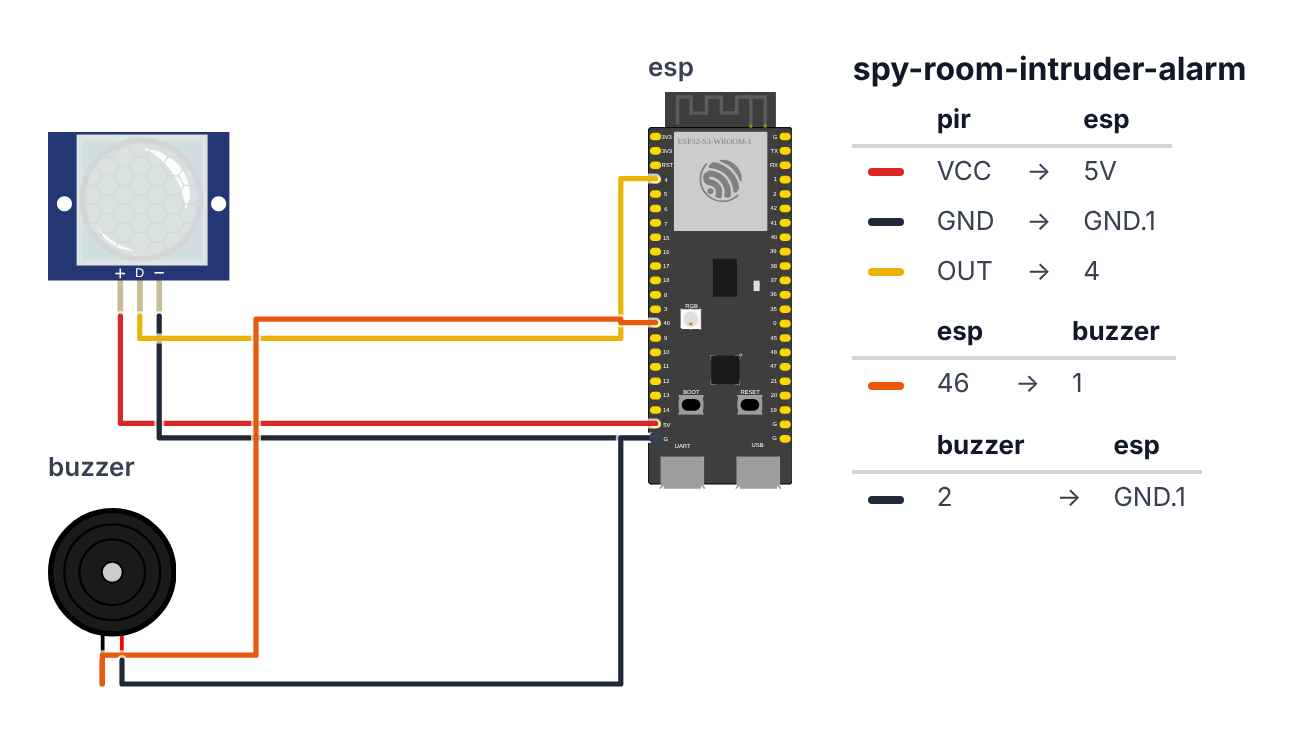
You’re connecting 5 wires total.
PIR Sensor (3 wires):
- PIR VCC → ESP32 5V — red wire
- PIR GND → ESP32 GND — black wire
- PIR OUT (middle pin) → ESP32 GPIO 4 (C6: GPIO 0) — yellow wire
Buzzer (2 wires, optional): 4. Buzzer + (positive leg) → ESP32 GPIO 46 (C6: GPIO 10) — orange wire 5. Buzzer - (negative leg) → ESP32 GND — black wire
Check: Count your wires. 3 for the PIR, 2 for the buzzer (if using). The PIR gets 5V — the HC-SR501 has a little voltage regulator inside and needs at least 4.5V to work properly. Its OUT pin only ever sends 3.3V, so the ESP32 is safe. The yellow dome on the PIR faces INTO the room — not toward the wall.
Common mistake: Using the wrong PIR pin. The HC-SR501 has 3 pins: VCC, OUT, GND — in that order from left to right when the dome is facing you. OUT is the middle one.
Step 2: Flash the code
Time: ~5 minutes
Install these libraries in Arduino IDE first:
- Go to Sketch → Include Library → Manage Libraries
- Search “UniversalTelegramBot” → Install (by Brian Lough)
- Search “ArduinoJson” → Install version 6.x (by Benoit Blanchon)
Now paste this code, fill in your credentials, and upload:
The big picture first. This program turns the ESP32 into a motion-triggered alarm with phone alerts:
- The ESP32 is the brain — it watches the PIR sensor pin and connects to WiFi.
- The PIR sensor is like a heat camera — it detects the warmth of a human body moving across its field of view and sends a HIGH signal.
- When HIGH is detected, the code sounds the buzzer and sends a Telegram message to your phone.
- A lockout timer prevents spam: after one alert, it ignores new detections for 10 seconds.
// ========== CHOOSE YOUR BOARD ==========
// Uncomment the line for YOUR board:
#define BOARD_S3    // ESP32-S3-DevKitC-1
//#define BOARD_C6  // ESP32-C6-DevKitC-1
// ========================================

#ifdef BOARD_S3
  #define PIN_PIR     4
  #define PIN_BUZZER 46
#endif
#ifdef BOARD_C6
  #define PIN_PIR     0
  #define PIN_BUZZER 10
#endif

#include <WiFi.h>
#include <WiFiClientSecure.h>
#include <UniversalTelegramBot.h>
#include <ArduinoJson.h>

const char* WIFI_SSID     = "YourWiFiName";
const char* WIFI_PASSWORD = "YourWiFiPassword";
const char* BOT_TOKEN     = "YOUR_TELEGRAM_BOT_TOKEN";
const char* CHAT_ID       = "YOUR_TELEGRAM_CHAT_ID";

unsigned long lastAlertTime = 0;
const unsigned long LOCKOUT_MS = 10000;

WiFiClientSecure client;
UniversalTelegramBot bot(BOT_TOKEN, client);

void setup() {
  Serial.begin(115200);
  pinMode(PIN_PIR, INPUT);
  pinMode(PIN_BUZZER, OUTPUT);
  digitalWrite(PIN_BUZZER, LOW);

  Serial.print("Connecting to WiFi");
  WiFi.begin(WIFI_SSID, WIFI_PASSWORD);
  while (WiFi.status() != WL_CONNECTED) {
    delay(500);
    Serial.print(".");
  }
  Serial.println("\nConnected! IP: " + WiFi.localIP().toString());

  client.setInsecure();
  Serial.println("Operation Sibling Watch: ARMED");
}

void loop() {
  int motionDetected = digitalRead(PIN_PIR);

  if (motionDetected == HIGH) {
    unsigned long now = millis();

    if (now - lastAlertTime > LOCKOUT_MS) {
      lastAlertTime = now;

      tone(PIN_BUZZER, 1000);
      delay(1000);
      noTone(PIN_BUZZER);

      String message = "INTRUDER ALERT!\n";
      message += "Motion detected in room.\n";
      message += "Uptime: " + String(now / 1000) + "s";

      bool sent = bot.sendMessage(CHAT_ID, message, "");
      if (sent) {
        Serial.println("Alert sent to Telegram.");
      } else {
        Serial.println("Telegram send failed — check token/ID.");
      }
    }
  }

  delay(50);
}
Line-by-line: what every line does and why
Lines 1–4: Borrowing ready-made tools
#include <WiFi.h>
#include <WiFiClientSecure.h>
#include <UniversalTelegramBot.h>
#include <ArduinoJson.h>
#include grabs instruction books. WiFi connects to your router. WiFiClientSecure handles encrypted (HTTPS) connections — Telegram requires HTTPS so nobody can intercept your alerts. UniversalTelegramBot gives you bot.sendMessage(). ArduinoJson reads the JSON-formatted replies Telegram sends back.
Lines 6–9: The secrets you fill in
const char* WIFI_SSID     = "YourWiFiName";
const char* WIFI_PASSWORD = "YourWiFiPassword";
const char* BOT_TOKEN     = "YOUR_TELEGRAM_BOT_TOKEN";
const char* CHAT_ID       = "YOUR_TELEGRAM_CHAT_ID";
const means “locked — never changes.” char* stores a word (a string of letters).
BOT_TOKENis the long code @BotFather gave you — it proves you own the bot.CHAT_IDis your Telegram account’s unique number — it tells the bot who to message.
Lines 11–12: Pin numbers
  #define PIN_PIR     4
  #define PIN_BUZZER 46
#define gives a number a name that never changes. These tell the code which physical legs of the ESP32 are connected to each component. PIN_PIR 4 means “the PIR sensor’s OUT wire is connected to GPIO pin 4.” These lines come from the BOARD_S3 block at the top of the sketch — on a C6 board, the BOARD_C6 block uses GPIO 0 for the PIR and GPIO 10 for the buzzer.
Lines 14–16: Timing variables
unsigned long lastAlertTime = 0;
const unsigned long LOCKOUT_MS = 10000;
unsigned long is a very large whole number (no negative values, counts up to ~4 billion). We need it because millis() counts milliseconds since boot and can reach billions over many hours.
lastAlertTime = 0 — a sticky note: “when did the last alert fire?” Starts at 0 (never fired).
LOCKOUT_MS = 10000 — 10,000 milliseconds = 10 seconds. After one alarm, the system ignores new detections for 10 seconds. Without this, one person walking slowly through the room could fire dozens of alerts.
Lines 18–19: The Telegram objects
WiFiClientSecure client;
UniversalTelegramBot bot(BOT_TOKEN, client);
WiFiClientSecure client creates the secure internet connection object. Think of it as the “phone” that dials Telegram’s server.
UniversalTelegramBot bot(BOT_TOKEN, client) creates the bot object using your token and that phone. From now on, bot.sendMessage(...) sends a Telegram message.
Lines 21–34: setup() — runs once at power-on
void setup() {
  Serial.begin(115200);
  pinMode(PIN_PIR, INPUT);
  pinMode(PIN_BUZZER, OUTPUT);
  digitalWrite(PIN_BUZZER, LOW);
  ...
}
setup() is the morning routine — runs exactly once when you plug in the board.
Serial.begin(115200) — start the “phone line” to your computer via USB. 115200 is the communication speed. Open Serial Monitor in Arduino IDE with the same speed.
pinMode(PIN_PIR, INPUT) — tell the ESP32 that GPIO 4 (C6: GPIO 0) is an input (data flows INTO the chip from the PIR sensor). The PIR sends HIGH or LOW; the ESP32 listens.
pinMode(PIN_BUZZER, OUTPUT) — GPIO 46 (C6: GPIO 10) is an output (the ESP32 sends power OUT to the buzzer).
digitalWrite(PIN_BUZZER, LOW) — set the buzzer to LOW (off) on startup. Without this, some buzzers start making noise immediately.
WiFi.begin(WIFI_SSID, WIFI_PASSWORD) — start connecting.
while (WiFi.status() != WL_CONNECTED) — keep waiting until connected. != means “is NOT equal to.” So: “while the status is not ‘connected,’ keep looping and printing a dot.”
client.setInsecure() — skip checking Telegram’s security certificate. This is fine for a bedroom alarm — a bank would not do this.
Lines 36–60: loop() — the heartbeat
void loop() {
  int motionDetected = digitalRead(PIN_PIR);

  if (motionDetected == HIGH) {
    unsigned long now = millis();
    if (now - lastAlertTime > LOCKOUT_MS) {
      lastAlertTime = now;
      tone(PIN_BUZZER, 1000);
      delay(1000);
      noTone(PIN_BUZZER);
      ...
      bool sent = bot.sendMessage(CHAT_ID, message, "");
    }
  }
  delay(50);
}
loop() beats like a heartbeat — runs over and over, as long as the board has power.
digitalRead(PIN_PIR) — read GPIO 4 (C6: GPIO 0). Returns HIGH (someone is moving) or LOW (nothing detected).
if (motionDetected == HIGH) — == is a question: “is it equal to HIGH?” (a single = would be an assignment; two == is a comparison). Only enter the block if truly HIGH.
unsigned long now = millis() — read the stopwatch. millis() counts how many milliseconds have passed since power-on.
now - lastAlertTime > LOCKOUT_MS — “is the difference between now and the last alert more than 10 seconds?” Both conditions together: “motion detected AND we’re past the cooldown.”
lastAlertTime = now — write on the sticky note: “I just fired at this moment.” This resets the 10-second countdown.
tone(PIN_BUZZER, 1000) — play 1000 Hz (a medium beep) on the buzzer. 1000 Hz means the buzzer vibrates 1,000 times per second — that’s the “pitch” of the sound.
delay(1000) — wait 1 second (1,000 milliseconds). The buzzer plays during this pause.
noTone(PIN_BUZZER) — silence the buzzer. Without this, the beep would continue forever.
String message = "INTRUDER ALERT!\n" — String is a text variable. \n is the newline character (like pressing Enter). += means “add to the end.”
now / 1000 — divide milliseconds by 1000 to get seconds. “Uptime: 4521s” tells you when the alert happened relative to when you started the board.
bool sent = bot.sendMessage(CHAT_ID, message, "") — send the Telegram message. bool is a yes/no box: sent will be true if Telegram accepted it, false if it failed.
delay(50) — check the PIR 20 times per second. Fast enough to catch anyone entering; slow enough not to spam the processor.
The whole thing in one sentence
The code connects to WiFi once, then loops forever reading the PIR pin; when motion is detected and 10 seconds have passed since the last alert, it beeps the buzzer for 1 second and sends a Telegram message to your phone.
First thing to try: wave your hand in front of the PIR sensor. Watch Serial Monitor — it should say “Alert sent to Telegram.” Check your Telegram app. Then try walking through the doorway at normal speed. The alert should arrive within 3 seconds of you crossing.
Check: Open Serial Monitor at 115200 baud. You should see “Connected! IP: 192.168.x.x” followed by “Operation Sibling Watch: ARMED”. If you see dots forever, your WiFi credentials are wrong.
Step 3: Wait 30 seconds
Time: ~30 seconds
The HC-SR501 needs a warm-up period after power-on. It calibrates to the room temperature. During this time, the sensor may fire randomly — this is normal.
After 30 seconds, it settles down and becomes accurate.
Check: Stand still in front of the sensor for 30 seconds, then walk. If the Serial Monitor shows “Alert sent to Telegram” and your phone buzzes — you’re done.
Step 4: Use it!
Time: ~2 minutes to place
The alarm is running. Here’s how to get the most out of it:
Placement matters
Mount the PIR sensor at shoulder height (or higher) pointing into the room. The HC-SR501 has a wide cone of detection — roughly 120 degrees. Position it so the cone covers your door.
Adjustment tip: There are two small potentiometers on the back of the HC-SR501. The left one adjusts sensitivity (range). The right one adjusts how long the signal stays HIGH after motion stops. Start with both in the middle position.
Test it
Walk through the room at normal speed. Your phone should buzz within 3 seconds. The buzzer fires immediately. The Telegram message takes 2-3 seconds to arrive (WiFi + API round trip).
Silent mode
Don’t want the buzzer alerting the intruder? Comment out the tone() line in the code and re-upload. The Telegram alert still fires — silently.
What just happened (what you learned)
You built a real motion-triggered alarm system. Here’s what you used:
-
PIR sensor detects infrared heat from moving bodies — the same technology used in automatic doors at shops and motion-sensing outdoor lights. The “P” stands for Passive — it doesn’t emit anything, just detects.
-
digitalRead() checks whether a pin is HIGH (voltage present) or LOW (no voltage). Your ESP32’s way of asking: “is something happening here right now?”
-
millis() is a counter that never stops — like the clock on your phone. It lets you measure how much time has passed without freezing everything with
delay(). The cooldown timer uses this. -
HTTPS vs HTTP — the
WiFiClientSecureclass handles encrypted connections. Telegram requires HTTPS so nobody can intercept your intruder alerts on the way to your phone.
Level Up
Silent mode + web control: Add a simple web page served from the ESP32 that shows the alert count and has an “Arm/Disarm” toggle. Now you can silence the buzzer from your bed without touching the hardware.
Time filtering: Add the NTPClient library to get real time from the internet. Change the Telegram message from “Uptime: 4521s” to “Motion detected at 11:47 PM”. Real timestamps make better evidence.
False alarm filter: The alarm triggers on ANY motion, including your cat. Add a 2-second check: only alert if the PIR stays HIGH for more than 2 continuous seconds. This ignores brief movement from curtains blowing in the breeze.
★★ You completed: Room Intruder Alarm!
Troubleshooting
| Problem | Fix |
|---|---|
| PIR fires constantly on startup | Normal — it takes 30 seconds to calibrate. Wait it out. |
| Phone never gets a Telegram alert | Check: Is WiFi connected? (Look for IP in Serial Monitor.) Is the bot token correct? Is your chat ID correct? Try sending a message to your bot first to activate it. |
| Telegram send failed | Your bot token or chat ID has a typo. Copy them again carefully — they’re long strings. |
| Buzzer makes no sound | Make sure it’s a passive buzzer, not active. Check polarity: + to GPIO 46 (C6: GPIO 10), - to GND. |
| PIR doesn’t trigger at all | Check wiring: 5V to VCC, GND to GND, GPIO 4 (C6: GPIO 0) to OUT (middle pin). Try a different breadboard column. |
| Too many false alerts | Turn the sensitivity potentiometer (left one on back of PIR) counter-clockwise to reduce range. Or increase LOCKOUT_MS to 30000 (30 seconds). |