Parent info
Parts you need
Affiliate links — we may earn a small commission
Try this circuit in your browser!
Run the code, press the buttons and watch what happens — before you buy any parts. No account needed.
Open in Simulator →Your classmates made a poster timeline. Yours walks people through history.
US History project: the Industrial Revolution, the Civil War era, westward expansion — pick one and present it. Everyone makes a posterboard timeline. Dates on the left, arrows, small pictures. Gets a B+. Forgettable.
Your model is a 3D diorama with a LED timeline bar along the bottom. Press a button to advance through historical periods — the LED strip illuminates the current era, a servo animates a period machine (a spinning steam engine wheel, a cotton gin, a telegraph), and the buzzer plays a short musical cue for each era. Visitors interact with your history. They don’t read it — they step through it.
What you’ll need
| Part | What it does | Price |
|---|---|---|
| ESP32-S3-DevKitC-1 N8R8 | The brain — manages timeline state and all outputs | ~$12 |
| WS2812 LED strip (1m, 30 LEDs) | Timeline illumination + building/area highlights | ~$10 |
| SG90 servo motor | Animates a period machine (wheel, lever, arm) | ~$3 |
| Passive buzzer | Era-appropriate musical cues | ~$2 |
| Tactile push buttons | Advance/back through history | ~$3 |
| Breadboard + jumper wires | Connects everything | ~$5 |
Total: ~$35 | Time: ~3 hours | Difficulty: ●●●○○
How it works (60 seconds)
Your model has up to 6 historical “periods” (whatever your specific topic covers). Each period has: a specific LED zone that lights up on the strip, a servo position for the animated machine, a color theme for the era (warm amber for industrial era, blue-white for northern states, red for war periods), and a short musical cue. Press NEXT to advance to the next period. The LED strip shifts, the servo moves, the buzzer plays. Press BACK to go backward. This is interactive storytelling with electronics.
Step 0: Plan your historical content
Time: ~20 minutes
Choose your historical topic and define 5–6 periods. Here’s an example for the Industrial Revolution:
| Period # | Era | LED Color | Servo Position | Musical Cue |
|---|---|---|---|---|
| 0 | Pre-Industrial (1750) | Warm brown | 10° (still) | Simple slow melody |
| 1 | Steam Power (1780) | Orange | 45° (turning) | Rhythmic pulses |
| 2 | Factories (1820) | Yellow-white | 90° (fast) | Faster rhythm |
| 3 | Railways (1850) | Blue-white | 135° (full) | Driving rhythm |
| 4 | Mass Production (1880) | Bright white | 170° (maximum) | Complex pattern |
| 5 | Modern Era (1900) | Cool white | 90° (settled) | Triumphant close |
Physical model ideas:
- Industrial Revolution: A small cardboard factory with a spinning waterwheel (servo-driven), LED strip as a timeline bar at the base
- Civil War: Two regions of the model with different LED colors, a cannon that rotates (servo)
- Westward Expansion: A map base with LED strip showing routes, a wagon that moves (servo)
Build your physical model BEFORE adding electronics.
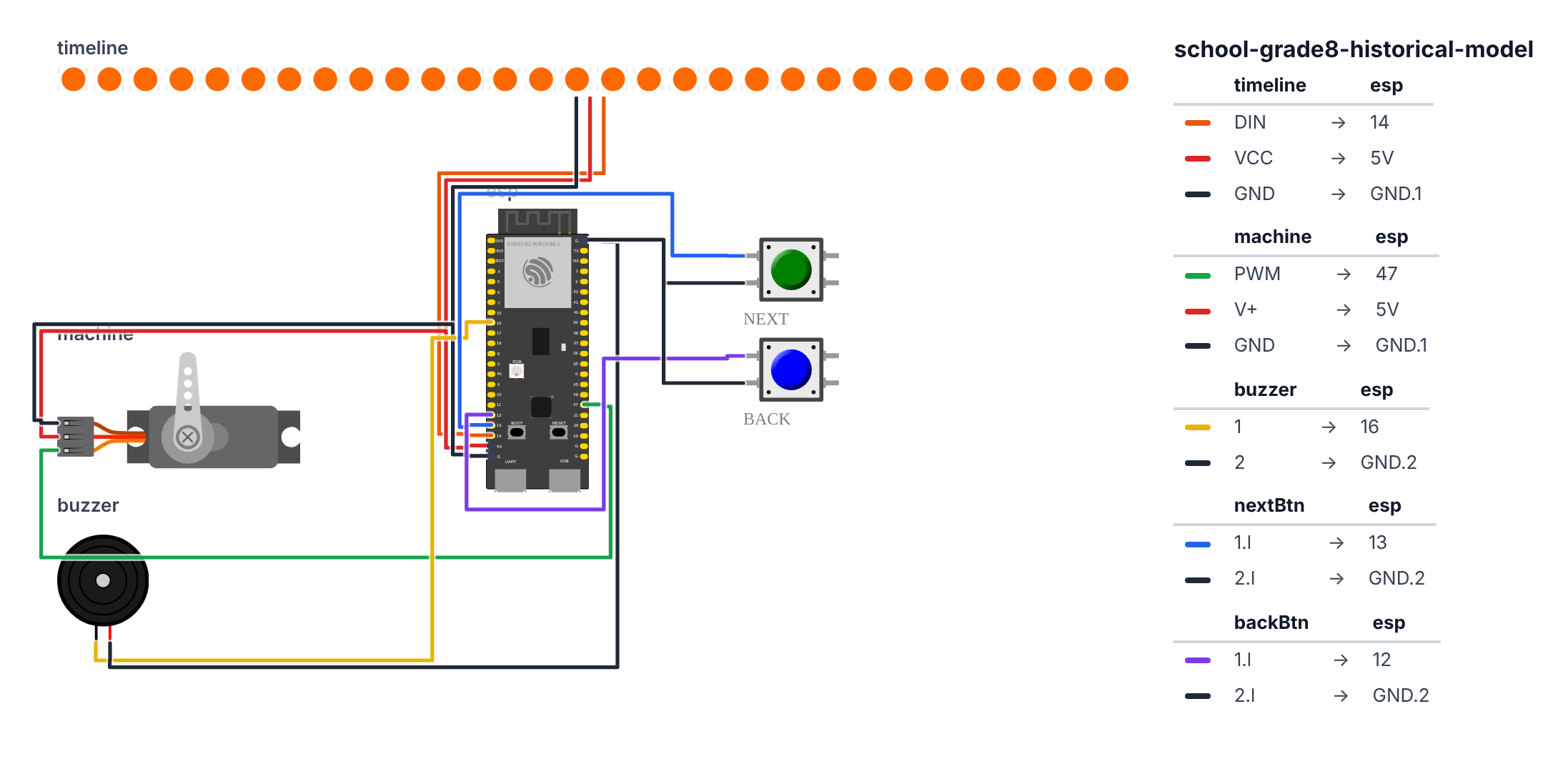
Step 1: Wire it up
Time: ~15 minutes
WS2812 LED Strip (3 wires):
- Strip DIN → board GPIO 14 (C6: GPIO 8) — orange wire. On the C6, GPIO 8 also drives the board’s own RGB LED, so that little LED copies the strip’s first pixel. That’s normal.
- Strip 5V → board 5V — red wire
- Strip GND → board GND — black wire
SG90 Servo (3 wires): 4. Servo signal → board GPIO 47 (C6: GPIO 5) — green wire 5. Servo VCC → board 5V — red wire 6. Servo GND → board GND — black wire
Passive Buzzer (2 wires): 7. Buzzer + → board GPIO 16 (C6: GPIO 10) — yellow wire 8. Buzzer - → board GND — black wire
Next Button: 9. Button one side → board GPIO 13 (C6: GPIO 9) — blue wire 10. Button other side → board GND — black wire
Back Button: 11. Button one side → board GPIO 12 (C6: GPIO 15) — purple wire 12. Button other side → board GND — black wire
Step 2: Flash the code
Time: ~30 minutes
Install Adafruit NeoPixel and ESP32Servo libraries.
Here is the big picture. This program is an interactive timeline machine with 6 historical periods built in:
- The LED strip is the timeline bar — each period lights up a zone in its own color. Past eras dim; future eras stay dark.
- The servo is an animated machine that moves to a different position for each era, representing change over time.
- The buzzer plays a short musical cue for each era — slower and simpler for early periods, faster and more complex for later ones.
- The NEXT and BACK buttons navigate through history. Everything transitions with a sweep animation.
The “CUSTOMIZE THIS SECTION” block is where you change the content for your specific history topic.
// ========== CHOOSE YOUR BOARD ==========
// Uncomment the line for YOUR board:
#define BOARD_S3    // ESP32-S3-DevKitC-1
//#define BOARD_C6  // ESP32-C6-DevKitC-1
// ========================================

#ifdef BOARD_S3
  #define PIN_LED     14
  #define PIN_SERVO   47
  #define PIN_BUZZER  16
  #define PIN_BTN_NEXT 13
  #define PIN_BTN_BACK 12
#endif
#ifdef BOARD_C6
  #define PIN_LED      8
  #define PIN_SERVO    5
  #define PIN_BUZZER  10
  #define PIN_BTN_NEXT 9
  #define PIN_BTN_BACK 15
#endif

#include <Adafruit_NeoPixel.h>
#include <ESP32Servo.h>

#define LED_COUNT 30

Adafruit_NeoPixel strip(LED_COUNT, PIN_LED, NEO_GRB + NEO_KHZ800);
Servo servo;

#define NUM_PERIODS 6

const char* periodNames[NUM_PERIODS] = {
  "Pre-Industrial",
  "Steam Power",
  "Factory Era",
  "Railways",
  "Mass Production",
  "Modern Era"
};

const char* periodYears[NUM_PERIODS] = {
  "~1750",
  "~1780",
  "~1820",
  "~1850",
  "~1880",
  "~1900"
};

uint8_t periodColors[NUM_PERIODS][3] = {
  {80,  40,  0},
  {200, 80,  0},
  {220, 150, 0},
  {50,  100, 255},
  {255, 220, 100},
  {180, 200, 255},
};

int periodServoPos[NUM_PERIODS] = {10, 45, 90, 120, 150, 90};

struct Note { int freq; int duration; };

Note period0Music[] = {{523, 200}, {440, 200}, {392, 400}, {0, 100}};
Note period1Music[] = {{440, 150}, {440, 150}, {523, 300}, {0, 100}};
Note period2Music[] = {{523, 100}, {659, 100}, {523, 100}, {784, 300}, {0, 50}};
Note period3Music[] = {{392, 100}, {440, 100}, {523, 100}, {659, 100}, {784, 300}};
Note period4Music[] = {{784, 80},  {880, 80},  {784, 80},  {659, 160}, {0, 80}};
Note period5Music[] = {{523, 300}, {659, 200}, {784, 400}, {0, 200}};

Note* periodMusic[NUM_PERIODS] = {
  period0Music, period1Music, period2Music,
  period3Music, period4Music, period5Music
};
int periodMusicLen[NUM_PERIODS] = {4, 4, 5, 5, 5, 4};

int currentPeriod = 0;
bool transitionActive = false;

void playPeriodCue(int period) {
  Note* music = periodMusic[period];
  int len = periodMusicLen[period];

  for (int n = 0; n < len; n++) {
    if (music[n].freq == 0) {
      delay(music[n].duration);
    } else {
      int halfPeriod = 1000000 / (music[n].freq * 2);
      long cycles = (long)music[n].freq * music[n].duration / 1000;
      for (long c = 0; c < cycles; c++) {
        digitalWrite(PIN_BUZZER, HIGH);
        delayMicroseconds(halfPeriod);
        digitalWrite(PIN_BUZZER, LOW);
        delayMicroseconds(halfPeriod);
      }
    }
  }
}

void transitionToPeriod(int targetPeriod, bool forward) {
  int ledsPerPeriod = LED_COUNT / NUM_PERIODS;
  int targetStart = targetPeriod * ledsPerPeriod;

  uint8_t r = periodColors[targetPeriod][0];
  uint8_t g = periodColors[targetPeriod][1];
  uint8_t b = periodColors[targetPeriod][2];

  if (forward) {
    for (int i = 0; i < LED_COUNT; i++) {
      strip.setPixelColor(i, strip.Color(r/3, g/3, b/3));
      if (i <= targetStart + ledsPerPeriod) {
        strip.setPixelColor(i, strip.Color(r, g, b));
      }
      strip.show();
      delay(20);
    }
  } else {
    for (int i = LED_COUNT - 1; i >= 0; i--) {
      strip.setPixelColor(i, strip.Color(r/3, g/3, b/3));
      if (i >= targetStart) {
        strip.setPixelColor(i, strip.Color(r, g, b));
      }
      strip.show();
      delay(20);
    }
  }

  for (int i = 0; i < LED_COUNT; i++) {
    int era = i / ledsPerPeriod;
    era = constrain(era, 0, NUM_PERIODS - 1);

    if (era == targetPeriod) {
      strip.setPixelColor(i, strip.Color(
        periodColors[targetPeriod][0],
        periodColors[targetPeriod][1],
        periodColors[targetPeriod][2]
      ));
    } else if (era < targetPeriod) {
      strip.setPixelColor(i, strip.Color(
        periodColors[era][0] / 4,
        periodColors[era][1] / 4,
        periodColors[era][2] / 4
      ));
    } else {
      strip.setPixelColor(i, 0);
    }
  }
  strip.show();

  int currentPos = servo.read();
  int targetPos = periodServoPos[targetPeriod];
  int step = (targetPos > currentPos) ? 2 : -2;

  for (int pos = currentPos; pos != targetPos; pos += step) {
    servo.write(pos);
    delay(15);
    if (abs(pos - targetPos) < abs(step)) break;
  }
  servo.write(targetPos);

  playPeriodCue(targetPeriod);

  Serial.print("Period "); Serial.print(targetPeriod);
  Serial.print(": "); Serial.print(periodNames[targetPeriod]);
  Serial.print(" ("); Serial.print(periodYears[targetPeriod]);
  Serial.println(")");
}

void setup() {
  Serial.begin(115200);

  strip.begin();
  strip.setBrightness(80);
  strip.clear();
  strip.show();

  servo.attach(PIN_SERVO);
  servo.write(periodServoPos[0]);

  pinMode(PIN_BTN_NEXT, INPUT_PULLUP);
  pinMode(PIN_BTN_BACK, INPUT_PULLUP);
  pinMode(PIN_BUZZER, OUTPUT);

  Serial.println("Historical Timeline Interactive Model");
  Serial.println("PIN_BTN_NEXT = advance period, PIN_BTN_BACK = go back");

  delay(500);
  transitionToPeriod(0, true);
}

bool lastNext = HIGH;
bool lastBack = HIGH;

void loop() {
  bool nextBtn = digitalRead(PIN_BTN_NEXT);
  bool backBtn = digitalRead(PIN_BTN_BACK);

  if (lastNext == HIGH && nextBtn == LOW) {
    delay(50);
    if (currentPeriod < NUM_PERIODS - 1) {
      currentPeriod++;
      transitionToPeriod(currentPeriod, true);
    } else {
      Serial.println("End of timeline!");
      playPeriodCue(currentPeriod);
    }
  }

  if (lastBack == HIGH && backBtn == LOW) {
    delay(50);
    if (currentPeriod > 0) {
      currentPeriod--;
      transitionToPeriod(currentPeriod, false);
    }
  }

  lastNext = nextBtn;
  lastBack = backBtn;
  delay(10);
}
Line-by-line: what every line does and why
Lines 13–30: The period data — your historical content
#define NUM_PERIODS 6
const char* periodNames[NUM_PERIODS] = { "Pre-Industrial", "Steam Power", ... };
const char* periodYears[NUM_PERIODS] = { "~1750", "~1780", ... };
const char* means “a piece of text that won’t change.” periodNames is a shelf of 6 text labels. periodYears is another shelf of 6 date strings. Changing these six text arrays customizes the whole project for your specific history topic without touching any other code.
Lines 32–40: Colors per era
uint8_t periodColors[NUM_PERIODS][3] = {
  {80, 40, 0},    // warm brown
  {200, 80, 0},   // orange
  ...
};
A 2D shelf: 6 rows (one per era), 3 columns (R, G, B). uint8_t means a number from 0–255. periodColors[2][0] is the red value for era 2. The color choices tell a story: warm brown for pre-industrial, orange for steam power, blue-white for railways (speed, modernity), cool white for the modern era.
Lines 42–43: Servo positions per era
int periodServoPos[NUM_PERIODS] = {10, 45, 90, 120, 150, 90};One servo angle per era. The servo moves to 10° for the earliest period and 150° for near-peak industrialization, then back to 90° for the settled modern era. Physically, this means a wheel or lever goes from barely turning to spinning nearly full tilt.
Lines 45–60: The musical notes — struct Note
struct Note { int freq; int duration; };
Note period0Music[] = {{523, 200}, {440, 200}, {392, 400}, {0, 100}};
struct Note creates a custom data type that holds two numbers together: a frequency and a duration. {523, 200} means “play 523 Hz for 200 milliseconds.” {0, 100} means “silence for 100 milliseconds.” Each era gets its own short melody: Period 0 is slow and descending (pre-industrial calm); Period 4 is fast and syncopated (peak industry).
Lines 62–66: Pointers to the music arrays
Note* periodMusic[NUM_PERIODS] = {
  period0Music, period1Music, ...
};
int periodMusicLen[NUM_PERIODS] = {4, 4, 5, 5, 5, 4};
Note* is a pointer — it stores the address (location) of an array rather than copying it. periodMusic[2] points to period2Music. periodMusicLen stores how many notes are in each melody. This avoids duplicating music data.
Lines 70–82: playPeriodCue() — the buzzer music player
for (int n = 0; n < len; n++) {
  if (music[n].freq == 0) {
    delay(music[n].duration);
  } else {
    int halfPeriod = 1000000 / (music[n].freq * 2);
    long cycles = (long)music[n].freq * music[n].duration / 1000;
    for (long c = 0; c < cycles; c++) {
      digitalWrite(PIN_BUZZER, HIGH);
      delayMicroseconds(halfPeriod);
      digitalWrite(PIN_BUZZER, LOW);
      delayMicroseconds(halfPeriod);
    }
  }
}
A loop plays each note in the melody. halfPeriod is half of one sound cycle in microseconds — the buzzer pin flips HIGH then LOW this many times per second to produce the correct pitch. For freq=0 (a rest), it just calls delay().
Lines 84–120: transitionToPeriod() — the sweep animation
int ledsPerPeriod = LED_COUNT / NUM_PERIODS;Divides 30 LEDs evenly into 6 zones (5 LEDs each). Each era occupies 5 consecutive LEDs.
The sweep animation loops through all 30 LEDs, setting each to a dim version of the target color, then brightening it fully once it reaches the target era’s zone. Going forward sweeps left-to-right; backward sweeps right-to-left — following the direction of travel through time.
if (era == targetPeriod) { ... full brightness ... }
else if (era < targetPeriod) { ... divide by 4 for dim past ... }
else { strip.setPixelColor(i, 0); }
After the sweep, the display settles: current era is bright, past eras are dim (you can still see them), future eras are dark (not yet reached).
The servo sweep:
int step = (targetPos > currentPos) ? 2 : -2;
for (int pos = currentPos; pos != targetPos; pos += step) {
  servo.write(pos);
  delay(15);
}
Moves the servo in steps of 2° every 15ms — a smooth physical transition instead of snapping.
The whole thing in one sentence
At startup, the timeline initializes to Period 0. Each NEXT or BACK button press triggers a sweep animation — LEDs move through the timeline, the servo changes position, and a musical cue plays — bringing each era to life.
First thing to try: Press NEXT repeatedly and watch the LED strip fill from left to right as history advances. Each press changes the color, moves the servo, and plays a different melody. Press BACK to go backward in time.
Check: After uploading, you should see Period 0 lit up on the LED strip and the servo at 10°. Press BTN_NEXT (GPIO 13 button to GND; C6: GPIO 9) — the strip should sweep to Period 1 with new colors, servo should move to 45°, buzzer plays a cue. Press BTN_BACK to go back.
Step 3: Customize for your topic
The key section is labeled CUSTOMIZE THIS SECTION. Change:
periodNames[]— your actual historical periodsperiodYears[]— the yearsperiodColors[]— colors that match your period (warmer = earlier, cooler = later?)periodServoPos[]— what position your servo-animated object should be at each period- The music arrays — experiment with different frequencies for different moods
What just happened
Historical and technical concepts connected:
- Timeline navigation — stepping through history in order is exactly how historical causation works: each period creates conditions for the next. Your button navigation models this.
- Servo angles as analog representations — mapping history onto a physical movement (the machine spinning faster as industrialization accelerates) is an analogy, a storytelling tool. Historians use analogy constantly.
- Interactive vs. passive presentation — you created an interactive experience. The audience controls the pace. Educational research shows interactive learning has higher retention than passive listening.
Curriculum alignment: Common Core Social Studies Grade 8 — Analyze the causes and effects of westward expansion, the Civil War, or the Industrial Revolution (depending on your topic). Specifically: construct timelines of key events, explain cause-and-effect relationships.
Presentation tip: Let your classmates press the buttons themselves. Hand the device to three or four different people and say: “Press NEXT when you want to advance.” When they control the pace, they stay engaged. Each time they press, explain what changed historically and why the model shows it the way it does.
Level Up
OLED text display: Add an OLED display. At each period transition, show a key fact about that era in two lines of text — like a mini Wikipedia entry.
Sound recording: With ESP32-S3 N8R8 (the full version), you can store short audio clips. Record actual historical sounds or speeches (digitized) and play them at each period.
Visitor kiosk mode: Add a third button for “auto-advance” — it steps through all periods automatically every 15 seconds. Set it up as a display and let it run unattended.
★★ You completed: Grade 8 Historical Model!
Troubleshooting
| Problem | Fix |
|---|---|
| LEDs don’t transition smoothly | Reduce the delay(20) in the sweep to delay(10), or increase it to delay(40) for slower transitions. |
| Servo doesn’t reach target positions | The smooth sweep code steps by 2 degrees. If it gets stuck, adjust the step size or check the while loop logic. |
| Buzzer plays wrong notes | Passive buzzers need a frequency signal. If you hear just clicks, you may have an active buzzer — swap it for a passive one. |
| Button triggers multiple times | Increase debounce delay from 50ms to 100ms. |
| Period gets stuck at boundaries | The code prevents going below 0 or above NUM_PERIODS-1. If it seems stuck, check your NUM_PERIODS matches the number of items in your arrays. |