Coming Soon
This project is being tested and polished. Check back soon!
Parent info
Parts you need
Affiliate links — we may earn a small commission
Try this circuit in your browser!
Open Wokwi Simulator, paste the diagram.json, and test the wiring before buying any parts.
Your classmates built a cardboard city. Yours has electricity.
Every 6th grader has built a shoebox diorama of an ancient civilization. Mesopotamia, Egypt, Ancient Rome. You paint little pyramids, cut out cardboard columns, glue on sand. Very nice.
Now imagine your model has glowing amber lights inside each building, a wooden drawbridge gate that opens when you command it from your phone, and a “day/night” mode you can trigger with a text message. While everyone else is proud of their painted cardboard, you’re controlling yours via Telegram.
That’s what we’re building. In about 2 hours. For about $31.
What you’ll need
| Part | What it does | Price |
|---|---|---|
| ESP32-S3-DevKitC-1 N8R8 | The brain. WiFi + AI agent. Must be N8R8 version. | ~$12 |
| SG90 servo motor | Moves the city gate open and closed | ~$3 |
| WS2812 LED strip (30 LED/m, 0.5m) | 15 individually controllable LEDs for buildings | ~$6 |
| Breadboard + jumper wires | Connects everything. No soldering. | ~$5 |
| USB-C data cable | Connects board to computer | ~$5 |
You also need: a WiFi connection, Telegram app (free), and an AI API key.
Total: ~$31 | Time: ~2 hours | Difficulty: ●●○○○
How it works (60 seconds)
This project uses ESP-Claw — the same AI-chat system from the Halloween Pumpkin project. You flash the firmware, connect to WiFi and Telegram, and then you can text your model in plain English. “Turn on the market district lights amber” → the LEDs in that section glow warm orange. “Open the city gate” → the servo rotates and your cardboard gate swings open. The AI translates your English commands into LED and servo instructions automatically. No coding required after setup.
Step 0: Build your ancient city model
Time: ~45 minutes (the fun part)
Build your diorama first. Then add the electronics.
Materials for the model (not included — use what you have):
- Cardboard boxes of different sizes (buildings)
- Brown paper bags or newspaper (walls)
- Air-dry clay or cardboard (pyramids, columns, rooftops)
- Hot glue or white glue
- Paint and markers
Plan where the electronics go BEFORE you build:
The gate: Use a popsicle stick as the gate. Attach the servo inside the gate opening with hot glue. The servo arm connects to the gate via a thin wire or another popsicle stick. When the servo rotates 90°, the gate swings up.
The LED strip: Cut the strip into segments (cut between the copper pads only — never through an LED). Place segments inside buildings, behind thin paper walls. The light shines through the paper beautifully — thin white paper makes especially good “glowing windows.”
Ancient city ideas:
- Mesopotamia/Babylon: Ziggurat in the center, city walls around the perimeter, market district with LED glow
- Ancient Egypt: Pyramids (solid cardboard triangles), Nile river (blue foil), temple complex with LED torches
- Ancient Rome: Forum in the center, colosseum shape, aqueduct arches, glowing senate building
Tip: Warm amber/orange LEDs look like torchlight or firelight inside ancient buildings. We’ll program exactly those colors.
Step 1: Wire it up
Time: ~15 minutes
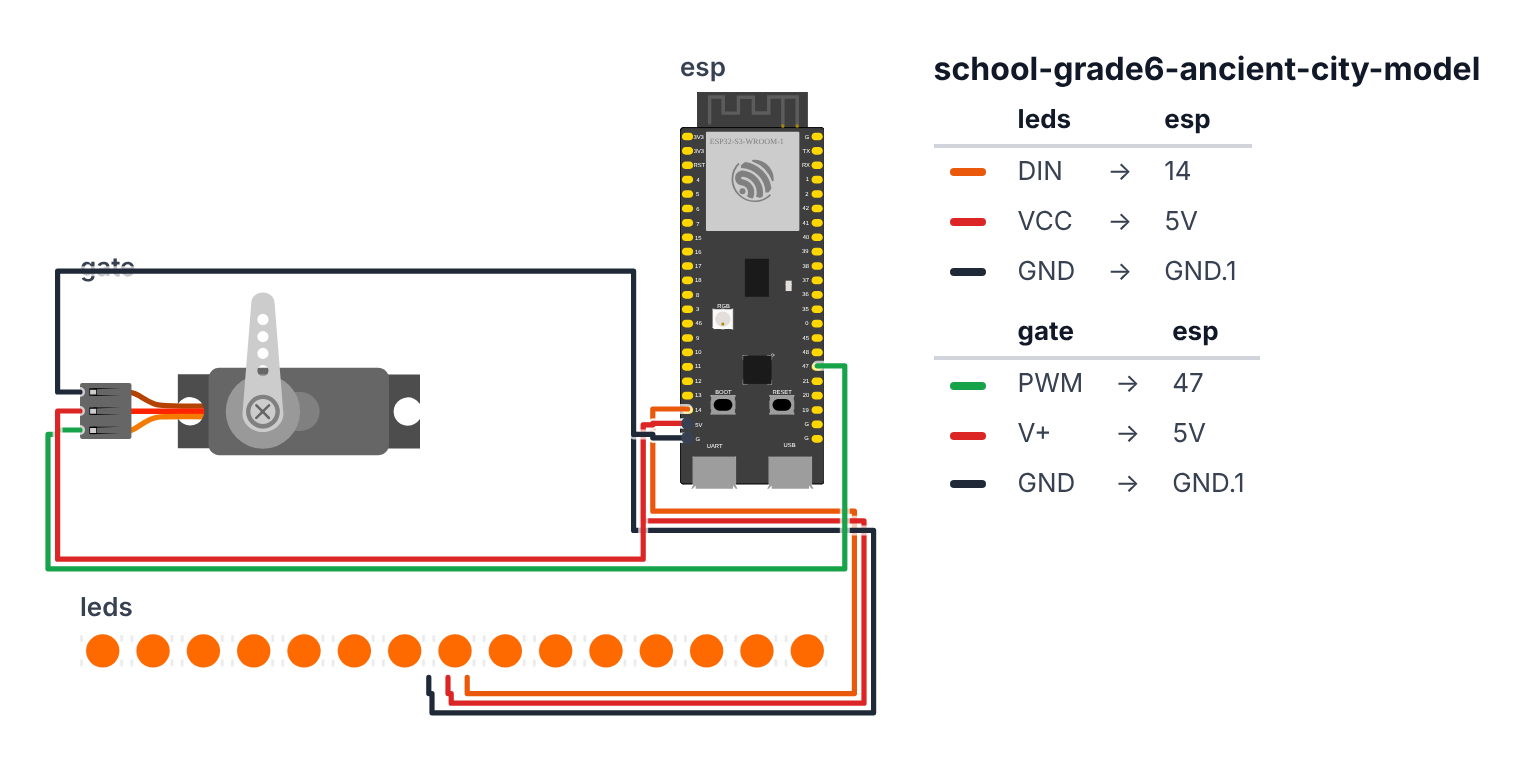
WS2812 LED Strip (3 wires):
- Strip DIN (data in, marked on the strip or first arrow end) → board GPIO14 — orange wire
- Strip VCC or 5V → board 5V — red wire
- Strip GND → board GND — black wire
SG90 Servo Motor (3 wires): 4. Servo signal (orange wire from servo) → board GPIO47 — green wire 5. Servo VCC (red wire from servo) → board 5V — red wire 6. Servo GND (brown wire from servo) → board GND — black wire
Check: LED strip arrows show the direction of data flow. The DIN end (first arrow) is where you connect data. DOUT is the other end (to chain more strips). Use the DIN end.
Check: You have 6 wires total: 2 red (power), 2 black (ground), 1 orange (LED data), 1 green (servo signal).
Step 2: Flash ESP-Claw
Time: ~5 minutes
- Connect your ESP32 to your computer via USB-C.
- Open Chrome or Edge browser (not Firefox).
- Go to: https://esp-claw.com/en/flash/
- Select ESP32-S3 and click Flash Firmware.
- Pick your board’s serial port when prompted.
- Wait ~1 minute for flashing to complete.
After flashing, enter your WiFi credentials. The page will show your board’s IP address.
Check: Open the IP address in your browser. You should see the ESP-Claw configuration page.
Step 3: Connect to Telegram and AI
Time: ~5 minutes
- Open Telegram → search for @BotFather → type
/newbot - Name your bot: AncientCityBot (or whatever you like)
- Copy the bot token BotFather gives you
- In the ESP-Claw config page, find Telegram → paste the token → save
- Find LLM settings → select Claude or OpenAI → paste your API key → save
- Restart the board
Check: Text your bot “Hello” in Telegram. If it responds, setup is complete.
Step 4: Command your ancient city
Now the fun part. Open your Telegram bot and try these commands:
Light up your city at night: “Turn on all LEDs warm amber, like torchlight in an ancient city”
Market district glow: “Set LEDs 0 through 5 to orange, LEDs 6 through 10 to red, LEDs 11 to 14 off — like a bustling market district”
Open the city gate: “Move the servo on GPIO47 to 90 degrees — the city gate is opening”
Close it: “Move the servo to 0 degrees — gate closed”
Day/night transition: “Create a skill: when I say ‘sunrise’, slowly fade the LEDs from dark blue to bright gold over 10 seconds”
Guard alert: “When I type ‘ALERT’, flash all LEDs red three times and snap the servo to 45 degrees”
What just happened
Concepts you connected to your social studies:
- City planning — ancient cities had gates, markets, temples, and residential areas. By programming different LED zones, you demonstrated how different parts of an ancient city had different functions.
- Night life in ancient cities — most ancient cities used oil lamps and torches after dark. Your amber LEDs represent exactly that light color (warm yellow-orange = fire and oil light).
- City gates as control points — in ancient Babylon, Mesopotamia, and Rome, gates were critical infrastructure. Only authorized people could enter. Your servo gate demonstrates this access control concept.
Curriculum alignment: Common Core Social Studies Grade 6 — Analyze the geographic, economic, and political characteristics of ancient civilizations. Specifically, city structure, trade routes, and defensive architecture.
Presentation tip: During your social studies presentation, use the bot to control your city live. Say: “This is the marketplace — it stayed lit late into the evening for trade” and turn on the orange LEDs. “This is the city gate — guards opened it at dawn” and trigger the servo. Physical demonstrations are 10× more memorable than talking at a poster.
Level Up
Motion sensor guard: Add a PIR sensor to GPIO5. Tell ESP-Claw: “When PIR fires, flash red LEDs and move servo to closed position — intruder alert!” Now anyone who walks near your model triggers the city’s defense system.
Trade route lights: Run a thin strip of LEDs along a “road” in your model. Command the lights to travel from one end to the other (like caravans moving through the city).
Historical accuracy mode: Program specific lighting patterns for specific ancient events. “Morning prayer” (sunrise golden glow), “Market hours” (warm amber everywhere), “Night watch” (dim red torches only at the gate).
★★ You completed: Grade 6 Ancient City Model!
Troubleshooting
| Problem | Fix |
|---|---|
| LEDs don’t light | Check DIN vs DOUT. Check 5V (not 3.3V) on strip VCC. Check the N8R8 board version. |
| Servo doesn’t move | Check GPIO47 signal wire. Try: “test servo on GPIO47 sweep from 0 to 90 degrees.” |
| Bot doesn’t respond | Check: board powered, WiFi connected, bot token correct, API key valid with credit. |
| Gate mechanism is stiff | The SG90 is a small servo. If the gate is too heavy or the mechanism too stiff, the servo will buzz and overheat. Make the gate lighter (thin cardboard instead of thick). |
| Some LEDs wrong color | WS2812 LEDs are individually addressable. If one LED is wrong, check for a loose connection at the cut point on the strip. |