Parent info
Parts you need
Affiliate links — we may earn a small commission
Try this circuit in your browser!
Run the code, press the buttons and watch what happens — before you buy any parts. No account needed.
Open in Simulator →Your phone buzzes. “ALERT! Motion — Zone 1 (front door).”
Imagine this: you’re at school. Your phone buzzes. Telegram message: “ALERT! Motion — Zone 1 (front door).” You check the timestamp — it’s 3pm on a Tuesday. That’s fine, it’s your little brother. But now you know your room is covered.
This project builds a real alarm system with two motion zones, a buzzer, web control, and Telegram notifications. Better yet: it auto-disarms when your phone comes within Bluetooth range of the house.
2 hours. About $20. Works while you’re away.
What you’ll need
| Part | What it does | Price |
|---|---|---|
| ESP32-S3 Dev Board | The brain — monitors sensors, sends alerts, serves the web control page | ~$12 |
| PIR Motion Sensor ×2 | Front door and back door zones — each covers about 6 meters | ~$4 total |
| Active Piezo Buzzer | Sounds the alarm — an active buzzer makes noise when you put 5V on it | ~$1 |
| LED + 220Ω resistor | Status indicator — blinks when armed | ~$0.50 |
| Breadboard + jumper wires | Connects everything | ~$5 |
You also need: a free Telegram account and 5 minutes to set up a bot.
Total: ~$20 | Time: ~2 hours | Difficulty: ●●○○○
Telegram bot setup (do this first — 5 minutes):
- Open Telegram, message
@BotFather- Send
/newbot, give it a name, copy the API token it gives you- Message your new bot once, then visit:
https://api.telegram.org/bot<TOKEN>/getUpdates- In the JSON response, find
"chat":{"id":123456789}— that number is your chat ID- Keep both values. You’ll paste them into the code.
How it works (60 seconds)
Think of the ESP32 as a security guard that never sleeps. When armed, it watches two PIR sensors. The moment either one goes HIGH (something moved), it:
- Sounds the buzzer
- Sends you a Telegram message saying which zone triggered
- Waits for you to tap DISARM on the web page
The BLE auto-disarm is a clever bonus: every 60 seconds, the ESP32 briefly scans for Bluetooth devices. If it finds your phone’s MAC address, it knows you’re home and automatically disarms.
Step 0: PIR placement before wiring
Time: ~5 minutes thinking
PIR sensors cover a cone-shaped area about 6 meters wide and 120° wide. Where you mount them matters:
- Front door zone: Mount at 1.2m height, angled to cover the doorway and a few meters of the entrance path
- Back door zone: Same height, covering the rear entry
- Avoid: Pointing directly at a heater vent, sunny window, or the refrigerator — these cause false alarms because PIR detects heat movement
For now, just place them on the breadboard for testing. Permanent mounting comes after you’ve confirmed everything works.
Check: Stand in front of each PIR sensor and wave your hand. The output pin should go HIGH briefly (you’ll see it in Step 2’s Serial Monitor output). If nothing happens, the sensor has a 30–60 second warm-up period after power-on — wait a minute and try again.
Step 1: Wire it up
Time: ~10 minutes
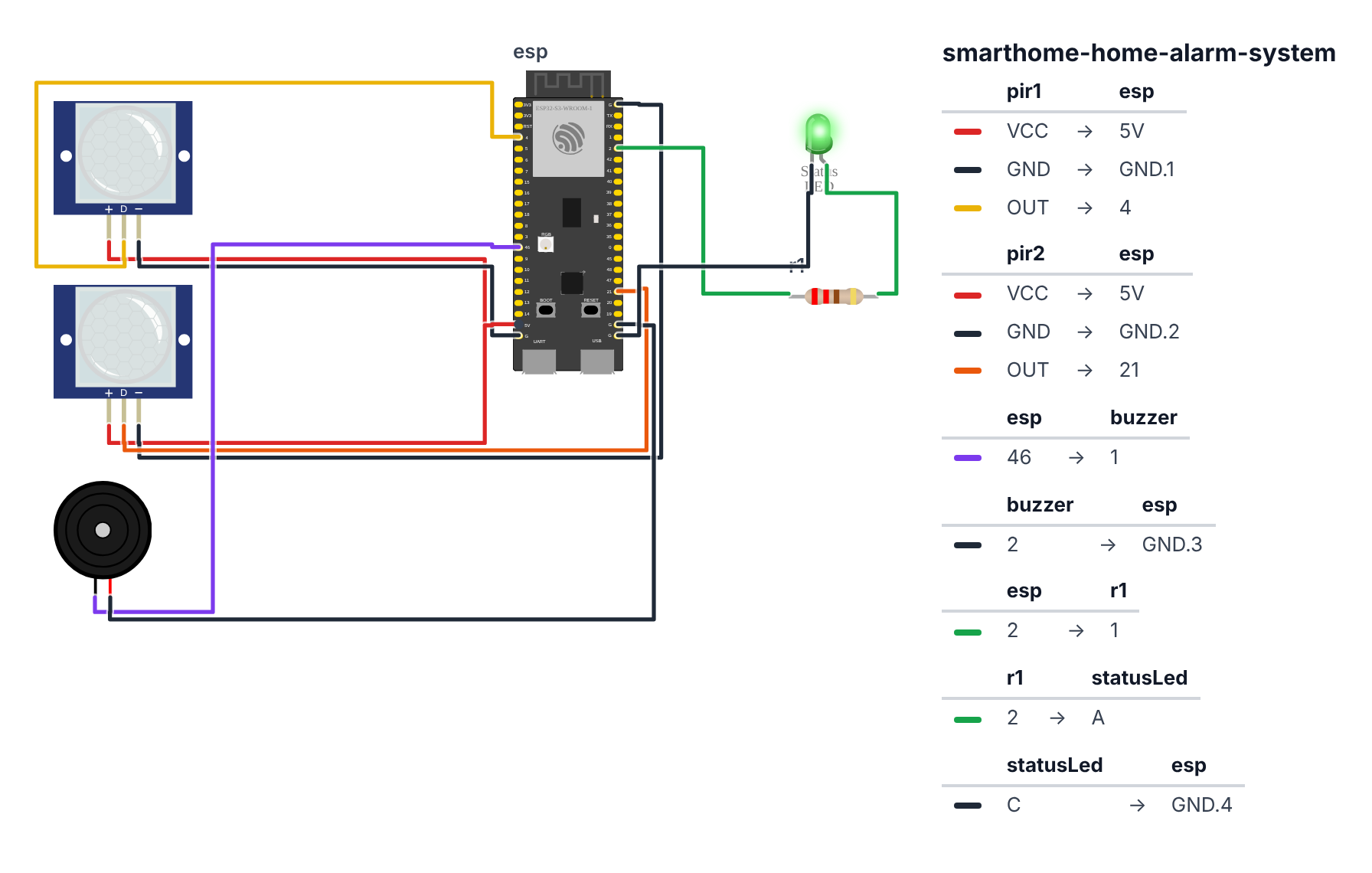
PIR Sensor 1 — Front door zone (3 wires):
- PIR1 VCC → board 5V — red wire
- PIR1 GND → board GND — black wire
- PIR1 OUT → board GPIO 4 (C6: GPIO 0) — yellow wire
PIR Sensor 2 — Back door zone (3 wires): 4. PIR2 VCC → board 5V — red wire 5. PIR2 GND → board GND — black wire 6. PIR2 OUT → board GPIO 21 (C6: GPIO 11) — orange wire
Active Piezo Buzzer (2 wires): 7. Buzzer + (longer leg) → board GPIO 46 (C6: GPIO 10) — purple wire 8. Buzzer - (shorter leg) → board GND — black wire
Status LED (2 wires): 9. LED Anode (+, longer leg) → 220Ω resistor → board GPIO 2 (C6: GPIO 2) — green wire 10. LED Cathode (-, shorter leg) → board GND — black wire
Check: Both PIR sensors get 5V — they have a little voltage regulator inside and need at least 4.5V to work properly. Don’t worry about the ESP32: the PIR’s OUT pin only ever sends 3.3V. The buzzer is controlled by GPIO 46 (C6: GPIO 10) directly. Count: 10 wires. Board not plugged in yet.
Step 2: Flash the code
Time: ~10 minutes
Fill in your WiFi credentials, bot token, and chat ID before uploading:
The big picture first. This program turns the ESP32 into a real home alarm system:
- Two PIR sensors watch two zones (front door, back door). Each sends HIGH when heat moves across it.
- A web page on the ESP32 lets you ARM and DISARM from your phone browser.
- When armed and motion detected: the buzzer sounds, a Telegram message goes to your phone.
- A bonus: every 60 seconds the ESP32 does a quick Bluetooth scan. If it finds your phone’s MAC address, it knows you’re home and auto-disarms.
// ========== CHOOSE YOUR BOARD ==========
// Uncomment the line for YOUR board:
#define BOARD_S3 // ESP32-S3-DevKitC-1
//#define BOARD_C6 // ESP32-C6-DevKitC-1
// ========================================
#ifdef BOARD_S3
#define PIN_PIR1 4
#define PIN_PIR2 21
#define PIN_BUZZER 46
#define PIN_LED 2
#endif
#ifdef BOARD_C6
#define PIN_PIR1 0
#define PIN_PIR2 11
#define PIN_BUZZER 10
#define PIN_LED 2
#endif
#include <WiFi.h>
#include <WebServer.h>
#include <HTTPClient.h>
#include <BLEDevice.h>
#include <BLEScan.h>
const char* ssid = "YourWiFiName";
const char* password = "YourWiFiPassword";
const char* BOT_TOKEN = "your_telegram_bot_token";
const char* CHAT_ID = "your_telegram_chat_id";
const char* HOME_BT_MAC = "AA:BB:CC:DD:EE:FF";
bool armed = false;
bool alertActive = false;
unsigned long lastBLEScan = 0;
unsigned long lastLedBlink = 0;
bool ledState = false;
WebServer server(80);
BLEScan* pBLEScan;
void sendTelegram(const String& msg) {
if (WiFi.status() != WL_CONNECTED) return;
HTTPClient http;
String url = "https://api.telegram.org/bot";
url += BOT_TOKEN;
url += "/sendMessage?chat_id=";
url += CHAT_ID;
url += "&text=";
url += msg;
http.begin(url);
http.GET();
http.end();
}
bool isPhoneNearby() {
BLEScanResults* results = pBLEScan->start(3, false);
for (int i = 0; i < results->getCount(); i++) {
BLEAdvertisedDevice d = results->getDevice(i);
if (d.getAddress().toString() == String(HOME_BT_MAC)) {
pBLEScan->clearResults();
return true;
}
}
pBLEScan->clearResults();
return false;
}
String buildPage() {
String state = armed ? "ARMED" : "DISARMED";
String stColor = armed ? "#f44336" : "#4caf50";
String alert = alertActive ? "<p style='color:#ff9800;font-size:20px'>ALERT ACTIVE</p>" : "";
return "<!DOCTYPE html><html><head>"
"<meta name='viewport' content='width=device-width,initial-scale=1'>"
"<meta http-equiv='refresh' content='5'>"
"<style>body{font-family:sans-serif;background:#0d0d0d;color:#eee;"
"text-align:center;padding:20px} .state{font-size:40px;font-weight:bold;"
"color:" + stColor + "} .btn{background:#1a1a2e;color:white;"
"padding:14px 30px;margin:10px;border-radius:8px;text-decoration:none;"
"font-size:16px;display:inline-block}</style></head><body>"
"<h1>🔒 Home Alarm</h1>"
"<p class='state'>" + state + "</p>" + alert +
"<br><a class='btn' href='/arm'>ARM</a>"
"<a class='btn' href='/disarm'>DISARM</a>"
"<a class='btn' href='/silence'>SILENCE</a>"
"</body></html>";
}
void setup() {
Serial.begin(115200);
pinMode(PIN_PIR1, INPUT);
pinMode(PIN_PIR2, INPUT);
pinMode(PIN_BUZZER, OUTPUT);
pinMode(PIN_LED, OUTPUT);
digitalWrite(PIN_BUZZER, LOW);
WiFi.begin(ssid, password);
while (WiFi.status() != WL_CONNECTED) { delay(500); Serial.print("."); }
Serial.printf("\nIP: %s\n", WiFi.localIP().toString().c_str());
BLEDevice::init("");
pBLEScan = BLEDevice::getScan();
pBLEScan->setActiveScan(true);
server.on("/", []() { server.send(200, "text/html", buildPage()); });
server.on("/arm", []() { armed = true; alertActive = false;
sendTelegram("Alarm+ARMED");
server.sendHeader("Location","/"); server.send(303); });
server.on("/disarm", []() { armed = false; alertActive = false;
digitalWrite(PIN_BUZZER, LOW);
sendTelegram("Alarm+disarmed");
server.sendHeader("Location","/"); server.send(303); });
server.on("/silence",[]() { alertActive = false; digitalWrite(PIN_BUZZER, LOW);
server.sendHeader("Location","/"); server.send(303); });
server.begin();
Serial.println("Alarm system ready.");
}
void loop() {
server.handleClient();
if (armed && millis() - lastLedBlink > 1000) {
ledState = !ledState;
digitalWrite(PIN_LED, ledState);
lastLedBlink = millis();
}
if (!armed) digitalWrite(PIN_LED, LOW);
if (armed) {
bool pir1 = digitalRead(PIN_PIR1) == HIGH;
bool pir2 = digitalRead(PIN_PIR2) == HIGH;
if ((pir1 || pir2) && !alertActive) {
alertActive = true;
digitalWrite(PIN_BUZZER, HIGH);
String zone = pir1 ? "Zone+1+(front+door)" : "Zone+2+(back+door)";
sendTelegram("ALERT!+Motion+in+" + zone);
Serial.println("ALERT triggered");
}
}
if (millis() - lastBLEScan > 60000) {
lastBLEScan = millis();
if (armed && isPhoneNearby()) {
armed = false;
alertActive = false;
digitalWrite(PIN_BUZZER, LOW);
sendTelegram("Auto-disarmed+(phone+detected)");
Serial.println("Auto-disarmed — phone nearby");
}
}
delay(200);
}Line-by-line: what every line does and why
Lines 1–5: Borrowing ready-made tools
#include <WiFi.h>
#include <WebServer.h>
#include <HTTPClient.h>
#include <BLEDevice.h>
#include <BLEScan.h>#include grabs instruction books. WiFi connects to your network. WebServer hosts the ARM/DISARM web page. HTTPClient makes outgoing HTTPS requests — used to send Telegram messages. BLEDevice and BLEScan control the Bluetooth scanner for the auto-disarm feature.
Lines 7–18: The settings
const char* ssid      = "YourWiFiName";
const char* BOT_TOKEN = "your_telegram_bot_token";
const char* HOME_BT_MAC = "AA:BB:CC:DD:EE:FF";
  #define PIN_PIR1    4
  #define PIN_PIR2   21
  #define PIN_BUZZER 46
  #define PIN_LED     2
const means “locked — never changes.” The #define lines come from the BOARD_S3 block at the top of the sketch: they give each pin a name, so the code can say PIN_PIR1 instead of a bare number. HOME_BT_MAC is your phone’s Bluetooth hardware address. When the ESP32 scans and finds this address, it knows you’re home.
Pin numbers: PIR1 on GPIO 4 (front door zone), PIR2 on GPIO 21 (back door zone), buzzer on GPIO 46, LED on GPIO 2. On a C6 board, the BOARD_C6 block uses GPIO 0, 11, 10 and 2 instead.
Lines 20–30: State variables
bool armed       = false;
bool alertActive = false;
unsigned long lastBLEScan  = 0;
unsigned long lastLedBlink = 0;
bool ledState = false;
bool is a yes/no box. armed = false means the system starts disarmed. alertActive = false means no alert is ringing.
unsigned long lastBLEScan = 0 — a sticky note recording “when did I last do a BLE scan?” Starts at 0 (never scanned).
lastLedBlink = 0 — same idea for the LED blink timer.
bool ledState = false — remembers whether the LED is currently on or off, so the code can flip it.
Lines 36–46: sendTelegram() — texts your phone
void sendTelegram(const String& msg) {
  if (WiFi.status() != WL_CONNECTED) return;
  HTTPClient http;
  String url = "https://api.telegram.org/bot";
  url += BOT_TOKEN;
  url += "/sendMessage?chat_id=";
  url += CHAT_ID;
  url += "&text=";
  url += msg;
  http.begin(url);
  http.GET();
  http.end();
}
const String& msg — the & means the function receives a reference to the string (not a copy). More efficient for large strings.
if (WiFi.status() != WL_CONNECTED) return — check WiFi before trying to send. return exits the function immediately if WiFi is gone.
The Telegram Bot API works by sending an HTTPS GET request to a special URL that includes your bot token, chat ID, and message text. http.begin(url) sets up the connection. http.GET() sends the request. http.end() closes the connection.
Spaces in the message text must be encoded as + in URLs (that’s why “Zone+1” not “Zone 1”).
Lines 48–60: isPhoneNearby() — the auto-disarm check
bool isPhoneNearby() {
  BLEScanResults* results = pBLEScan->start(3, false);
  for (int i = 0; i < results->getCount(); i++) {
    BLEAdvertisedDevice d = results->getDevice(i);
    if (d.getAddress().toString() == String(HOME_BT_MAC)) {
      pBLEScan->clearResults();
      return true;
    }
  }
  pBLEScan->clearResults();
  return false;
}
pBLEScan->start(3, false) — listen for Bluetooth broadcasts for 3 seconds. Every phone with Bluetooth on broadcasts its MAC address periodically.
The for loop checks each found device. d.getAddress().toString() converts the device address to a string. == compares it to your stored home MAC.
return true — if found, immediately exit the function with “yes, phone is nearby.” return false — if the loop finishes without finding it, the phone is not home.
Lines 62–80: buildPage() — the web interface
String buildPage() {
  String state   = armed ? "ARMED" : "DISARMED";
  String stColor = armed ? "#f44336" : "#4caf50";
  ...
}
armed ? "ARMED" : "DISARMED" is a ternary operator — a compact if/else. Read it as: “if armed is true, use ‘ARMED’; otherwise use ‘DISARMED’.”
"#f44336" is a color in hex — red (for ARMED). "#4caf50" is green (for DISARMED). The web page uses CSS to set the text color.
The function returns a complete HTML string. Every time you tap a button and the page reloads, buildPage() runs again and shows the current state.
Lines 82–111: setup() — morning routine
pinMode(PIN_PIR1, INPUT) — set PIR pins as inputs (data flows in from sensors). pinMode(PIN_BUZZER, OUTPUT) — buzzer is an output (ESP32 sends power out to it).
server.on("/arm", []() { ... }) — this registers a route using a lambda (an anonymous function written inline). The []() syntax means “a function with no name, created right here.” When you tap ARM in the browser, your phone sends a GET request to /arm, and this lambda runs.
server.sendHeader("Location", "/") and server.send(303) — redirect the browser back to the main page after processing the button tap. 303 is the HTTP “See Other” redirect code.
Lines 113–152: loop() — the repeating heartbeat
void loop() {
  server.handleClient();
  if (armed && millis() - lastLedBlink > 1000) {
    ledState = !ledState;
    digitalWrite(PIN_LED, ledState);
    lastLedBlink = millis();
  }
  ...
}
server.handleClient() — check if any browser has sent a request. Must be called repeatedly in loop() to keep the web server responsive.
millis() - lastLedBlink > 1000 — “has more than 1 second passed since the LED last changed?” The LED blinks once per second when armed.
ledState = !ledState — ! flips a bool. If ledState was true (LED on), it becomes false (LED off). Next call, it flips back. This is the blink.
pir1 || pir2 — || means OR. “If PIR1 is HIGH OR PIR2 is HIGH, trigger the alarm.” Either sensor can trigger it.
!alertActive — only trigger if no alert is already active. Prevents firing the same alarm 200 times while the intruder is still in the room.
millis() - lastBLEScan > 60000 — check every 60 seconds. BLE scanning takes 3 seconds and blocks the web server during that time — running it rarely keeps the web page responsive.
The whole thing in one sentence
loop() continuously handles web requests, blinks the LED when armed, watches both PIR sensors for motion, and checks for your phone via Bluetooth every 60 seconds to auto-disarm.
First thing to try: open the web page and tap ARM. Wave your hand in front of PIR1. The buzzer should sound immediately and your Telegram should buzz within 5 seconds. Tap SILENCE to stop the buzzer, DISARM to reset. Confirm both PIR sensors trigger independently.
Check: Open Serial Monitor (115200 baud). You should see the IP address. Open it in your browser. The page shows “DISARMED” in green.
Step 3: Test the alarm
Time: ~5 minutes
- Open the web page and tap ARM
- Watch the LED — it should start blinking once per second (armed indicator)
- Wave your hand in front of PIR Sensor 1
- Buzzer sounds. Check Telegram — you should get a message within 5 seconds.
- Tap SILENCE on the web page — buzzer stops. Alert stays active.
- Tap DISARM — system resets to green.
- Tap ARM again and test PIR Sensor 2
Check: Both PIR sensors trigger the alarm independently. Telegram messages arrive with the zone name. SILENCE stops the buzzer without disarming.
Step 4: Use it!
How to use it daily:
Tap ARM before you leave the house or go to bed. The LED blinks — visual confirmation.
If motion is detected while armed: your phone buzzes with a Telegram message. The buzzer sounds. Check the camera (your phone camera works, or a Telegram bot photo trick) to see if it’s real.
Tap DISARM when you come home (before BLE auto-disarm kicks in, if your Android phone has a static MAC address).
BLE auto-disarm: If you filled in your phone’s real MAC address, the system checks every 60 seconds. When your phone is within 10–30 meters, it disarms automatically. You don’t have to touch your phone.
What just happened
Real security concepts you just used:
-
PIR sensors detect heat movement, not people. PIR stands for Passive Infrared. The sensor has a lens that divides the field of view into zones. When a warm body moves across zones, a voltage signal is generated. This is why it misses people standing perfectly still, why pets trigger it, and why a sunny window causes false alarms. It’s a physics sensor — not a camera.
-
The Telegram Bot API is just HTTP. Your ESP32 sends an HTTPS GET request to a URL containing your bot token and message text. Telegram’s servers receive it and deliver to your chat. No special library needed — just
HTTPClient. The spaces in the text are URL-encoded as+. -
BLE scanning is passive listening. Bluetooth Low Energy devices broadcast short “advertisement” packets every few hundred milliseconds. The ESP32 listens for these and reads the source MAC address. This is how Find My works, how wireless earbuds auto-reconnect, and how presence detection works. Note: iOS 14+ randomizes MAC addresses for privacy — BLE auto-disarm may not work on iPhone, but the web page always does.
-
millis()instead ofdelay()for timing. The alarm loop usesmillis() - lastLedBlink > 1000to blink the LED every second without blocking. If you useddelay(1000), the web server wouldn’t respond during that second. Non-blocking timing withmillis()is one of the most important patterns in embedded programming.
Level Up
Add a 30-second entry delay. When the front door PIR triggers, beep the buzzer once per second as a countdown warning instead of immediately alerting. If you tap DISARM within 30 seconds, cancel the countdown. If it reaches zero, trigger the full alarm. This is the difference between a real alarm and a toy.
Add a 4-digit PIN disarm. Create a web form with 4 number inputs. The correct PIN disarms the alarm without needing your phone to be open. Store the PIN as a const int PIN = 1234 in code. This gives you a backup when Bluetooth fails.
Log alarm events to a Google Sheet. Every time the alarm triggers, in addition to the Telegram message, send an HTTP POST to a Google Apps Script URL with the timestamp and zone. After a month you’ll have a record of every detection — useful for spotting patterns (back door PIR triggers every morning when the sun hits it, so false-alarm rate is 100% in that zone 7–8am).
Troubleshooting
| Problem | Fix |
|---|---|
| PIR never triggers | Wait 60 seconds after power-on — the sensor needs time to calibrate. Wave your hand slowly across the detection zone. Adjust the sensitivity pot on the back of the sensor. |
| PIR triggers constantly (false alarms) | Move it away from heaters, AC vents, and windows with direct sunlight. Tilt it downward slightly. |
| Telegram message never arrives | Visit https://api.telegram.org/bot<TOKEN>/getUpdates — did you message your bot at least once? Check that your chat ID is a number, not a string. Check WiFi is connected. |
| BLE auto-disarm doesn’t work | iPhone users: iOS randomizes MAC addresses for privacy — it won’t work reliably. Android users: find your real Bluetooth MAC in Settings → About → Status. Make sure you’re within 10–20 meters. |
| Buzzer makes no sound | Make sure you have an ACTIVE piezo buzzer (not passive). Active buzzers make sound when voltage is applied. Passive buzzers need a PWM signal. |
| Web page times out | The BLE scan runs for 3 seconds every 60 seconds and blocks the web server during that time. This is normal — just reload the page. |