Parent info
Parts you need
Affiliate links — we may earn a small commission
Try this circuit in your browser!
Run the code, press the buttons and watch what happens — before you buy any parts. No account needed.
Open in Simulator →Your classmates rolled dice and counted tallies. You built a probability machine.
Math class: probability experiment. Everyone gets a physical die and a tally sheet. Roll it 30 times, count the 1s, 2s, 3s, and so on. Write your results on the board. They look random and messy and nobody’s sure what it proves.
You walk in with a device that has already rolled a virtual die 500 times, logged every result, calculated the frequency of each outcome as a percentage, and displayed a bar graph showing how close each outcome is to the theoretical 16.67%. The bar graph looks almost perfectly even at 500 rolls — which is exactly what probability theory predicts.
You didn’t prove probability by rolling dice. You proved it with data.
What you’ll need
| Part | What it does | Price |
|---|---|---|
| ESP32-S3-DevKitC-1 | The brain — generates random numbers and calculates statistics | ~$12 |
| 0.96” OLED display | Shows dice faces, counts, and frequency bar graph | ~$5 |
| Tactile push buttons | Roll button, mode button | ~$3 |
| Breadboard + jumper wires | Connects everything | ~$5 |
Total: ~$25 | Time: ~90 minutes | Difficulty: ●●○○○
Is it truly random? The ESP32 has a hardware random number generator (HWRNG) that generates real randomness from electrical noise in the chip. This is much better than software pseudo-random generators like
rand()in most languages. Real randomness matters in cryptography, simulations, and scientific experiments. You’re using the same technology in smart cards and banking systems.
How it works (60 seconds)
Press the ROLL button → the ESP32 calls esp_random() (hardware random number generator) → divides the result by the number of sides → gets a number 1–6 → stores it in a counter array → updates the display with the die face, counts, and bar graph showing how close each number is to perfect equal distribution (16.67% each for a fair die).
Step 0: Understand the math first
Time: ~5 minutes
For a fair six-sided die, each outcome (1, 2, 3, 4, 5, 6) should appear exactly 1/6 of the time = 16.67%.
But if you roll it 10 times, you might get three 4s and no 6s. Is the die unfair? No — that’s just the law of small numbers: with few trials, random variation looks huge.
Roll it 1000 times and each number will be very close to 16.67%. That’s the law of large numbers: more data → closer to true probability.
Your device will demonstrate this live: press the button 20 times and the bars are uneven. Press it 200 more times and they even out. That’s the whole lesson.
Extension question for your project: What if you simulated a loaded die (unfair)? Could you detect unfairness from data? How many rolls would you need before you were confident the die is biased?
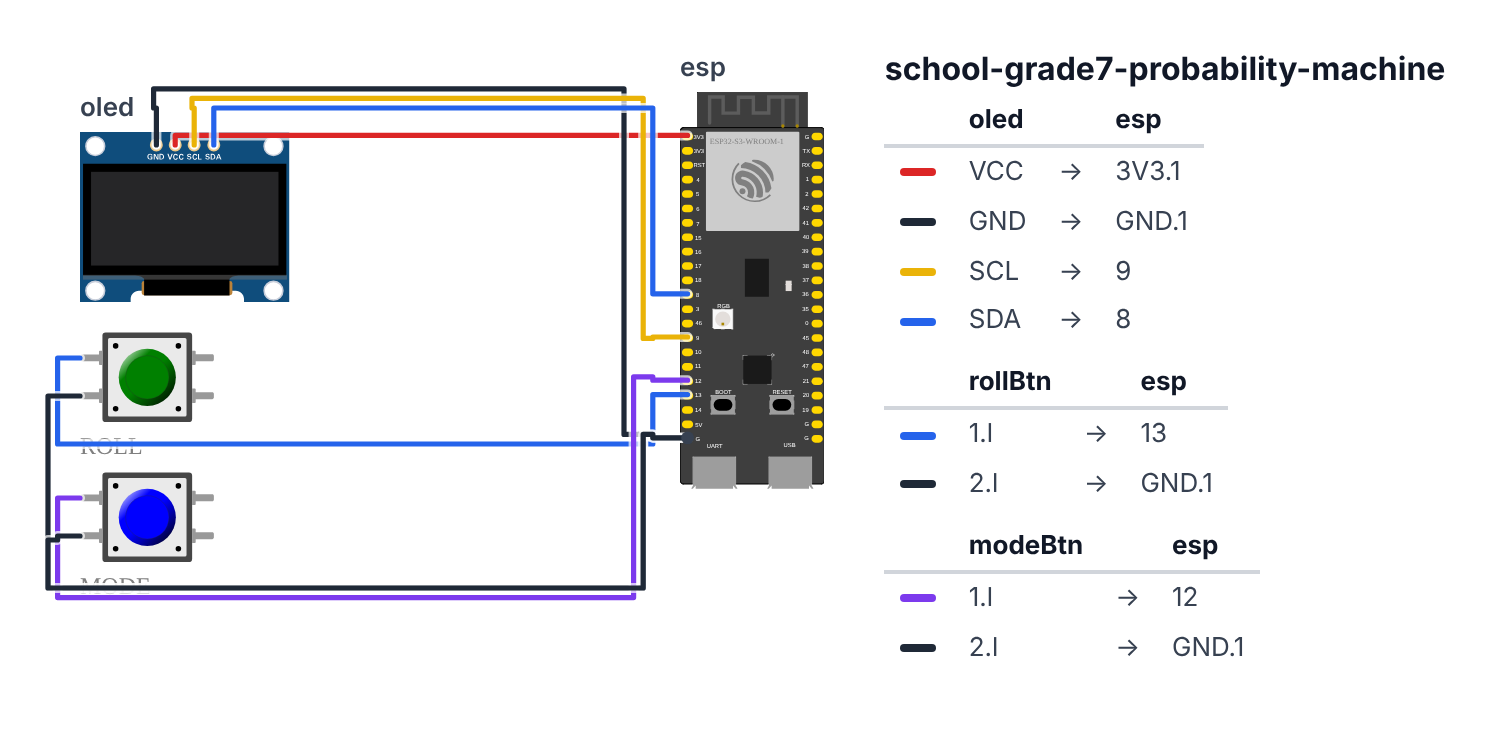
Step 1: Wire it up
Time: ~10 minutes
OLED Display (I2C):
- OLED VCC → board 3.3V — red wire
- OLED GND → board GND — black wire
- OLED SCL → board GPIO 9 (C6: GPIO 7) — yellow wire
- OLED SDA → board GPIO 8 (C6: GPIO 6) — blue wire
Roll Button: 5. Button one terminal → board GPIO 13 (C6: GPIO 5) — blue wire 6. Button other terminal → board GND — black wire
Mode Button (switches between auto-roll and manual modes): 7. Button one terminal → board GPIO 12 (C6: GPIO 15) — purple wire 8. Button other terminal → board GND — black wire
Check: Both buttons use GPIO INPUT_PULLUP mode — no external resistor needed. The ESP32 has built-in pull-up resistors that hold the pin HIGH when the button is not pressed. Pressing the button connects the pin to GND, making it LOW.
Step 2: Flash the code
Time: ~20 minutes
Install Adafruit SSD1306 and Adafruit GFX libraries.
Here is the big picture. This program is a real probability experiment running on silicon:
- The ESP32 has a hardware random number generator — a chip that generates true randomness from electrical noise inside the processor itself. This is far more random than software tricks.
- Every roll, the result gets stored in a counter. The display shows a die face AND a bar chart with a dotted line at 16.67% — the theoretically perfect height for a fair die.
- As you roll more, watch the bars move toward that dotted line. That is the law of large numbers happening live.
// ========== CHOOSE YOUR BOARD ==========
// Uncomment the line for YOUR board:
#define BOARD_S3    // ESP32-S3-DevKitC-1
//#define BOARD_C6  // ESP32-C6-DevKitC-1
// ========================================

#ifdef BOARD_S3
  #define PIN_SDA       8
  #define PIN_SCL       9
  #define PIN_ROLL_BTN  13
  #define PIN_MODE_BTN  12
#endif
#ifdef BOARD_C6
  #define PIN_SDA       6
  #define PIN_SCL       7
  #define PIN_ROLL_BTN  5
  #define PIN_MODE_BTN  15
#endif

#include <Wire.h>
#include <Adafruit_SSD1306.h>
#include "esp_random.h"

#define SCREEN_WIDTH 128
#define SCREEN_HEIGHT 64
Adafruit_SSD1306 display(SCREEN_WIDTH, SCREEN_HEIGHT, &Wire, -1);

#define ROLL_BTN PIN_ROLL_BTN
#define MODE_BTN PIN_MODE_BTN

int dieSides = 6;
int rollCounts[6] = {0};
int totalRolls = 0;
int lastRoll = 0;

bool autoRollMode = false;
unsigned long lastAutoRoll = 0;
#define AUTO_ROLL_INTERVAL 200

int rollDie() {
  return (esp_random() % dieSides) + 1;
}

void drawDieFace(int x, int y, int size, int value) {
  display.drawRect(x, y, size, size, SSD1306_WHITE);

  int dotR = size / 10;
  int m = size / 4;

  bool dots[7][7] = {
    {false, false, false, true,  false, false, false},
    {true,  false, false, false, false, false, true },
    {true,  false, false, true,  false, false, true },
    {true,  true,  false, false, false, true,  true },
    {true,  true,  false, true,  false, true,  true },
    {true,  true,  true,  false, true,  true,  true },
  };

  if (value < 1 || value > 6) return;

  int idx = value - 1;
  int cx = x + size / 2;
  int cy = y + size / 2;

  int dotX[7] = {x+m,   x+size-m, x+m,  cx, x+size-m, x+m,   x+size-m};
  int dotY[7] = {y+m,   y+m,      cy,   cy, cy,        y+size-m, y+size-m};

  for (int d = 0; d < 7; d++) {
    if (dots[idx][d]) {
      display.fillCircle(dotX[d], dotY[d], dotR, SSD1306_WHITE);
    }
  }
}

void drawFrequencyGraph() {
  if (totalRolls == 0) return;

  float expected = 100.0 / dieSides;
  int graphTop = 40;
  int graphHeight = 20;
  int barWidth = 128 / dieSides;

  for (int i = 0; i < dieSides; i++) {
    float freq = (float)rollCounts[i] / totalRolls * 100.0;
    int barH = (int)(freq / 35.0 * graphHeight);
    barH = constrain(barH, 0, graphHeight);

    int x = i * barWidth;
    int y = graphTop + graphHeight - barH;

    display.fillRect(x + 1, y, barWidth - 2, barH, SSD1306_WHITE);

    display.setCursor(x + barWidth/2 - 3, graphTop + graphHeight + 2);
    display.print(i + 1);
  }

  int expectedY = graphTop + graphHeight - (int)(expected / 35.0 * graphHeight);
  for (int x = 0; x < 128; x += 4) {
    display.drawPixel(x, expectedY, SSD1306_WHITE);
  }
}

void updateDisplay() {
  display.clearDisplay();
  display.setTextColor(SSD1306_WHITE);

  if (lastRoll > 0) {
    drawDieFace(0, 0, 36, lastRoll);
  }

  display.setTextSize(1);
  display.setCursor(42, 0);
  display.print("Roll #"); display.println(totalRolls);

  display.setCursor(42, 10);
  display.print("Mode: ");
  display.println(autoRollMode ? "AUTO" : "MANUAL");

  display.setCursor(42, 20);
  display.print("Fair: 16.67%");

  display.drawLine(0, 38, 128, 38, SSD1306_WHITE);

  drawFrequencyGraph();

  display.display();
}

void performRoll() {
  lastRoll = rollDie();
  rollCounts[lastRoll - 1]++;
  totalRolls++;

  Serial.print(totalRolls); Serial.print(","); Serial.println(lastRoll);

  if (totalRolls % 50 == 0) {
    Serial.println("--- Frequency summary ---");
    for (int i = 0; i < dieSides; i++) {
      Serial.print("Face "); Serial.print(i+1); Serial.print(": ");
      Serial.print(rollCounts[i]); Serial.print(" rolls = ");
      Serial.print((float)rollCounts[i]/totalRolls*100.0, 1); Serial.println("%");
    }
    Serial.println("Expected: 16.67% each");
    Serial.println("-------------------------");
  }

  updateDisplay();
}

void setup() {
  Serial.begin(115200);
  Wire.begin(PIN_SDA, PIN_SCL);

  pinMode(ROLL_BTN, INPUT_PULLUP);
  pinMode(MODE_BTN, INPUT_PULLUP);

  if (!display.begin(SSD1306_SWITCHCAPVCC, 0x3C)) {
    Serial.println("Display not found!");
    while (true);
  }

  display.clearDisplay();
  display.setTextColor(SSD1306_WHITE);
  display.setCursor(0, 0);
  display.println("Probability Machine");
  display.println("ROLL btn = roll once");
  display.println("MODE btn = auto/manual");
  display.println("Serial = CSV data");
  display.display();
  delay(2000);

  updateDisplay();
  Serial.println("Roll#,Outcome");
}

bool lastRollBtn = HIGH;
bool lastModeBtn = HIGH;

void loop() {
  bool rollBtn = digitalRead(ROLL_BTN);
  bool modeBtn = digitalRead(MODE_BTN);

  if (lastRollBtn == HIGH && rollBtn == LOW) {
    delay(50);
    performRoll();
  }

  if (lastModeBtn == HIGH && modeBtn == LOW) {
    delay(50);
    autoRollMode = !autoRollMode;
    Serial.println(autoRollMode ? "AUTO mode ON" : "MANUAL mode");
    updateDisplay();
  }

  if (autoRollMode && millis() - lastAutoRoll >= AUTO_ROLL_INTERVAL) {
    performRoll();
    lastAutoRoll = millis();
  }

  lastRollBtn = rollBtn;
  lastModeBtn = modeBtn;
  delay(10);
}
Line-by-line: what every line does and why
Line 3: The hardware random number generator
#include "esp_random.h"This imports the ESP32’s hardware random number generator. The function esp_random() returns a random 32-bit number (0 to 4,294,967,295) generated from real electrical noise inside the chip — not a formula that just looks random. This is important: software random number generators produce predictable sequences if you know the starting value. Hardware RNG is truly unpredictable.
Lines 11–16: The probability data
int dieSides = 6;
int rollCounts[6] = {0};
int totalRolls = 0;
int lastRoll = 0;
rollCounts[6] is a shelf with 6 compartments, one per die face. rollCounts[0] counts how many 1s have been rolled, rollCounts[1] counts 2s, and so on. All start at 0 (= {0} initializes the whole array to zero).
Lines 20–22: rollDie() — the core function
int rollDie() {
  return (esp_random() % dieSides) + 1;
}
esp_random() returns a huge random number. % dieSides (remainder after dividing by 6) gives 0, 1, 2, 3, 4, or 5. Adding 1 shifts it to 1–6. This is exactly how random dice work in all computer games — % to limit the range, +1 to shift to the right starting value.
Lines 24–57: drawDieFace() — pixel art on the OLED
bool dots[7][7] = {
  {false, false, false, true,  false, false, false},  // face 1
  ...
};
This 2D table (bool = true/false) encodes the dot pattern for each die face. There are 7 possible dot positions (top-left, top-right, middle-left, center, middle-right, bottom-left, bottom-right). For face 1, only the center is true. For face 6, all except the center are true.
display.fillCircle(dotX[d], dotY[d], dotR, SSD1306_WHITE);fillCircle draws a filled circle (a dot) at pixel coordinates (dotX[d], dotY[d]) with radius dotR. This is literally drawing the pip dots of the die face on the OLED pixel by pixel.
Lines 59–84: drawFrequencyGraph() — the live histogram
float freq = (float)rollCounts[i] / totalRolls * 100.0;
int barH = (int)(freq / 35.0 * graphHeight);
freq is the percentage frequency of each face (e.g., if face 3 came up 20 times out of 100 rolls, freq = 20.0). Dividing by 35 scales it to the graph height — a bar at 35% fills the entire graph space. constrain prevents the bar from going off-screen.
int expectedY = graphTop + graphHeight - (int)(expected / 35.0 * graphHeight);
for (int x = 0; x < 128; x += 4) {
  display.drawPixel(x, expectedY, SSD1306_WHITE);
}
This draws a dotted horizontal line at the height corresponding to 16.67% (the expected value for a fair die). Dots every 4 pixels create a dashed line. When your bars reach this line, the die is behaving fairly.
Lines 100–120: performRoll() — one complete roll
lastRoll = rollDie();
rollCounts[lastRoll - 1]++;
totalRolls++;
Roll the die, store the result, add 1 to the counter for that face (lastRoll - 1 converts 1–6 to index 0–5), and increase the total count. Then update the display and log to Serial.
if (totalRolls % 50 == 0) { ... }% 50 == 0 means “is totalRolls divisible by 50?” If yes, print a frequency summary to Serial Monitor. This appears automatically every 50, 100, 150… rolls.
Lines 135–155: Mode toggle
autoRollMode = !autoRollMode;! means NOT. So !autoRollMode flips it: if it was false, it becomes true; if true, becomes false. This is a toggle — one button press turns auto mode on, the next press turns it off.
if (autoRollMode && millis() - lastAutoRoll >= AUTO_ROLL_INTERVAL) {
  performRoll();
  lastAutoRoll = millis();
}
If in auto mode AND 200ms have passed, roll automatically and reset the timer. At 200ms per roll that’s 5 rolls per second — fast enough to reach 1000 rolls in a few minutes.
The whole thing in one sentence
The probability machine starts with empty counters. Each button press (or every 200ms in auto mode) generates a truly random die roll, stores it, updates the frequency bars, and draws the running histogram — showing the law of large numbers happening in real time.
First thing to try: Roll 20 times manually and look at how uneven the bars are. Then switch to AUTO mode and let it run to 500. Take a photo. The bars get much closer to the dotted line. That’s the whole statistics lesson — and you just watched it happen.
Check: Press the ROLL button. A die face should appear on the OLED and a bar should grow in the graph. Switch to AUTO mode — the die rolls automatically 5 times per second. Watch the bar graph — at 20 rolls it’s uneven, at 200 rolls it starts to even out, at 1000 rolls it’s nearly perfect. That’s the law of large numbers proving itself live.
Step 3: Run your probability experiment
Demonstrate the law of large numbers:
- Start fresh (restart the board)
- Roll 20 times manually — record the bar graph (take a photo)
- Auto-roll to 100 total — record it
- Auto-roll to 500 total — record it
- Auto-roll to 1000 total — record it
Compare your four photos. The graph gets more even at every step. This is statistical convergence.
For a loaded die comparison: Change (esp_random() % dieSides) + 1 to a biased version:
// Biased die: 4, 5, 6 are twice as likely
int biasedRoll() {
  int r = esp_random() % 9; // 0-8
  if (r < 3) return r + 1;  // 1,2,3 each 1/9 probability
  return (r - 3) / 2 + 4;  // 4,5,6 each 2/9 probability
}
How many rolls does it take before the bias shows up clearly in the graph?
What just happened
Concepts you used:
- Hardware random number generation — real randomness from physical noise in silicon chips. Different from software algorithms that just look random.
- Law of large numbers — the more trials you run, the closer your results get to the theoretical probability. You didn’t just read about this in a textbook. You watched it happen.
- Frequency histograms — bar graphs that show how often each outcome occurs. A perfectly fair die should produce a flat histogram.
- Statistical convergence — the process of results approaching a theoretical value with more data.
Curriculum alignment: Common Core Math 7.SP.C.5-8 (Probability concepts: relative frequency, theoretical probability, compound events, simulation). Specifically 7.SP.C.6: “Approximate the probability of a chance event by collecting data on the chance process that produces it and observing its long-run relative frequency.”
Presentation tip: Don’t just show the final even graph. Show the progression: “At 20 rolls, look how uneven this is. At 100, better. At 1000, almost perfect. This is the law of large numbers. It takes time — and the math predicts exactly how much time.” Then ask: “If you wanted to be 99% confident a die is fair, how many rolls would you need?” (Answer: hundreds to thousands, depending on desired confidence.)
Level Up
Chi-square test: Program the ESP32 to calculate the chi-square statistic and display whether the die is statistically fair. This is real hypothesis testing — the kind statisticians use.
Multiple dice: Add logic to roll two dice and display the sum. The distribution should show a bell curve centered on 7 — the most probable sum for two six-sided dice.
Custom probability distributions: Change the code to simulate coin flips (50/50), spinners with unequal sections, or any other probability experiment your class is studying.
★★ You completed: Grade 7 Probability Machine!
Troubleshooting
| Problem | Fix |
|---|---|
| Button doesn’t register | Make sure you’re using INPUT_PULLUP mode (code already does this). Check button wiring. |
| Die face doesn’t draw correctly | The dot positions depend on die size (36px). If you change drawDieFace() size, adjust the margin m accordingly. |
| Auto mode rolls too fast to see | Increase AUTO_ROLL_INTERVAL from 200 to 500 (half second per roll). |
| Display seems slow to update | Each display update takes ~10ms. In auto mode at 200ms interval, this is fine. |
| Results don’t converge even at 1000 rolls | That’s normal! Even at 1000 rolls, some slight variation remains. At 10,000 rolls it converges more. The ESP32 hardware RNG is truly random — results won’t be identical each time. |