Parent info
Parts you need
Affiliate links — we may earn a small commission
Try this circuit in your browser!
Run the code, press the buttons and watch what happens — before you buy any parts. No account needed.
Open in Simulator →They said it wasn’t that loud. Now you have a graph.
Imagine this: it’s 11pm on a school night. The TV is at maximum volume. You complain at breakfast. “It wasn’t that loud.” You pull out your phone and open a URL. A live chart loads, showing timestamps and decibel readings from last night. The spike at 11:07pm is labeled 94dB — just below a lawnmower. Case closed.
The ESP32 runs the entire web dashboard itself — no cloud service, no app, no subscription. Just open the IP address in any phone browser on your WiFi.
In 1 hour. For about $20.
What you’ll need
| Part | What it does | Price |
|---|---|---|
| ESP32-S3-DevKitC-1 | Reads the microphone, computes decibels, serves the web dashboard | ~$12 |
| INMP441 MEMS Microphone | Digital microphone via I2S — far more accurate than cheap analog sound sensors | ~$4 |
| OLED Display 0.96” (optional) | Shows current dB level without opening a browser — skip it to save $4 | ~$4 |
| Breadboard + jumper wires | Connects everything | ~$3 |
Total: ~$20 | Time: ~1 hour | Difficulty: ●●○○○
Important: Get the INMP441, not a generic analog “sound sensor module.” The analog modules only detect whether sound is loud or quiet — they can’t measure actual decibel levels. The INMP441 uses I2S (digital audio) and gives real, calibrated readings.
How it works (60 seconds)
Think of it like a digital speedometer for sound.
The INMP441 microphone converts sound into a digital stream of numbers over I2S — a digital audio protocol. The ESP32 reads 1024 of those numbers at once, computes the RMS (the “true” average loudness), and converts it to decibels. Every second, that number gets added to a chart on a web page the ESP32 is serving. You open the IP address in your phone browser and see a live graph updating in real time.
When the level crosses a threshold (default: 70dB — louder than normal conversation), the ESP32 logs the timestamp and peak reading. You can export this log later as evidence.
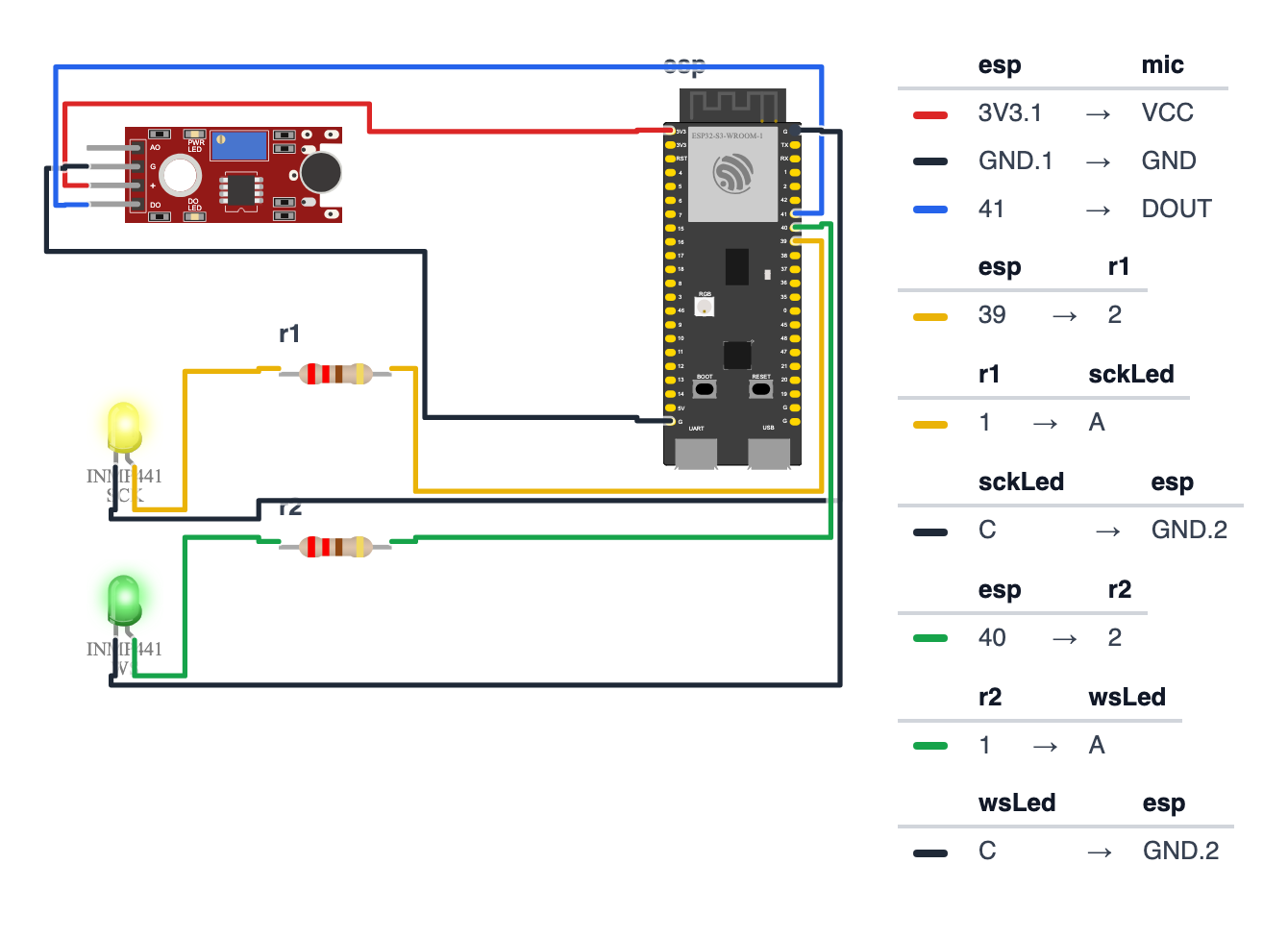
Step 1: Wire it up
Time: ~5 minutes
The INMP441 uses I2S — a 3-wire digital audio bus. I2S requires specific pins on the ESP32.
| ESP32-S3 | ESP32-C6 | Wire Color | INMP441 Pin |
|---|---|---|---|
| 3.3V | 3.3V | Red | VDD |
| GND | GND | Black | GND |
| GND | GND | Black | L/R (sets it to left channel) |
| GPIO 39 | GPIO 10 | Yellow | SCK (bit clock) |
| GPIO 40 | GPIO 11 | Green | WS (word select / left-right clock) |
| GPIO 41 | GPIO 23 | Blue | SD (serial data out) |
That’s 6 connections — two wires share GND.
Check: The L/R pin must be connected to GND. This tells the microphone “you’re the left channel.” Without this connection, the mic may not output any data at all.
Common mistake: Connecting the INMP441 to 5V instead of 3.3V. This is a 3.3V sensor. 5V will damage it.
Step 2: Install libraries
In Arduino IDE: Sketch → Include Library → Manage Libraries
- Search “ESPAsyncWebServer” → Install (by lacamera or ESP Async Web Server)
- Search “AsyncTCP” → Install (required by ESPAsyncWebServer)
The I2S driver (driver/i2s.h) is built into the ESP32 board package — no extra install.
Step 3: Flash the code
Time: ~5 minutes
The big picture first. This program turns the ESP32 into a scientific noise logger:
- The INMP441 microphone is a digital mic — it sends sound as a stream of numbers over I2S, a 3-wire audio protocol.
- The code reads 1,024 numbers at a time, calculates the RMS (a math formula for “true average loudness”), and converts that to decibels.
- Every second, it pushes the current dB reading to a live chart on a web page hosted on the ESP32.
- When the level crosses 70 dB (loud conversation level), it logs the event to memory. Check Serial Monitor for evidence.
// ========== CHOOSE YOUR BOARD ==========
// Uncomment the line for YOUR board:
#define BOARD_S3    // ESP32-S3-DevKitC-1
//#define BOARD_C6  // ESP32-C6-DevKitC-1
// ========================================

#ifdef BOARD_S3
  #define PIN_I2S_BCK   39
  #define PIN_I2S_LRCK  40
  #define PIN_I2S_DIN   41
#endif
#ifdef BOARD_C6
  #define PIN_I2S_BCK   10
  #define PIN_I2S_LRCK  11
  #define PIN_I2S_DIN   23
#endif

#include <driver/i2s.h>
#include <WiFi.h>
#include <ESPAsyncWebServer.h>
#include <math.h>

const char* WIFI_SSID     = "YourWiFiName";
const char* WIFI_PASSWORD = "YourWiFiPassword";

const float ALERT_DB     = 70.0;
const int   SAMPLE_COUNT = 1024;

#define I2S_PORT     I2S_NUM_0

#define MAX_LOG_ENTRIES 100
struct LogEntry {
  unsigned long timestamp;
  float db;
};
LogEntry eventLog[MAX_LOG_ENTRIES];
int logCount = 0;

float currentDB = 0;
AsyncWebServer server(80);

void initI2S() {
  i2s_config_t i2s_config = {
    .mode                 = (i2s_mode_t)(I2S_MODE_MASTER | I2S_MODE_RX),
    .sample_rate          = 16000,
    .bits_per_sample      = I2S_BITS_PER_SAMPLE_32BIT,
    .channel_format       = I2S_CHANNEL_FMT_ONLY_LEFT,
    .communication_format = I2S_COMM_FORMAT_STAND_I2S,
    .intr_alloc_flags     = ESP_INTR_FLAG_LEVEL1,
    .dma_buf_count        = 8,
    .dma_buf_len          = 1024,
    .use_apll             = false,
    .tx_desc_auto_clear   = false,
    .fixed_mclk           = 0
  };
  i2s_pin_config_t pin_config = {
    .bck_io_num   = PIN_I2S_BCK,
    .ws_io_num    = PIN_I2S_LRCK,
    .data_out_num = I2S_PIN_NO_CHANGE,
    .data_in_num  = PIN_I2S_DIN
  };
  i2s_driver_install(I2S_PORT, &i2s_config, 0, NULL);
  i2s_set_pin(I2S_PORT, &pin_config);
}

float readDecibels() {
  int32_t samples[SAMPLE_COUNT];
  size_t bytesRead;
  i2s_read(I2S_PORT, samples, sizeof(samples), &bytesRead, portMAX_DELAY);

  int samplesRead = bytesRead / sizeof(int32_t);

  double sum = 0;
  for (int i = 0; i < samplesRead; i++) {
    double sample = (double)samples[i] / (double)INT32_MAX;
    sum += sample * sample;
  }
  double rms = sqrt(sum / samplesRead);

  if (rms < 1e-10) rms = 1e-10;
  float db = 20.0f * log10f((float)rms) + 120.0f;
  return db;
}

const char dashboardHTML[] PROGMEM = R"rawliteral(
<!DOCTYPE html>
<html>
<head>
  <title>Decibel Diary</title>
  <meta name="viewport" content="width=device-width,initial-scale=1">
  <script src="https://cdn.jsdelivr.net/npm/chart.js"></script>
  <style>
    body { font-family: monospace; background:#111; color:#0f0; padding:20px; }
    h1 { color: #0f0; }
    #currentDB { font-size: 3em; }
  </style>
</head>
<body>
  <h1>Operation Decibel Diary</h1>
  <p>Current level: <span id="currentDB">--</span> dB</p>
  <canvas id="chart" width="400" height="200"></canvas>
  <script>
    const ctx = document.getElementById('chart').getContext('2d');
    const chart = new Chart(ctx, {
      type: 'line',
      data: { labels: [], datasets: [{
        label: 'dB Level',
        data: [],
        borderColor: '#0f0',
        tension: 0.1
      }]},
      options: { animation: false, scales: { y: { min: 40, max: 100 }}}
    });
    setInterval(() => {
      fetch('/data').then(r => r.json()).then(d => {
        document.getElementById('currentDB').textContent = d.db.toFixed(1);
        if (chart.data.labels.length > 60) {
          chart.data.labels.shift();
          chart.data.datasets[0].data.shift();
        }
        chart.data.labels.push(new Date().toLocaleTimeString());
        chart.data.datasets[0].data.push(d.db);
        chart.update();
      });
    }, 1000);
  </script>
</body>
</html>
)rawliteral";

void setup() {
  Serial.begin(115200);
  initI2S();

  WiFi.begin(WIFI_SSID, WIFI_PASSWORD);
  Serial.print("Connecting");
  while (WiFi.status() != WL_CONNECTED) {
    delay(500); Serial.print(".");
  }
  Serial.println("\nDashboard: http://" + WiFi.localIP().toString());

  server.on("/", HTTP_GET, [](AsyncWebServerRequest* request) {
    request->send_P(200, "text/html", dashboardHTML);
  });
  server.on("/data", HTTP_GET, [](AsyncWebServerRequest* request) {
    String json = "{\"db\":" + String(currentDB, 1) + "}";
    request->send(200, "application/json", json);
  });
  server.begin();

  Serial.println("Operation Decibel Diary: ARMED");
}

void loop() {
  currentDB = readDecibels();

  if (currentDB > ALERT_DB) {
    Serial.println("LOUD EVENT: " + String(currentDB, 1) + " dB");
    if (logCount < MAX_LOG_ENTRIES) {
      eventLog[logCount++] = {millis(), currentDB};
    }
  }
  delay(100);
}
Line-by-line: what every line does and why
Lines 1–4: Borrowing ready-made tools
#include <driver/i2s.h>
#include <WiFi.h>
#include <ESPAsyncWebServer.h>
#include <math.h>
#include grabs instruction books. driver/i2s is the ESP32’s built-in I2S audio driver — I2S is a 3-wire digital audio protocol, like a tiny CD player connection. WiFi connects to your network. ESPAsyncWebServer hosts the live dashboard. math.h gives us sqrt() (square root) and log10() (logarithm) — both needed for the dB calculation.
Lines 6–16: Settings
const float ALERT_DB  = 70.0;
const int SAMPLE_COUNT = 1024;
  #define PIN_I2S_BCK   39
  #define PIN_I2S_LRCK  40
  #define PIN_I2S_DIN   41
const float stores a decimal number. ALERT_DB = 70.0 — events louder than 70 dB get logged (70 dB is roughly a loud conversation).
SAMPLE_COUNT = 1024 — how many audio samples to read at once before calculating the dB level. At 16,000 samples per second, 1,024 samples takes about 64 milliseconds.
PIN_I2S_BCK 39 — the Bit Clock pin, GPIO 39 (C6: GPIO 10). I2S has a “metronome” wire that pulses once for every audio bit. Think of it as the ticking that keeps both the mic and the ESP32 in sync.
PIN_I2S_LRCK 40 — the Left/Right Clock, GPIO 40 (C6: GPIO 11). This wire switches between “left” and “right” audio channel at the sample rate.
PIN_I2S_DIN 41 — the actual audio data on GPIO 41 (C6: GPIO 23) — the stream of numbers from the microphone. These three pin lines come from the BOARD_S3 block at the top of the sketch.
Lines 18–28: The evidence log
#define MAX_LOG_ENTRIES 100
struct LogEntry {
  unsigned long timestamp;
  float db;
};
LogEntry eventLog[MAX_LOG_ENTRIES];
int logCount = 0;
A struct groups related data like a row in a spreadsheet. Each LogEntry has two columns: timestamp (when it happened, in milliseconds since boot) and db (how loud it was).
LogEntry eventLog[MAX_LOG_ENTRIES] — a shelf with 100 compartments, one per loud event.
int logCount = 0 — a tally counter. Starts at 0, goes up by 1 for each logged event.
Lines 32–50: initI2S() — starting the audio driver
void initI2S() {
  i2s_config_t i2s_config = {
    .sample_rate = 16000,
    .bits_per_sample = I2S_BITS_PER_SAMPLE_32BIT,
    .channel_format = I2S_CHANNEL_FMT_ONLY_LEFT,
    ...
  };
  ...
  i2s_driver_install(I2S_PORT, &i2s_config, 0, NULL);
  i2s_set_pin(I2S_PORT, &pin_config);
}
i2s_config_t i2s_config = { ... } — a settings form for the audio driver. Fill in all the fields, then hand it to the driver.
.sample_rate = 16000 — record 16,000 samples per second. CDs use 44,100; phone calls use 8,000. 16,000 is the middle ground — good quality, manageable data rate.
.bits_per_sample = I2S_BITS_PER_SAMPLE_32BIT — each sample is a 32-bit number. The INMP441 actually sends 24-bit audio, padded to 32 bits. Think of a 24-digit number padded with zeroes to fit a 32-digit slot.
.channel_format = I2S_CHANNEL_FMT_ONLY_LEFT — mono microphone on the left channel. The L/R pin on the INMP441 is connected to GND which sets it as the “left channel.”
i2s_driver_install(...) — install the driver with these settings. i2s_set_pin(...) tells the driver which GPIO pins carry the signals.
Lines 52–72: readDecibels() — the math of sound
float readDecibels() {
  int32_t samples[SAMPLE_COUNT];
  size_t bytesRead;
  i2s_read(I2S_PORT, samples, sizeof(samples), &bytesRead, portMAX_DELAY);

  int samplesRead = bytesRead / sizeof(int32_t);

  double sum = 0;
  for (int i = 0; i < samplesRead; i++) {
    double sample = (double)samples[i] / (double)INT32_MAX;
    sum += sample * sample;
  }
  double rms = sqrt(sum / samplesRead);

  if (rms < 1e-10) rms = 1e-10;
  float db = 20.0f * log10f((float)rms) + 120.0f;
  return db;
}
int32_t samples[SAMPLE_COUNT] — an array (shelf) of 1,024 boxes, each holding a 32-bit integer. This is where the audio samples go.
i2s_read(...) — read 1,024 samples from the microphone. portMAX_DELAY means “wait as long as needed.” This call blocks — the code pauses here until the buffer is full (~64ms). This is the timing mechanism.
double sample = (double)samples[i] / (double)INT32_MAX — normalize each sample to a range between -1.0 and +1.0. INT32_MAX is the biggest number a 32-bit integer can hold (about 2 billion). Dividing by it gives a fraction.
sum += sample * sample — square each sample and add to the running total. Why square? Sound waves go positive and negative. Plain averaging gives zero (positives and negatives cancel). Squaring makes everything positive.
rms = sqrt(sum / samplesRead) — Root Mean Square in three steps: divide the sum by count (mean), then take the square root. This gives the “true energy” of the wave.
if (rms < 1e-10) rms = 1e-10 — 1e-10 is the number 0.0000000001. When the room is perfectly silent, rms would be zero. log10(0) is mathematically undefined (negative infinity). This tiny floor value prevents that crash.
float db = 20.0f * log10f((float)rms) + 120.0f — convert the linear energy number to decibels. Decibels are a logarithmic scale — our ears perceive loudness logarithmically. The +120 shifts the result from a negative range into a readable 40–100 scale.
Lines 74–120: The web dashboard
const char dashboardHTML[] PROGMEM = R"rawliteral( ... )rawliteral";PROGMEM stores the HTML in flash memory instead of RAM. The ESP32 has 4MB of flash but only 320KB of RAM. A large HTML string must live in flash.
The HTML uses Chart.js (loaded from the internet) to draw a live line graph. The JavaScript inside uses setInterval(..., 1000) to fetch /data every 1 second, read the current dB number, and add it as a new point on the chart.
Lines 122–143: setup() and loop()
void setup() {
  initI2S();
  WiFi.begin(...);
  server.on("/", ...);
  server.on("/data", HTTP_GET, [](AsyncWebServerRequest* request) {
    String json = "{\"db\":" + String(currentDB, 1) + "}";
    request->send(200, "application/json", json);
  });
  server.begin();
}

void loop() {
  currentDB = readDecibels();
  if (currentDB > ALERT_DB) {
    eventLog[logCount++] = {millis(), currentDB};
  }
}
server.on("/data", ...) — when the chart’s JavaScript fetches /data, the ESP32 responds with a tiny JSON string like {"db":72.4}. JSON is a text format for data — browsers and apps understand it natively.
\" inside a string literal means a literal quotation mark character. (Without the backslash, the compiler would think the string ended there.)
logCount++ — add 1 to the tally. The ++ after the variable uses the value first, then increments. eventLog[logCount++] writes to position logCount, then increments.
currentDB = readDecibels() — calling readDecibels() takes ~64ms (while the I2S buffer fills). This is the main activity in loop().
The whole thing in one sentence
The microphone streams audio over I2S, readDecibels() calculates the true loudness every 64ms using RMS math, loop() stores events above 70 dB, and the web dashboard shows a live chart updating every second.
First thing to try: clap your hands next to the microphone. You should see a sharp spike on the chart reaching 80–90 dB. A quiet room should read around 40–50 dB. If the chart flatlines, check that the L/R pin on the INMP441 is connected to GND.
Check: Open Serial Monitor at 115200 baud. You should see the IP address: “Dashboard: http://192.168.x.x”. Note it down. If you see “Connecting…” forever, check your WiFi credentials.
Step 4: Open the dashboard!
Time: ~1 minute
On your phone (connected to the same WiFi):
- Open your phone’s browser
- Type the IP address from the Serial Monitor
- The live decibel graph loads
Calibrate by clapping: Clap your hands next to the microphone. You should see an immediate spike on the chart. A normal clap at close range is 80-90dB. A quiet room should read around 40-50dB.
Set your evidence threshold: The default is 70dB (loud conversation). If your room is naturally louder (near a street), increase it to 80dB. Edit the ALERT_DB constant and re-upload.
Understanding the readings
- 40-50dB — quiet room, whispers
- 60-70dB — normal conversation
- 70-80dB — loud conversation, TV at moderate volume
- 80-90dB — shouting, loud music, TV at high volume
- 90+ dB — genuinely very loud (lawnmower level)
Leave it running overnight or during peak hours. The log captures each event above threshold. Check Serial Monitor the next morning for a list of “LOUD EVENT: XX.X dB” entries.
What just happened (what you learned)
-
I2S (Inter-IC Sound) is a digital audio protocol where audio travels as a stream of binary numbers — like the difference between vinyl (analog) and a CD (digital). The INMP441 speaks I2S natively, which is why it’s more accurate than a cheap analog sound module.
-
RMS (Root Mean Square) is the correct way to measure the “average” energy of a wave that goes both positive and negative. Plain averaging gives you zero because positive and negative samples cancel out. Squaring first makes everything positive.
-
Decibels are a logarithmic scale — a 10dB increase sounds “twice as loud” even though the actual energy is 10 times higher.
log10()converts linear energy to the scale your ears actually experience. -
PROGMEM stores data in flash memory (the chip’s long-term storage) instead of RAM. The ESP32 has 4MB of flash but only 320KB of RAM. Large HTML strings must live in flash or you’ll run out of working memory.
-
Async web server handles HTTP requests without blocking audio recording. A regular web server would pause the audio sampling every time a browser polls for data. The async version runs the web handler in a separate background task.
Level Up
Persistent evidence log: The log stores in RAM and is lost on reboot. Add a MicroSD card and write each loud event to a file: "millis,db\n". On reboot, the log survives. Open it in a spreadsheet. Timestamped CSV evidence.
Adjustable threshold via phone: Add a /setthreshold?db=65 URL endpoint that updates ALERT_DB at runtime without re-uploading. No computer needed to tune it. request->getParam("db")->value().toFloat() reads the URL parameter.
Color alerts: When the current dB exceeds the threshold, change the chart line color from green to red for that data point. Visual evidence that’s immediately obvious.
★★ You completed: Sound Level Monitor!
Troubleshooting
| Problem | Fix |
|---|---|
| Dashboard shows “–” and never updates | WiFi connected but web server not responding. Try refreshing after 10 seconds. Check Serial Monitor for the correct IP. |
| Chart always shows the same flat value | INMP441 not wired correctly. Check L/R pin is connected to GND. Check GPIO 39, 40, 41 (C6: GPIO 10, 11, 23) connections. |
| No spikes when clapping loudly | Check the INMP441 is on 3.3V (not 5V). Try breathing on the microphone — you should see a small bump at least. |
| Very high readings constantly (90+ dB in silence) | I2S clock too fast. Try reducing sample_rate to 8000 in the I2S config. |
| Dashboard loads but chart doesn’t draw | Chart.js loads from a CDN — your phone needs internet access (not just local WiFi) for the chart library to load. |
| “ESPAsyncWebServer not found” | You need both ESPAsyncWebServer AND AsyncTCP installed. Install both from Library Manager. |